An Amazon keywords list is the set of search phrases you map to one listing: a few high-volume head terms, a larger group of long-tail phrases, and the category and style words shoppers add once they know what they want. To build one, collect candidates from autocomplete, competitor ASINs and your own Amazon keyword report, check each against real Amazon search volume, then give every keyword a home in the title, Item Highlights, bullets, description or backend search terms.
We pulled US search volumes for 17 yoga mat and water bottle searches on October 14, 2026 to show what the long tail looks like in practice. All figures come from Amazon SEO Ranking's search volume data, pulled through its Claude connector, and are Amazon's modelled monthly estimates (≈), so treat them as ranges.
Key Takeaways (TL;DR)
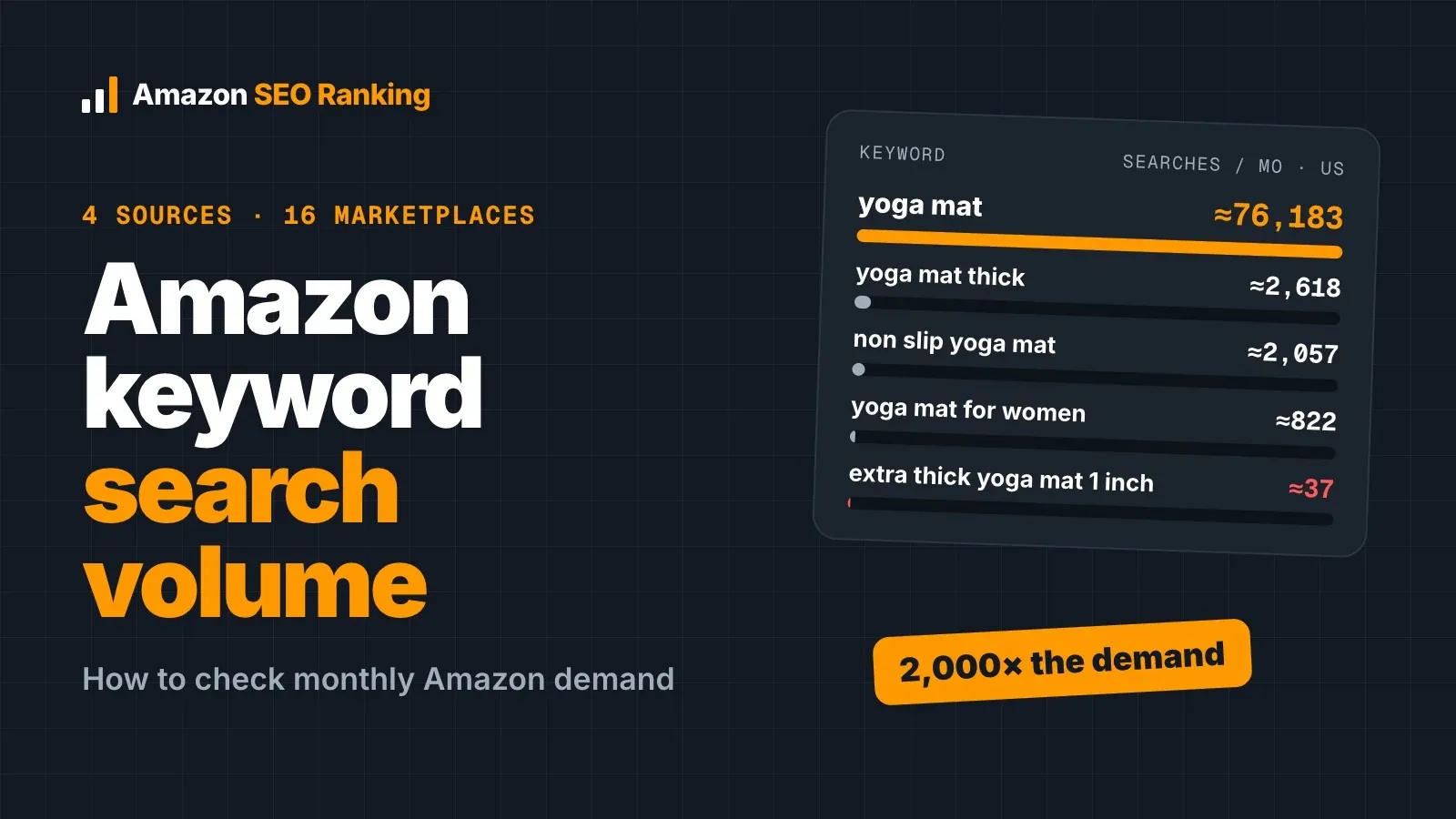
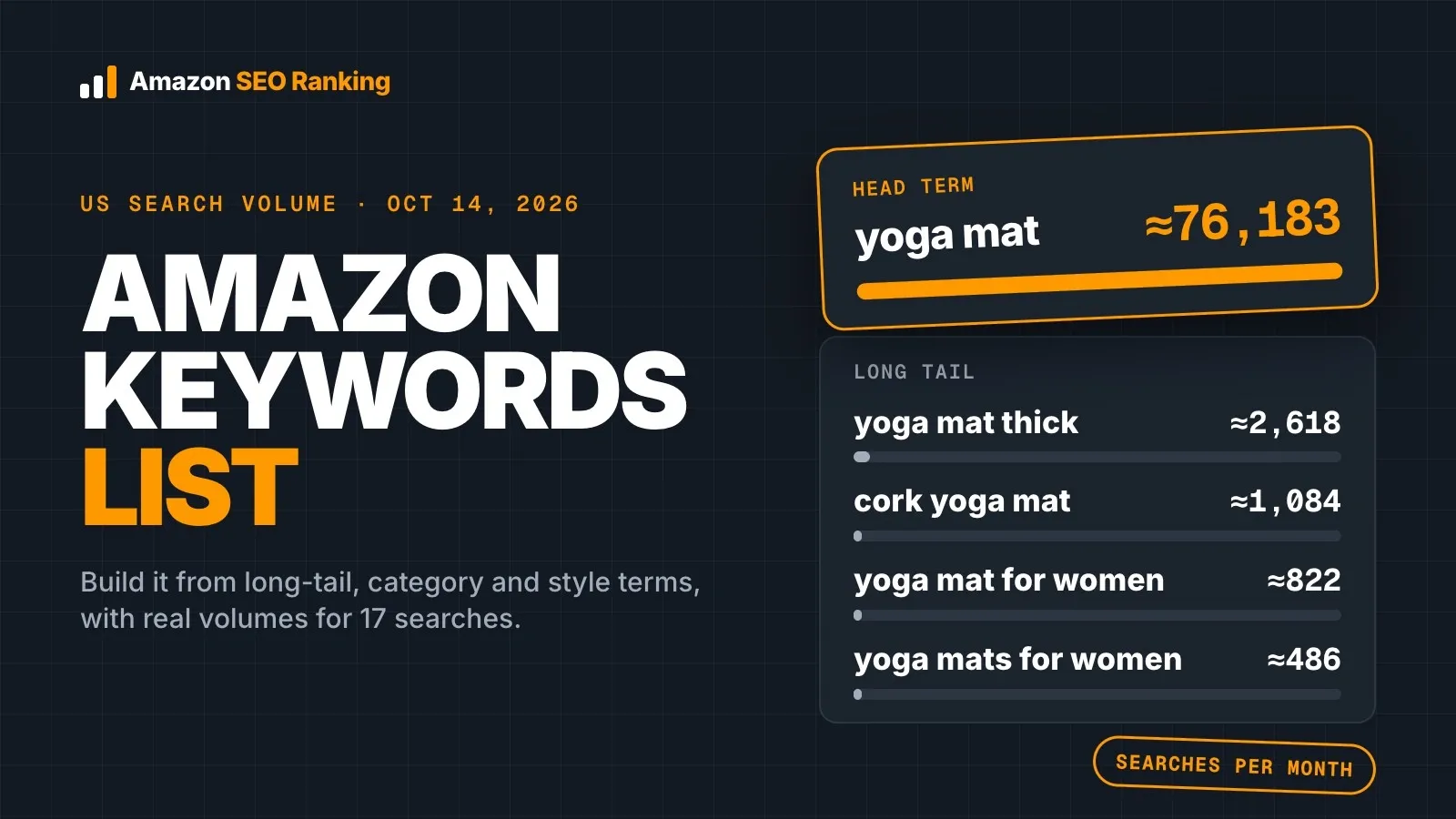
- Head terms carry the volume. "yoga mat" logged ≈76,183 monthly US searches; "yoga mat thick" logged ≈2,618.
- Many phrases of four or more words show volumes in the tens, or no recorded volume at all.
- Singular and plural forms are tracked as separate searches ("yoga mat for women" ≈822 vs "yoga mats for women" ≈486).
- Category keywords say what the product is. Style keywords say what it's made of or looks like.
- One main keyword goes early in the title (75 characters max); secondary phrases spread across Item Highlights and bullets; leftovers go in the 249-byte backend field with no repeats.
- A US list is a US list. Recheck volumes for every storefront you sell in.
Amazon Keywords List: at a Glance
| Question | Short answer |
|---|---|
| What goes on the list? | Head terms, long-tail phrases, category keywords and style keywords |
| Where do candidates come from? | Autocomplete, competitor ASINs, keyword ideas tools, your Sponsored Products search term report, reviews |
| How do you filter them? | Relevance to your exact product first, then search volume, then competition |
| How big is the drop from head to long tail? | "yoga mat" ≈76,183/mo vs "cork yoga mat" ≈1,084/mo (US, October 2026) |
| Where does each keyword go? | Title (75 chars), Item Highlights (125 chars), 5 bullets (under 200 chars each), description, backend terms (249 bytes) |
| How often to recheck? | Whenever you rewrite copy or enter a new marketplace, and against monthly volume snapshots |
What Counts as a Long-Tail Keyword on Amazon
A long-tail keyword is a head term plus one or more modifiers: a material, a size, a user, a use case. "Yoga mat" is the head. "Non slip yoga mat", "yoga mat for hot yoga" and "yoga mat with alignment lines" are the tail. Each one is searched less often, and each one describes a narrower product.
Here's how steep the drop is, using the US data we pulled on October 14, 2026:
| Search | Words | ≈ Monthly US searches |
|---|---|---|
| water bottle | 2 | 93,574 |
| insulated water bottle | 3 | 10,397 |
| water bottle with straw | 4 | 4,001 |
| water bottle with time marker | 5 | 935 |
| water bottle for kids | 4 | 598 |
| stainless steel water bottle 32 oz | 6 | 112 |
| glass water bottle with sleeve | 5 | 74 |
| leak proof water bottle for kids school | 7 | no recorded volume |
| yoga mat | 2 | 76,183 |
| yoga mat thick | 3 | 2,618 |
| non slip yoga mat | 4 | 2,057 |
| cork yoga mat | 3 | 1,084 |
| yoga mat for women | 4 | 822 |
| extra thick yoga mat | 4 | 486 |
| yoga mat for hot yoga | 5 | 374 |
| travel yoga mat foldable | 4 | 74 |
| yoga mat with alignment lines | 5 | 74 |
| yoga mat 1/2 inch thick | 5 | 37 |
Two patterns stand out. One modifier cuts volume by roughly 90% or more: "insulated water bottle" holds about 11% of the head term's volume, and "yoga mat thick" about 3.4%. And at the bottom of the list, several phrases share the exact same figure (74, 74, 74). Amazon reports lower volumes in steps, so a 74 and another 74 aren't necessarily equal demand.
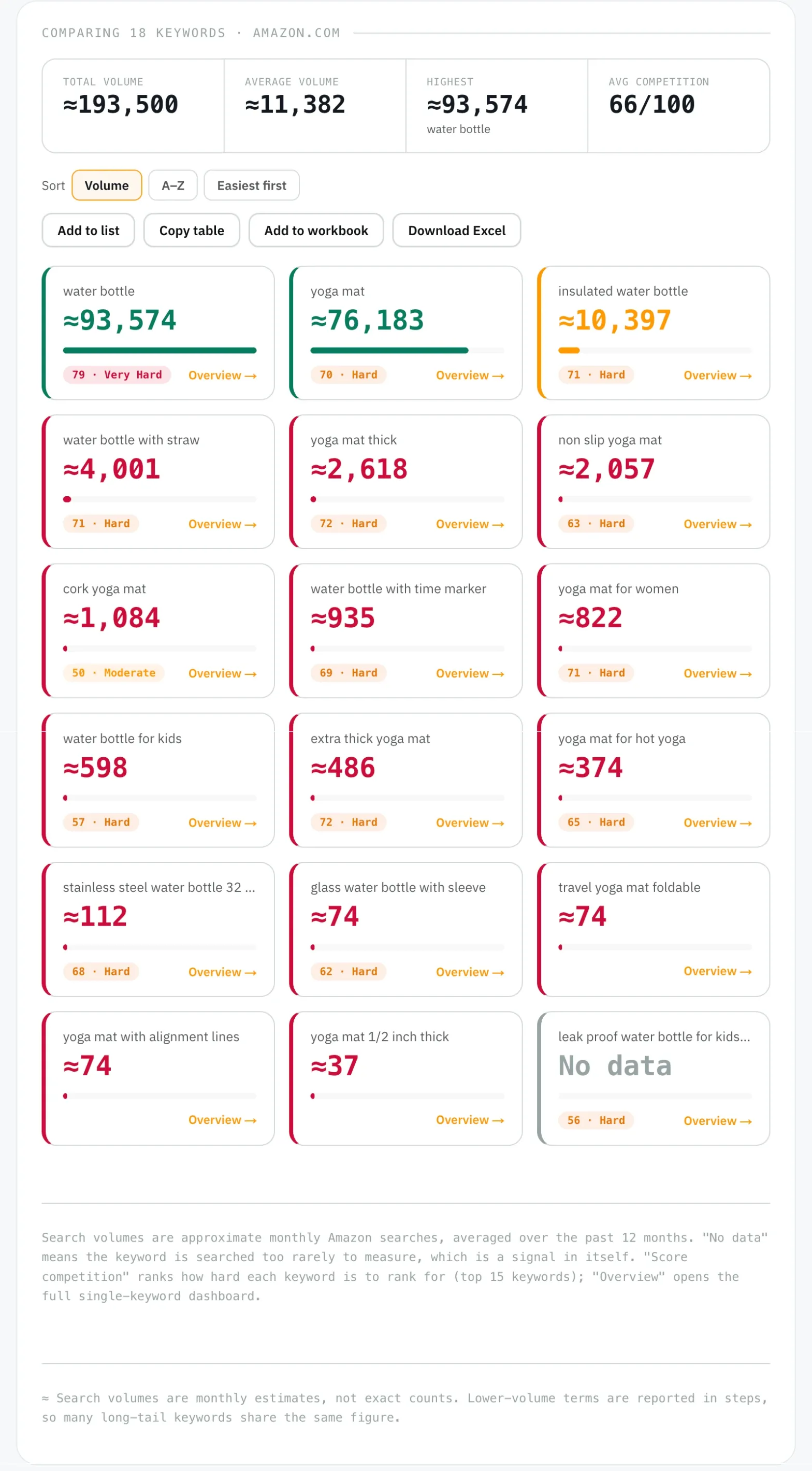
Word count alone doesn't define the tail. "Water bottle with straw" has four words and ≈4,001 searches, more than the three-word "cork yoga mat". What makes a phrase long-tail is how specific it is about the product, which is also why it's easier to match exactly.
The Four Keyword Types an Amazon Keyword List Needs
A usable Amazon keyword list sorts every phrase into one of four types. The type decides where the phrase goes in the listing, so sorting them early saves rework.
Head terms are the one- or two-word searches with the biggest numbers. You'll rarely rank on page one for them with a new listing, but your title still needs to contain one, because almost every long-tail phrase is built on top of it. Long-tail phrases are the head term plus modifiers, covered above.
Amazon Category Keywords
Amazon category keywords are the product-type words: "yoga mat", "water bottle", "insulated water bottle". They tell Amazon's search index and the shopper what the item is. On most lists the category keyword and the head term are the same phrase.
They also need to agree with where the listing sits in Amazon's catalog. A listing whose title says "yoga mat" but which is assigned to an unrelated browse node sends mixed signals. That's why Amazon SEO Ranking's audit scores the category assignment as one of its 12 criteria, under Backend & Attributes.
Style Keywords on Amazon
Style keywords on Amazon describe how the product looks, feels or is built: "cork", "foldable", "glass", "stainless steel", "extra thick". Shoppers add them when they've already decided on the category and are filtering by preference. In our sample, "cork yoga mat" (≈1,084) and "non slip yoga mat" (≈2,057) are both style-led searches.
Pull style keywords from your own spec table, not from competitors' listings. If your mat isn't cork, "cork yoga mat" is a claim your listing can't back up.
How to Find Amazon Long Tail Keywords
No single source gives you a complete list. Each one below catches phrases the others miss, so work through several and merge the results into one sheet before you filter anything.
In Amazon SEO Ranking, every keyword table has Copy table, which pastes straight into Google Sheets or Excel, and Add to workbook, which collects tables from several tools into one linked .xlsx. Its Keywords tab lists each keyword once, with its volume and which tools found it, so the merge is done before you start filtering.
Amazon Autocomplete
Type your head term into the Amazon search bar and note every suggestion. Then add a letter after it ("yoga mat a", "yoga mat b") and repeat. Autocomplete reflects what shoppers type on that storefront, so run it on each marketplace you sell in.
Its limit is that it shows no numbers. You get phrases, ranked by Amazon's own logic, with no way to tell a 2,000-search phrase from a 37-search one. Treat autocomplete as a source of candidates and check volume elsewhere.
Keyword Ideas Tools
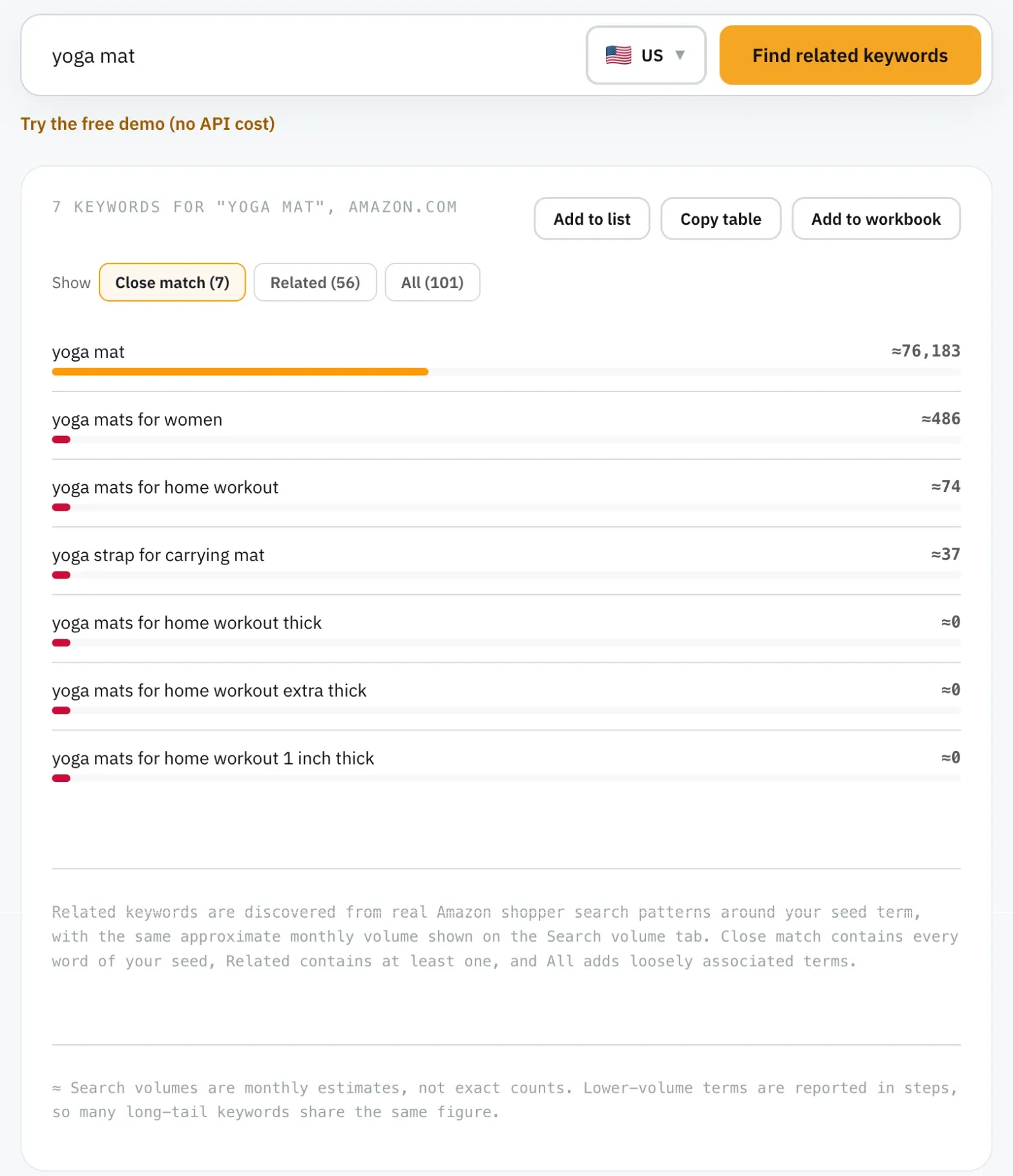
A keyword ideas tool expands a seed into related Amazon searches with volume attached. When we expanded "yoga mat" in Amazon SEO Ranking's Keyword ideas tool, it returned 101 related searches in total, of which 56 shared a meaningful word with the seed and 7 contained the seed's words exactly.
That relevance grading matters more than the raw count. Expansion tools pull in off-topic terms (yoga blocks, yoga pants), and a list padded with them is worse than a short one. Start with Close match, widen to Related, and only browse All for ideas you'll vet by hand.
Keyword ideas, What I rank for, Competitors and Keyword gap currently cover four storefronts: US, Egypt, Saudi Arabia and UAE. For the UK, the EU and other storefronts, collect ideas from autocomplete and check them in Search volume, which covers 16 marketplaces. Free accounts can preview Keyword ideas and Search volume: the first 3 results of each search, up to 30 lookups a month.
If you research listings with an AI assistant, the same data works inside Claude. Amazon SEO Ranking's Claude connector (Pro and Agency) gives Claude keyword volume, related keywords and keyword gap lookups, plus the audit and copy checks, so the assistant works from real Amazon numbers instead of guessing. The volumes in this article were pulled through it.
Competitor ASINs (Reverse ASIN Lookup)
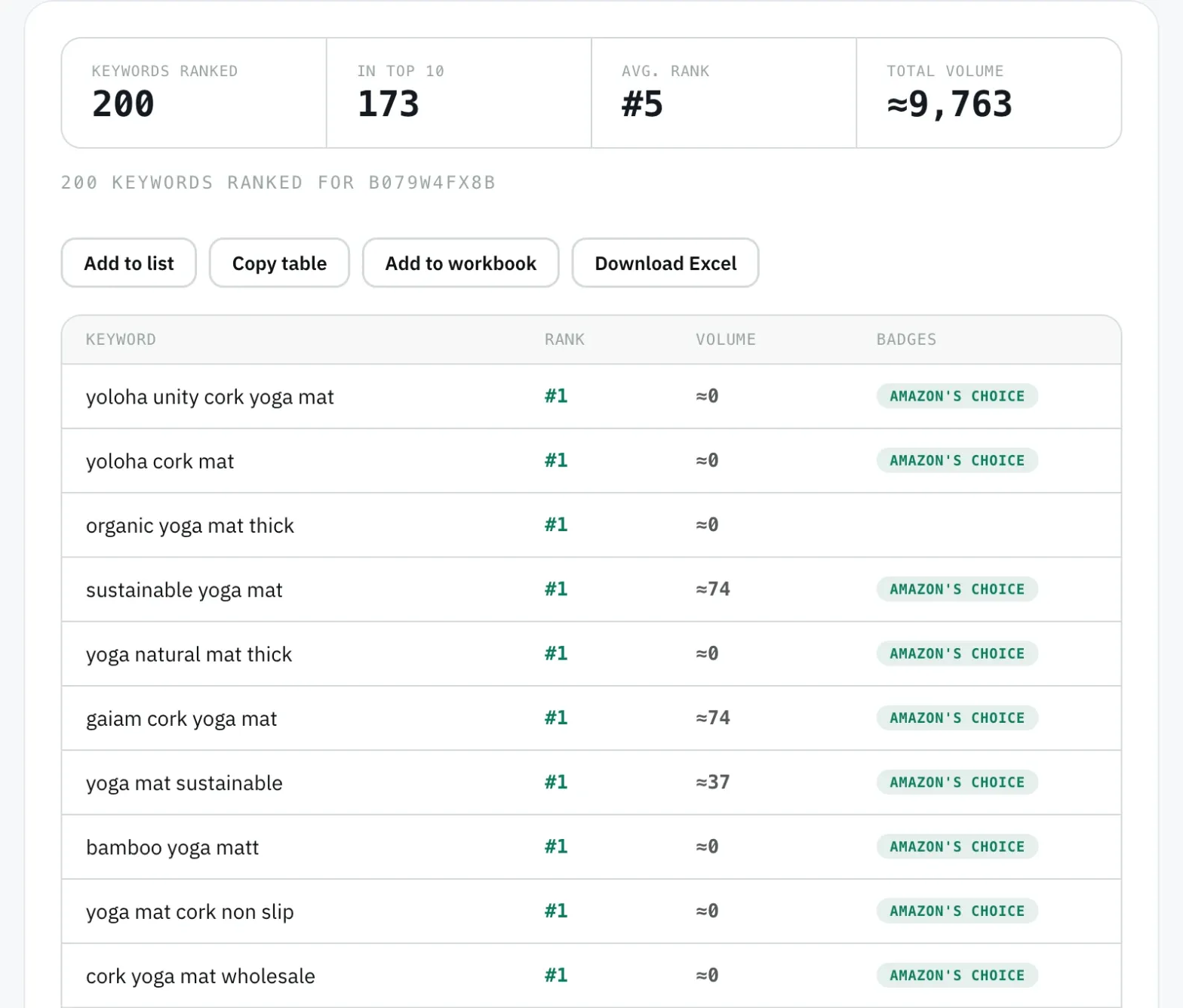
A reverse ASIN lookup shows every keyword a competing listing already ranks for, with its position. Pick three to five listings that sell the same product to the same buyer, and pull their ranked keywords. Phrases that appear for several competitors are proven demand.
If you're launching a brand-new listing that ranks for nothing yet, Amazon SEO Ranking's Competitors tool (Pro) falls back to the top organic results for a phrase taken from your title, so you still get a starting set. Agencies can go further with Keyword gap (Agency plan), which lines up rank positions for up to 20 ASINs side by side.
Run the same lookup on your own ASIN with What I rank for (Pro) before you change a word. The phrases your listing already ranks for go on the list first, so a rewrite keeps the traffic you have while it chases new phrases.
Your Own Amazon Keyword Report
If you run Sponsored Products ads, the search term report in Amazon Ads lists the exact phrases shoppers typed before clicking or buying. These are the most reliable long-tail keywords you'll find, because they come with a purchase attached. Brand-registered sellers also get the Search Query Performance dashboard in Brand Analytics.
Both reports share a blind spot. They only cover searches where your listing already appeared. Use them to confirm which phrases convert, and use competitor and ideas tools to find the ones you're missing.
Reviews and Questions
Reviews show the words buyers use after the fact: "thick enough for my knees", "fits in my bike holder". Read the reviews on your own listing and on two or three competitors', and note recurring nouns and use cases.
These phrases rarely have high volume. Their value is in the copy: they tell you which benefit to lead a bullet with, and they occasionally surface a use case ("for hot yoga", ≈374 searches) that deserves its own spot.
How to Run an Amazon Keyword Analysis Before You Commit
An Amazon keyword analysis is the filtering step between a long candidate list and the 20 or so phrases you'll write into a listing. Run it in this order, because each step removes phrases that would waste time in the next.
- Relevance. Delete anything that describes a different product, size or material from yours. This is the step most lists skip.
- Volume. Check every remaining phrase against Amazon search volume. Amazon SEO Ranking's Search volume tool takes up to 1,000 keywords per check across 16 marketplaces.
- Competition. Look at who ranks on page one. The tool's competition score uses top-listing review counts and how many results carry Amazon's Choice or Best Seller badges.
- Variants. Check singular and plural, and word order, separately.
- Proof. Check every style and size keyword against your spec table and brand facts. A material, size or pack count your product doesn't have turns the keyword into a claim the listing can't back up.
The variant step catches more than you'd expect. "Yoga mat for women" logged ≈822 searches while "yoga mats for women" logged ≈486, so the two forms are tracked as separate searches. When both matter, put the stronger form in visible copy and the other in backend terms.
Zero-volume phrases deserve a decision rather than an automatic delete. In our "yoga mat" expansion, "yoga mats for home workout extra thick" and two similar phrases showed 0. If a phrase describes your product exactly, it can still sit in backend terms at no cost to the visible copy. If it's only loosely related, cut it.
Volumes also change by storefront. A list built on amazon.com doesn't carry over to amazon.de or amazon.co.uk, partly because of language and partly because shoppers search for different things. Rerun the volume check for each marketplace before you localize the copy.
The same goes for the listing itself. Amazon SEO Ranking audits listings on 20 Amazon storefronts, and its AI rewrite writes in 12 languages, defaulting to the marketplace's own. Audit the ASIN on each storefront you sell in: the score, and the fixes it lists, can differ from one marketplace to the next.
Where Each Keyword Goes in Your Listing
Once the list is filtered, every keyword needs one home. Amazon gives each field its own limit, and putting a keyword in the wrong field either wastes space or breaks a rule.
| Field | Limit | What goes there |
|---|---|---|
| Title | 75 characters | Brand + main category keyword + the strongest style or size attribute, early |
| Item Highlights | 125 characters | 1 to 2 secondary long-tail phrases |
| Bullets | 5 bullets, under 200 characters each | Use-case and style phrases, one benefit per bullet, sentence-case headers |
| Description | Longer copy | Remaining secondary phrases in full sentences |
| Backend search terms | 249 bytes | Synonyms, alternate spellings, plural or singular variants, phrases not used in visible copy |
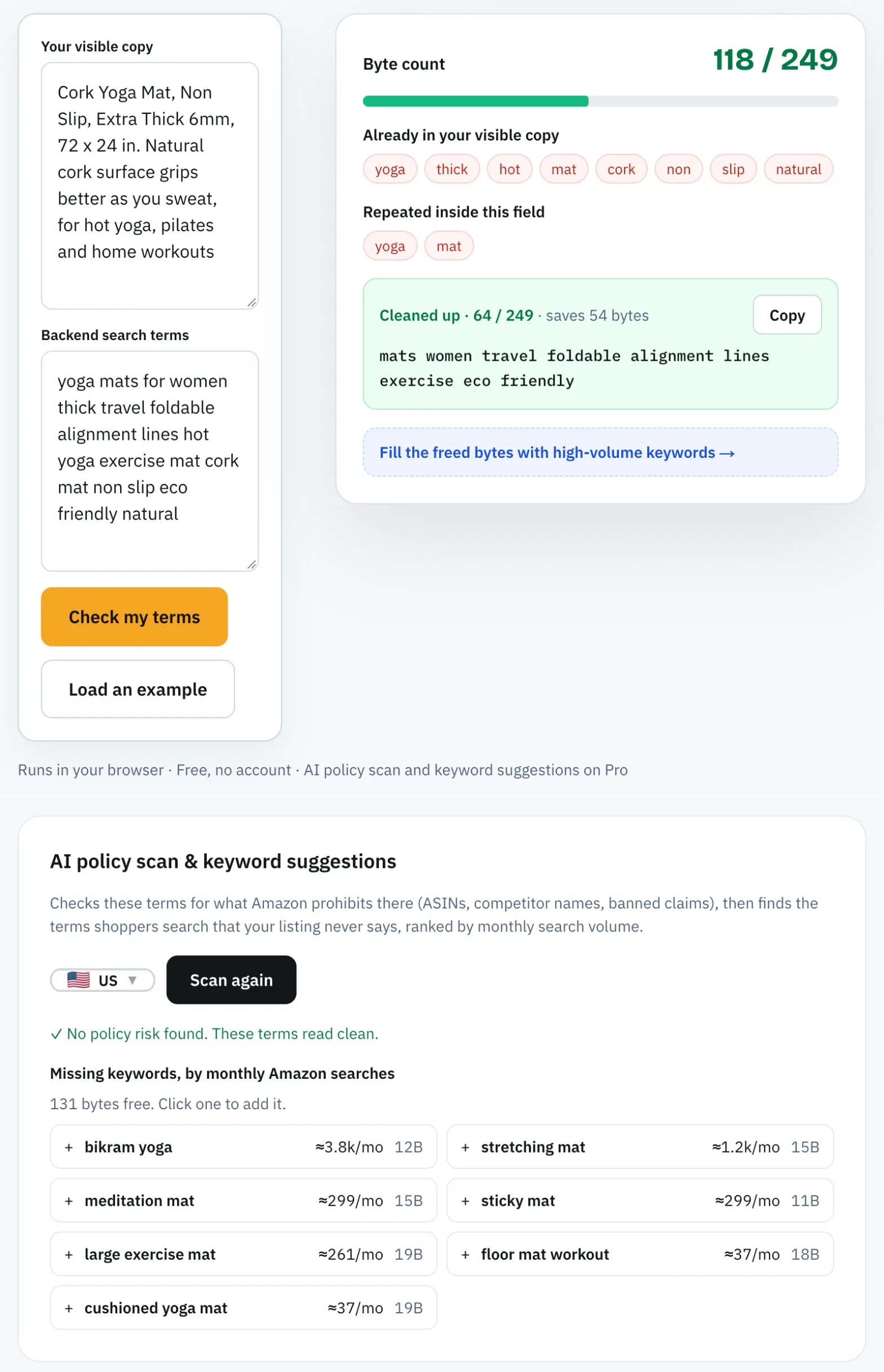
The backend field is measured in bytes, not characters, so accented letters take more than one byte each. That matters for storefronts like amazon.de, amazon.fr and amazon.es. Don't repeat words already visible in the title or bullets; the space is better spent on words the visible copy doesn't cover.
Amazon SEO Ranking's Backend Terms Checker measures the field in bytes against the 249 limit, on every plan including Free. On Pro and Agency it also suggests backend keywords ranked by real search volume, which is the feedback loop this hidden field otherwise lacks.
For detailed rules on the bullet field, see our guide to Amazon bullet points. Amazon SEO Ranking's AI Copy Rewriter takes your main keyword and secondary keywords as inputs, places the main one early in the title, works the rest into Item Highlights, bullets and description, and shows a coverage check of where each one landed.
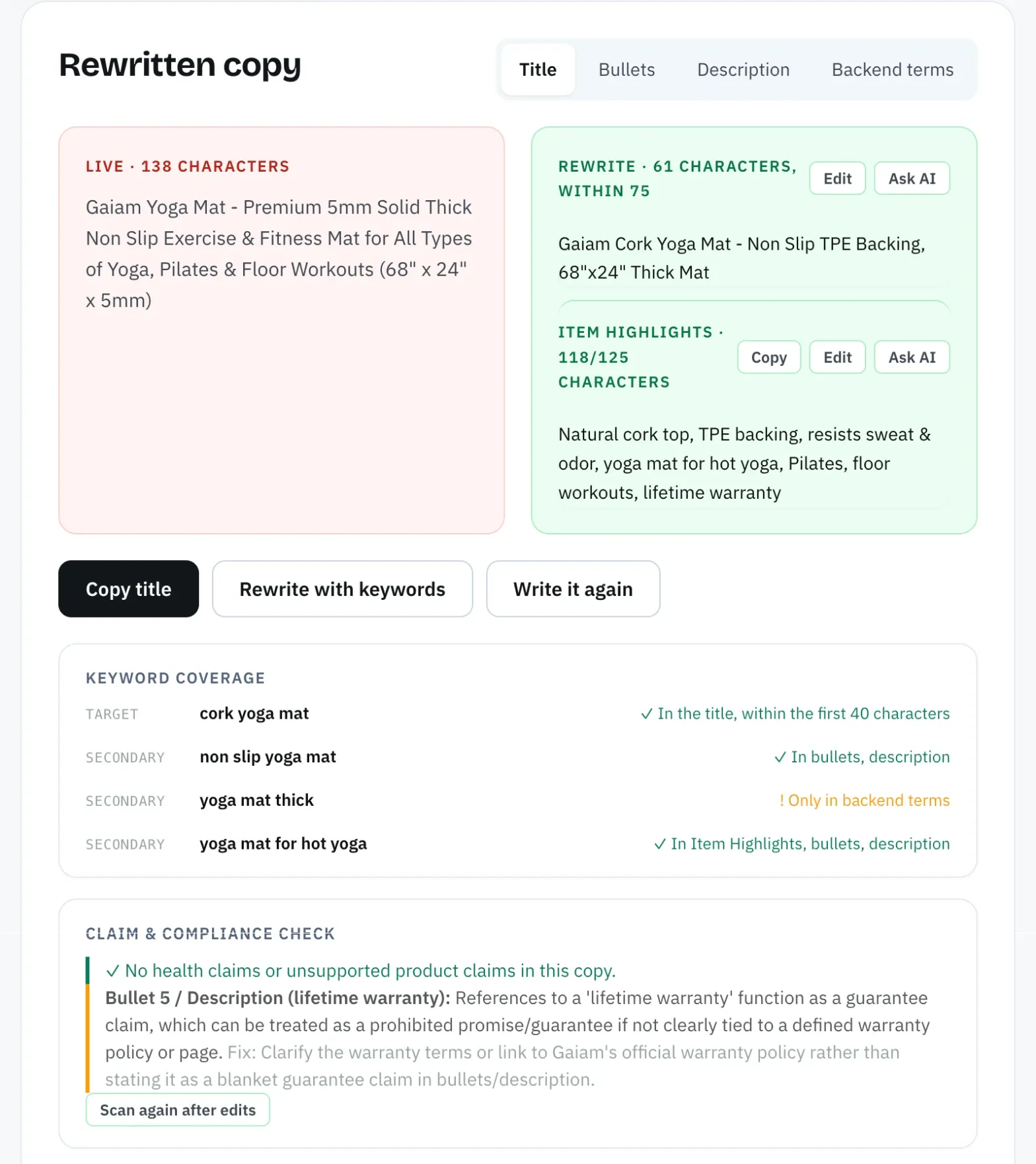
Before the new copy goes live, score it. A draft audit takes a title, Item Highlights, bullets or description that isn't live yet and scores it against the live listing's images, rating and Prime status, with a before-and-after view against the last live score. It uses one audit and isn't saved to history.
The score comes from a published rubric: 12 equally weighted criteria, three of them for Title & Item Highlights and three for Bullet Points, with every pass rule visible. When a criterion fails, you can see which rule it broke, and the AI fix targets that criterion rather than rewriting everything.
Mistakes That Waste a Good Keyword List
Most keyword lists fail at the writing stage, after the research is done. These are the ones that cost rank or trigger problems with Amazon's content rules:
- Stuffing the title past 75 characters to fit more phrases. Amazon enforces the limit.
- Using a style keyword the product doesn't have (a material, a pack size, a feature), which turns a keyword into a false claim.
- Writing bullet headers in ALL CAPS to make keywords stand out, a formatting pattern Amazon penalizes.
- Repeating title words in backend search terms, which uses bytes without adding a new search.
- Choosing keywords from one marketplace's data and pasting them into another storefront unchanged.
AI-written copy adds its own version of the second mistake. A general-purpose model will happily add "protein" to a fruit product or "20 packets" to an 8-count box if those words appear in your keyword list. Every rewrite from Amazon SEO Ranking is grounded in the listing's spec table and your brand fact sheet, then checked in code for health claims, unsupported claims and pack-count mismatches before you see it.
The same checks apply to copy you write yourself. Every audit, on the Free plan too, flags pack sizes and unit counts that disagree across the title, bullets, description and spec table, plus health claims and product claims the spec table doesn't support. These consistency checks don't use an AI call.
How to Keep Your Amazon Keywords List Current
A keyword list is accurate on the day you pull it. Volumes move with seasons and trends, and competitors rewrite their listings, which shifts who ranks where. Recheck the list when you plan a copy update, when you enter a new storefront, and at least once a quarter for your top listings.
Amazon SEO Ranking's Saved lists (Pro) keep monthly volume snapshots for each keyword, sortable by change, so you can spot a phrase that's rising before you rewrite. After a rewrite, use Amazon keyword rank tracking to confirm the listing held the phrases it already ranked for.
Everything You Need to Know About Amazon Keywords List
| Topic | What to know | Example or limit |
|---|---|---|
| Definition | The search phrases mapped to one listing, each assigned to a field | 1 main keyword + secondary phrases |
| Long-tail keywords | Head term + modifiers; lower volume, narrower match | "cork yoga mat" ≈1,084/mo vs "yoga mat" ≈76,183/mo |
| Category keywords | Product-type terms; usually the head term | Must match the listing's browse node |
| Style keywords | Material, finish, size, look | Only from your own spec table |
| Sources | Autocomplete, keyword ideas, reverse ASIN, keyword reports, reviews | Merge before filtering |
| Amazon keyword report | Sponsored Products search term report; Search Query Performance (Brand Registry) | Covers only searches you already appear for |
| Amazon keyword analysis | Relevance, volume, competition, variants | Singular and plural tracked separately |
| Placement | Title, Item Highlights, bullets, description, backend | 75 chars / 125 chars / under 200 chars x5 / 249 bytes |
| Marketplaces | Volumes differ per storefront | Search volume covers 16 marketplaces |
| Upkeep | Recheck on rewrites, new storefronts, quarterly | Monthly snapshots in Saved lists |
Turn Your Keyword List Into a Listing That Ranks
Among the five seller tools we compare (Helium 10, Jungle Scout, SellerApp, AMZScout and ZonGuru), Amazon SEO Ranking is the only one that publishes its full scoring rubric: 12 equally weighted criteria, every pass rule visible. Its AI rewrites place your main and secondary keywords, then get checked in code for unsupported claims, pack-count mismatches and Amazon's length limits before you see them. You can score that copy as a draft before it goes live, on the website or from inside Claude.
It's built for sellers and agencies whose job is getting an existing listing to rank for more searches: a seller about to rewrite a title, a brand expanding into a second storefront, or an agency comparing up to 20 client and competitor ASINs in Keyword gap.
The free plan runs 3 complete audits a month with AI fixes, plus a preview of the first 3 results of each Search volume and Keyword ideas search (up to 30 lookups a month), with no credit card. Run a free audit on your listing, or see Pro and Agency pricing and start a 7-day free trial.
FAQ
What is an Amazon keywords list?
An Amazon keywords list is the set of search phrases you target with one product listing, each checked for relevance and Amazon search volume. A typical list mixes one or two head terms, such as "yoga mat" at about 76,183 monthly US searches, with long-tail phrases such as "cork yoga mat" at about 1,084. Each keyword is assigned to one field: the title, Item Highlights, the five bullets, the description or the 249-byte backend search terms. The list also tells you which words to protect when you rewrite copy, so a new title doesn't drop a phrase that already brings traffic.
How do I find long-tail keywords for my Amazon listings?
You find long-tail keywords for your Amazon listings by expanding a seed term with Amazon autocomplete or a keyword ideas tool, then checking what competing ASINs already rank for. Your own Sponsored Products search term report adds phrases shoppers typed before buying. Check every candidate against real Amazon search volume and drop the ones that describe a different product. In our October 2026 US sample, phrases of four or more words often showed volumes in the tens or no recorded volume, so keep the ones that match your product exactly and place them in bullets or backend terms.
What are Amazon category keywords?
Amazon category keywords are the product-type terms that tell Amazon and shoppers what an item is, such as "yoga mat", "water bottle" or "insulated water bottle". They usually carry the highest volume in a niche: "water bottle" logged about 93,574 monthly US searches in our October 2026 check. Your category keyword belongs near the start of the title, right after the brand, and it should match the browse node the listing sits in. Amazon SEO Ranking scores the category assignment as one of its 12 audit criteria, under Backend & Attributes.
What are style keywords on Amazon?
Style keywords on Amazon are the words that describe how a product looks, feels or is made, such as "cork", "foldable", "glass" or "stainless steel". Shoppers add them to a category keyword once they know what they want, which narrows "yoga mat" (about 76,183 monthly US searches) to "cork yoga mat" (about 1,084). Use only the style keywords your product's spec table supports, because a material or finish you don't sell becomes a claim the listing can't back. Put the strongest one in the title and the rest in Item Highlights, bullets or backend terms.
How many keywords can I put in my Amazon listing?
The number of keywords you can put in an Amazon listing is set by field limits rather than a keyword count: a title of up to 75 characters, Item Highlights of up to 125 characters, five bullets under 200 characters each, and backend search terms under 249 bytes. Backend terms are counted in bytes, so accented letters use more than one byte each. Words already visible in the title or bullets don't need repeating in the backend field. That leaves the 249 bytes for synonyms, spelling variants and long-tail phrases the visible copy doesn't cover.
How do I find the most searched keywords on Amazon?
You find the most searched keywords on Amazon by checking candidate terms in a tool that reports Amazon's own search volume, since autocomplete shows suggestions without numbers. Head terms dominate: in our October 2026 check, "water bottle" had about 93,574 monthly US searches against about 10,397 for "insulated water bottle". If you own a registered brand, the Search Query Performance dashboard in Brand Analytics shows the searches that led shoppers to your products. Amazon SEO Ranking's Search volume tool checks up to 1,000 keywords at a time across 16 marketplaces.
Where can I find an Amazon keyword report in Seller Central?
An Amazon keyword report comes from two places: the Sponsored Products search term report in Amazon Ads, and the Search Query Performance dashboard in Brand Analytics. The search term report lists the exact phrases shoppers typed before clicking or buying through your ads, so it needs an active campaign. Search Query Performance is available to brand owners enrolled in Amazon Brand Registry. Neither report covers searches your listing doesn't appear for, so pair them with a tool that shows what competing ASINs rank for.
Do I need a paid tool to build an Amazon keyword list?
You can build an Amazon keyword list without a paid tool by using Amazon autocomplete and your own Seller Central reports, though neither shows volume for phrases you don't rank for yet. Amazon SEO Ranking's free plan adds a keyword preview, showing the first 3 results of each Search volume or Keyword ideas search, up to 30 lookups a month, with no card required. Full keyword research, including What I rank for and Competitors, starts on Pro at $79 a month with a 7-day free trial. That's 39% less than Helium 10's $129 monthly Platinum plan.