To find Amazon competitor keywords, paste a competitor's ASIN into a reverse ASIN lookup tool. It returns the search terms that product ranks for organically, with each term's position and estimated monthly Amazon search volume. Run your own ASIN next to two or three competitors and you get a gap list: the terms they rank for and you don't.
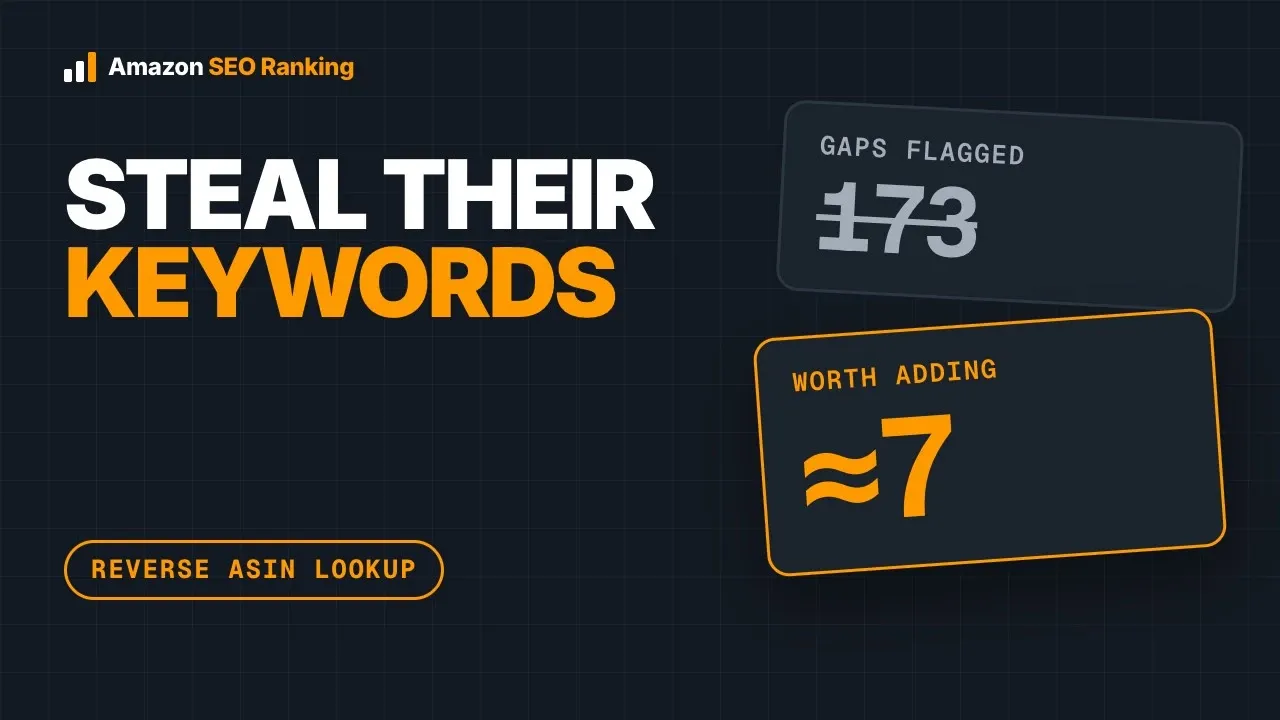
That list needs cleaning before you act on it. On October 13, 2026, we ran a Hydro Flask 32 oz bottle against an Owala FreeSip and a Stanley IceFlow in the US marketplace. The tool compared 200 keywords and flagged 173 as gaps, and about 7 of them belonged in the Hydro Flask listing. This guide covers how to pick competitors, run the lookup, strip the noise and put the remaining keywords where Amazon reads them.
Key Takeaways (TL;DR)
- Check first whether keywords are why a competitor outranks you. Images, reviews or Prime status can matter more, and a side-by-side audit shows it.
- A reverse ASIN lookup starts from a product ID and returns the keywords that product ranks for, with organic positions and search volume.
- Comparing your ASIN with 2 to 4 competitors in one keyword gap view is faster than reading separate lists side by side.
- Raw gap lists are mostly noise. In our test, 173 of 200 compared keywords were gaps; about 7 were worth adding.
- Other brands' names, misspellings, licensed characters, other languages and wrong colors make up most of that noise.
- Only add terms that are true of your product, and keep competitor brand names out of every listing field.
- Brand-registered sellers can filter Amazon's own Top Search Terms dashboard by ASIN at no extra cost.
- In Amazon SEO Ranking, What I rank for is on Pro ($79/mo) and Keyword gap on Agency ($189/mo), covering the US, Egypt, Saudi Arabia and UAE.
Amazon Competitor Keywords: at a Glance
The short version of this guide, in one table. Every figure comes from the test run described below or from Amazon's own seller documentation.
| Question | Answer |
|---|---|
| What you're looking for | Search terms a competitor's ASIN ranks for that yours doesn't |
| Method | Reverse ASIN lookup on one ASIN, or a keyword gap across several |
| What comes back | Keyword, organic position per ASIN, estimated monthly Amazon searches |
| How noisy a raw list is | 173 gaps out of 200 keywords in our 3-ASIN test; about 7 usable |
| Biggest noise sources | Other brands, misspellings, licensed characters, other languages, wrong variants |
| First check | Whether keywords are the reason at all (Competitor Comparison, free plan) |
| Free Amazon-native option | Brand Analytics Top Search Terms, filtered by ASIN (Brand Registry only) |
| Where the keywords go | Title, Item Highlights, bullets, description, backend search terms |
| How often to re-run | Monthly, and before any listing rewrite |
The step that most sellers skip is the cleaning in row four. A gap list sorted by volume puts the least useful terms at the top, because brand names carry the biggest search numbers.
What Is a Reverse ASIN Lookup?
An ASIN is the 10-character ID Amazon gives every product. Standard keyword research starts with a search term and asks which products rank for it; a reverse ASIN lookup starts with the product and asks which search terms it ranks for. Sellers search for the same job under several names: an amazon reverse keyword search, an amazon asin keyword search, an amazon keyword spy, an amazon keyword extractor or an amazon keyword scraper.
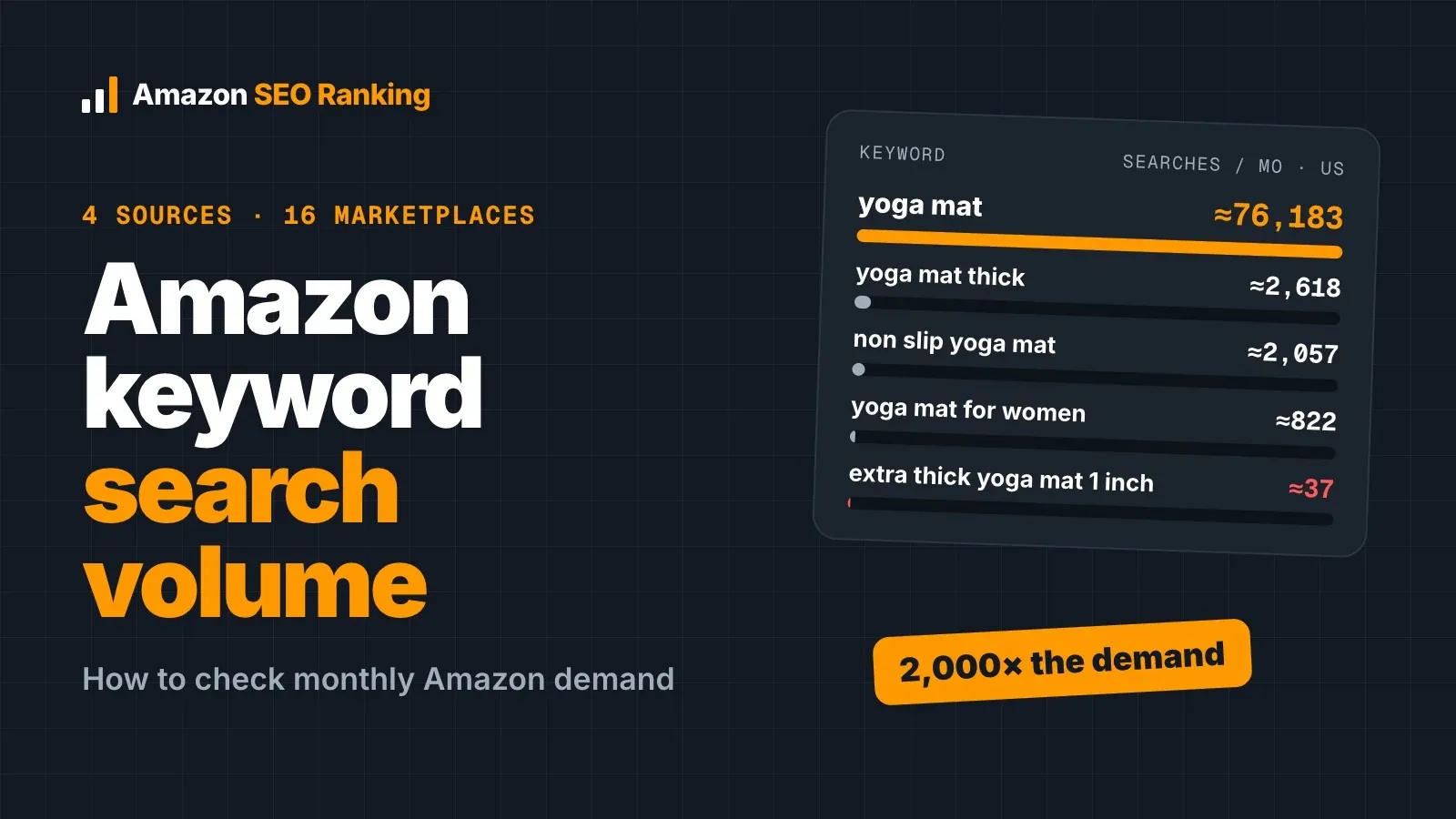
Every Amazon keyword reverse ASIN tool returns roughly the same columns. You get the keyword, the ASIN's organic position for it, and an estimate of monthly Amazon searches. In Amazon SEO Ranking those volumes carry a "≈" sign because Amazon reports modelled ranges, and lower volumes come in steps, so many long-tail terms share a figure. Our guide to Amazon keyword search volume covers how to read those numbers.
Why rank data shows more than reading the listing
Reading a competitor's title and bullets tells you what the seller wrote. It can't show their backend search terms, a 249-byte field that shoppers never see, and it can't show which written words Amazon actually ranks the product for.
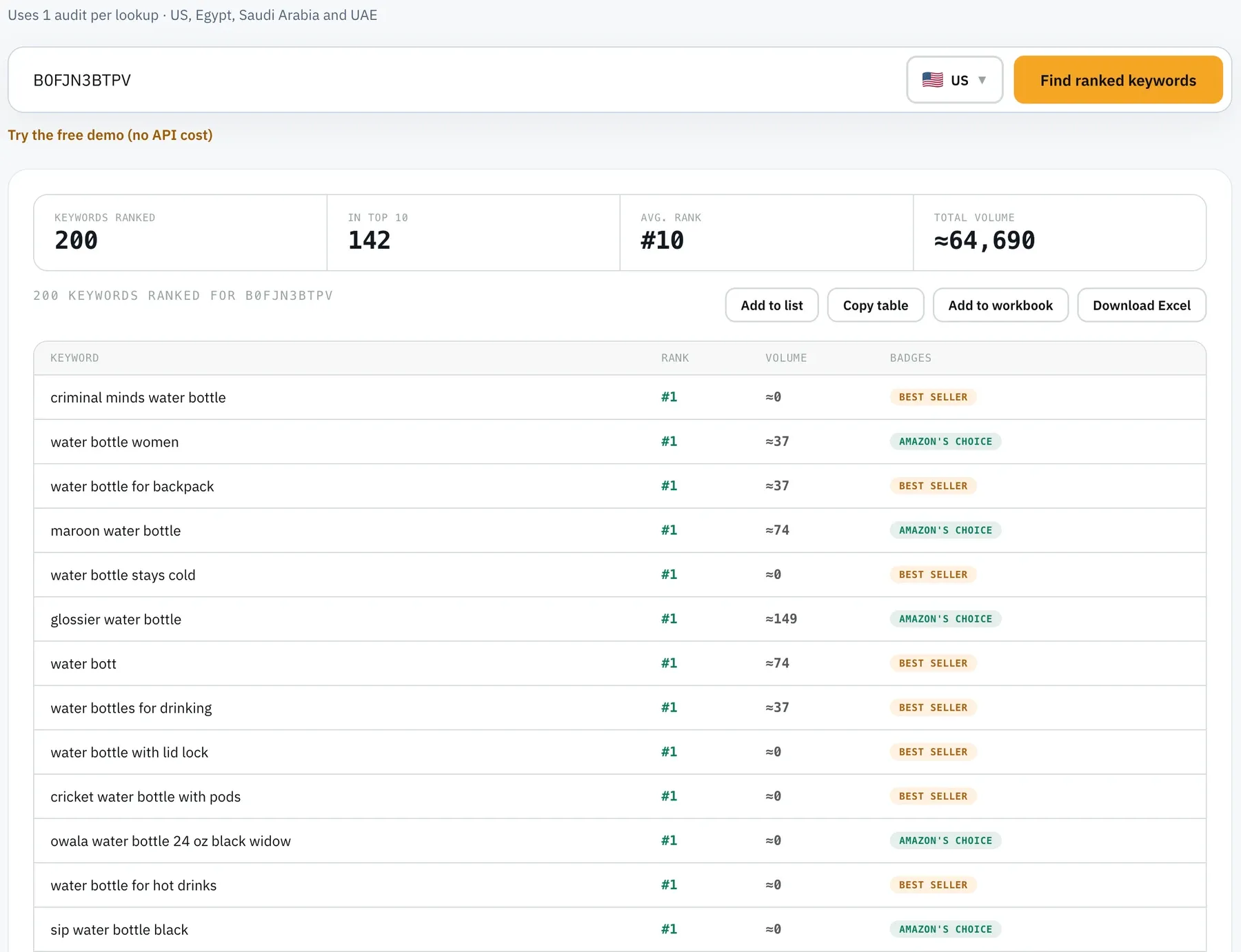
Rank data shows the outcome. Owala's 24 oz FreeSip ranked 13th for "tumbler" (≈44,206 searches a month) in our test, even though its product title calls it a water bottle. Nobody reading that listing would guess it competes for a tumbler search.
How to Find Competitors' Keywords on Amazon in 7 Steps
The steps below follow the order we used in the water bottle test, with the real output at each stage. If you're new to keyword work in general, how to do Amazon keyword research covers the seed-term side first.
All data here was pulled on October 13, 2026, from the US marketplace, using three ASINs: a Hydro Flask 32 oz Wide Mouth Flex Straw bottle in white (B0BG6PZGQN, treated as "your" listing), an Owala FreeSip 24 oz (B0FJN3BTPV) and a Stanley IceFlow Flip Straw 20 oz (B0CT47RV6Y).
Step 1: Check whether keywords are why they outrank you
A competitor can outrank you for reasons no keyword list shows: more gallery images, a higher rating, Prime eligibility, or bullets that answer what Amazon's Rufus assistant looks for. Run both listings through Competitor Comparison first. It scores your listing and the competitor's on the same 12 published criteria, side by side, at 1 audit per listing, and it's on the free plan.
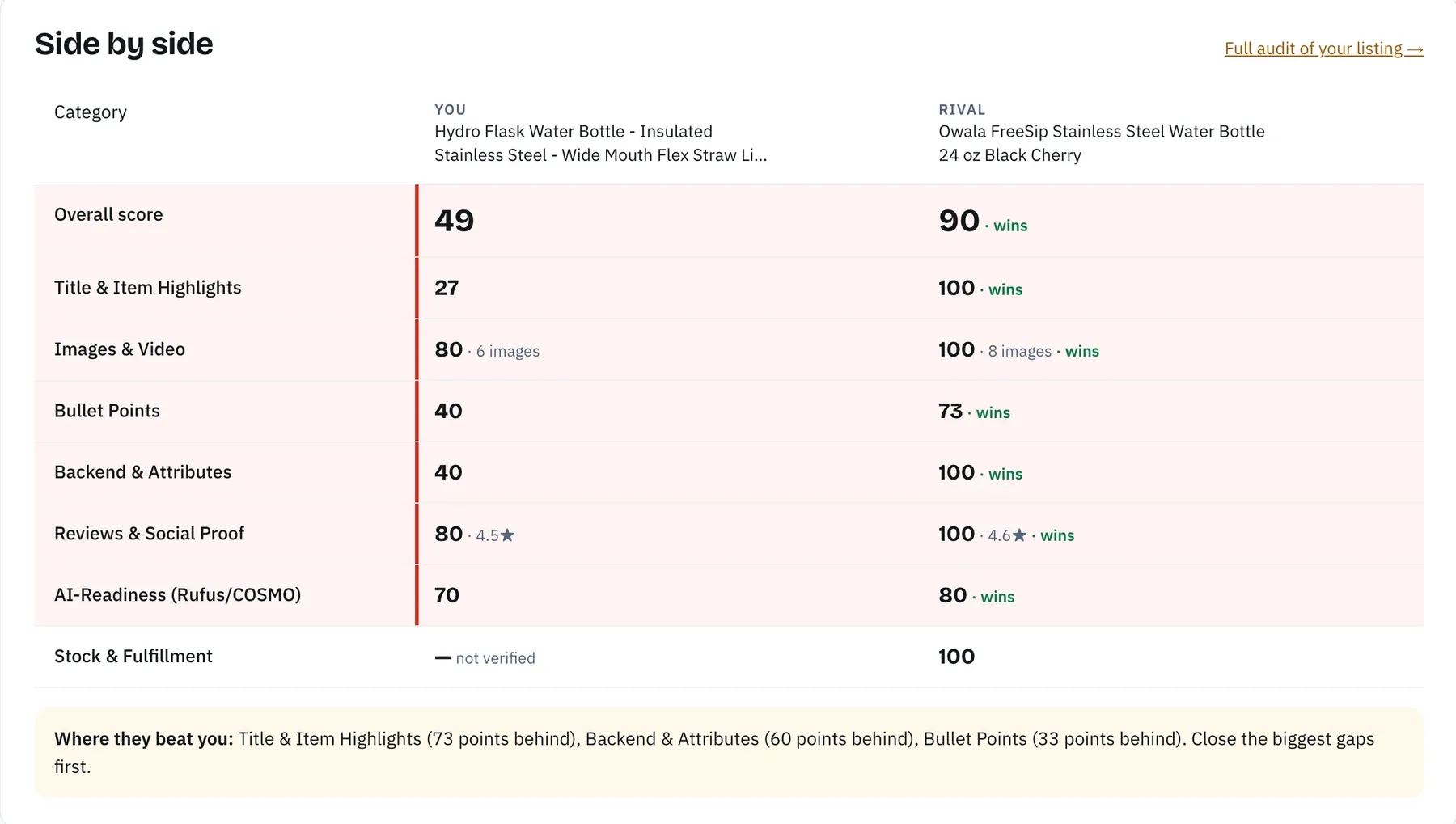
If the competitor wins on Images & Video or Reviews & Social Proof, new keywords won't close that gap. If the scores are close and they still outrank you, the difference is more likely in what each listing is indexed for, which is what the next steps find.
Step 2: Pick competitor ASINs that win your search
Search your main keyword on Amazon and take organic page-one results with a similar price, size and format. Skip the "Sponsored" placements, since paid position says nothing about organic rank. Two to four ASINs are enough to start. The Competitors tool in Amazon SEO Ranking lists the ASINs competing for the same searches as yours; for a new listing that ranks for nothing yet, it falls back to the top organic results for a phrase from your title and labels them as found by search.
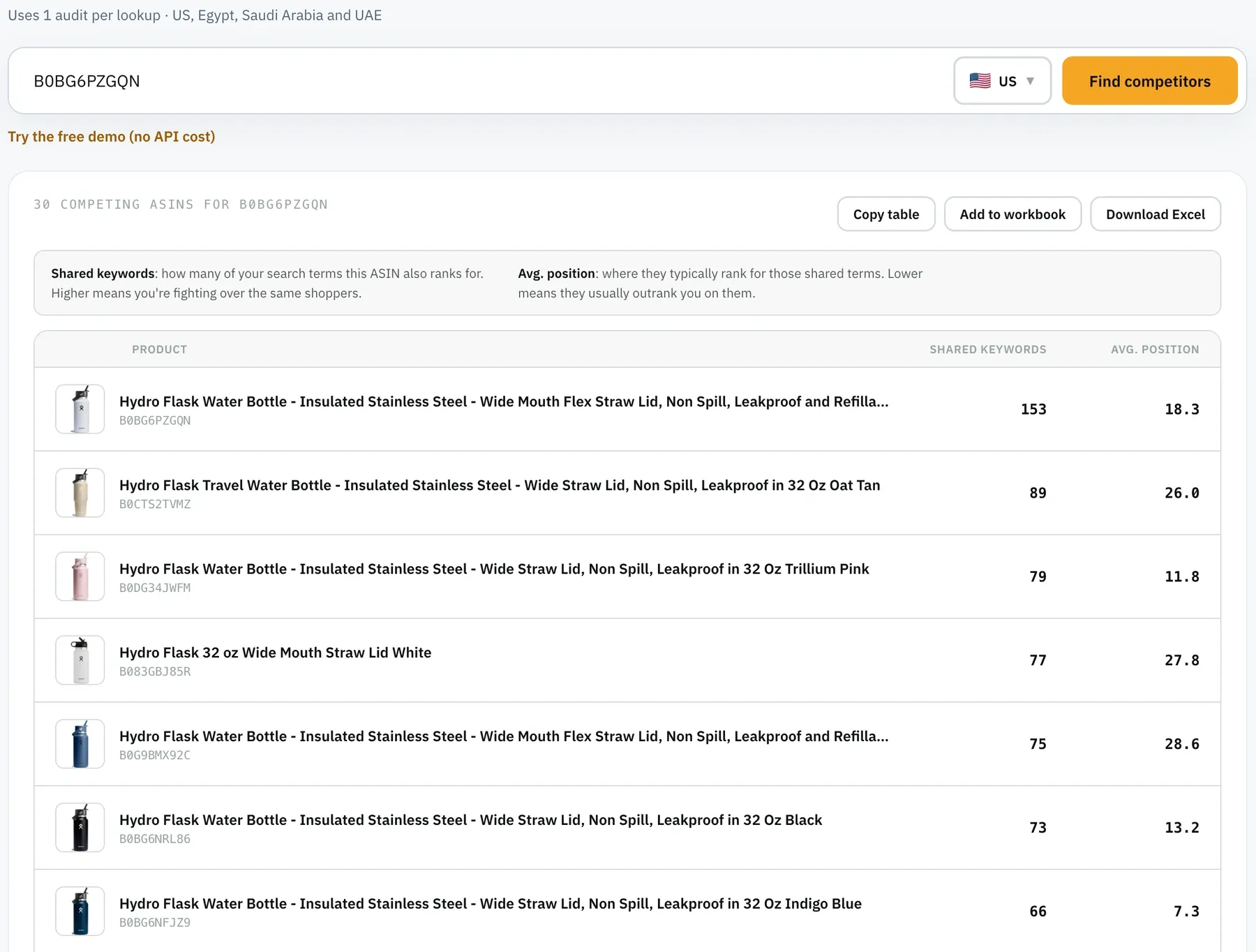
Pick the exact child variant that ranks. Rank data belongs to one ASIN, and a color or size child can rank differently from its siblings. The Stanley 20 oz child we chose appeared in only 3 of the 60 highest-volume rows, and the white Hydro Flask child ranked between positions 12 and 49 on its own brand terms, mostly 23 to 28. Before trusting a list, search the competitor's main keyword yourself and copy the ASIN from the listing that appears.
Step 3: Run the reverse ASIN lookup
For one ASIN, use a single-ASIN lookup. In Amazon SEO Ranking that's What I rank for in the Amazon keyword research tools, and each lookup uses 1 audit. To compare several ASINs at once, use Keyword gap with your ASIN first and competitors after it; it takes up to 20 ASINs and uses 1 audit per ASIN.
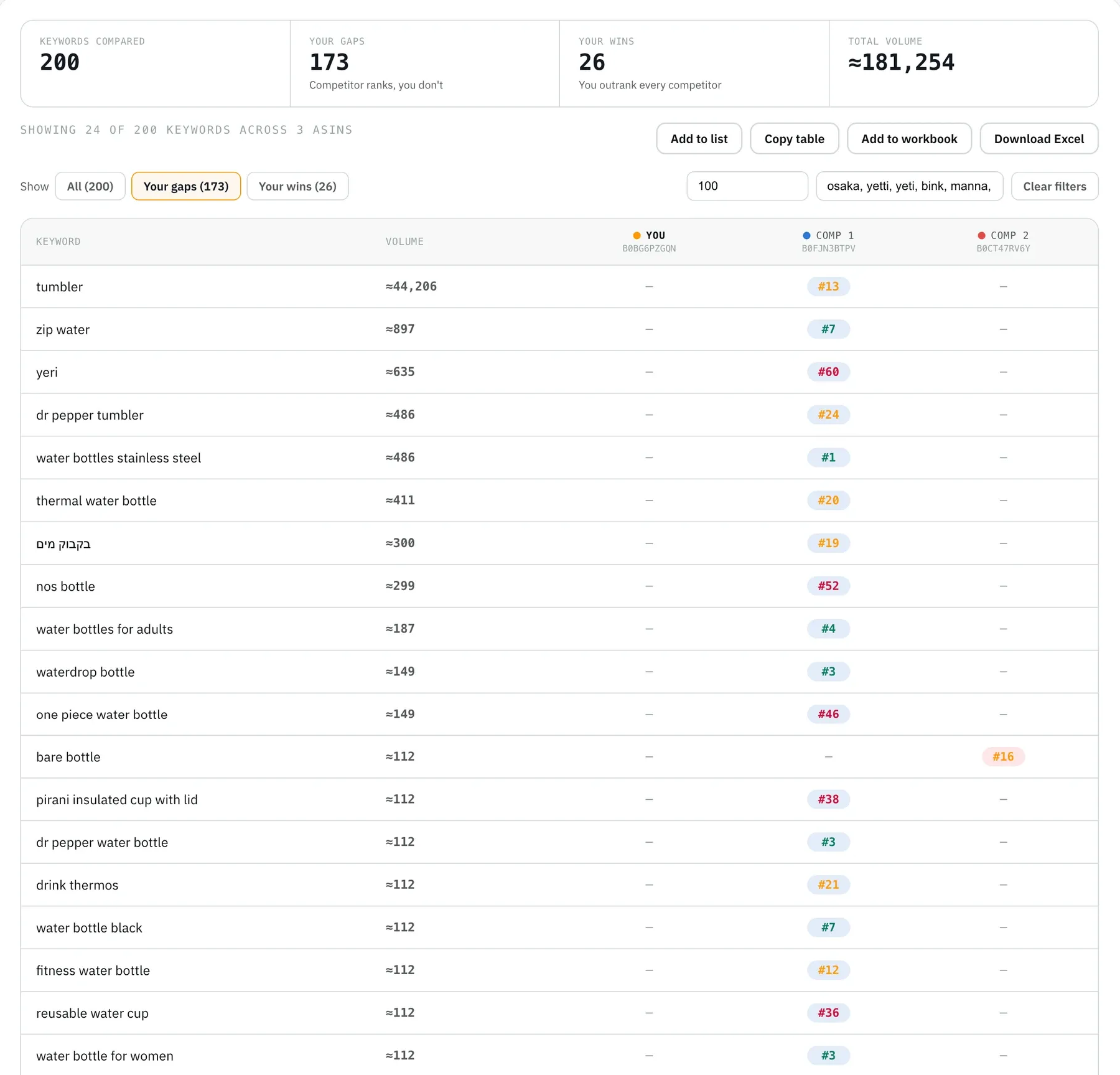
We ran the 3-ASIN Keyword gap twice, minutes apart. Both runs compared 200 keywords; the first returned 171 gaps (a competitor ranks, Hydro Flask doesn't) and 28 wins (Hydro Flask outranks both), the second 173 gaps and 26 wins. Here are the 10 highest-volume rows from the first, unfiltered run.
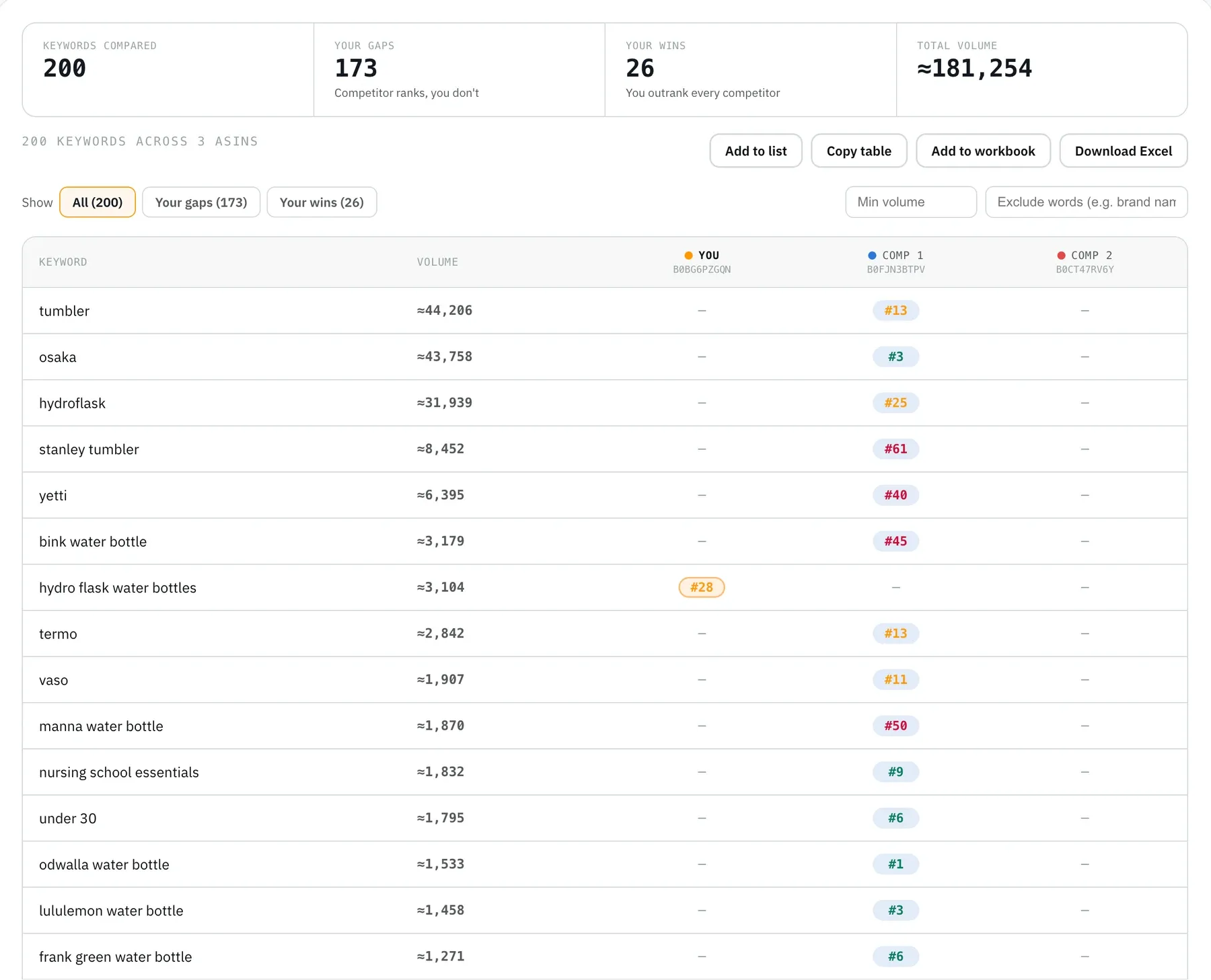
| Keyword | ≈ Monthly searches | Hydro Flask | Owala | Stanley |
|---|---|---|---|---|
| tumbler | 44,206 | not ranked | 13 | not ranked |
| osaka | 43,758 | not ranked | 3 | not ranked |
| hydroflask | 31,939 | not ranked | 25 | not ranked |
| stanley tumbler | 8,452 | not ranked | 61 | not ranked |
| yetti | 6,395 | not ranked | 40 | not ranked |
| bink water bottle | 3,179 | not ranked | 45 | not ranked |
| hydro flask water bottles | 3,104 | 28 | not ranked | not ranked |
| termo | 2,842 | not ranked | 13 | not ranked |
| vaso | 1,907 | not ranked | 11 | not ranked |
| manna water bottle | 1,870 | not ranked | 50 | not ranked |
Only one of those ten is a keyword a Hydro Flask bottle listing could use, and it's a judgment call. The rest are other brands, misspellings and Spanish words.
Step 4: Strip the noise before you sort
Of the 15 highest-volume gaps in the raw list, 9 were other companies' brand names or misspellings of them. The noise in our list fell into a few groups:
- Other brands: osaka, bink, manna, odwalla, lululemon and frank green, each over 1,000 monthly searches and none usable.
- Misspellings: yetti, owaa and owolo, all variants of other brands' names.
- Licensed characters: spiderman owala, snoopy, demon slayer and pusheen all appeared, tied to Owala's licensed designs.
- Other languages: "termo", "vaso" and a Hebrew term for water bottle.
- Attributes your product doesn't have: red, leopard print and personalized, which match Owala colorways rather than a white Hydro Flask.
- Off-intent phrases: "under 30" and "nursing school essentials", which come from gift searches.
Most gap tools have an exclude filter for this. After we excluded 28 words (brands, characters and foreign-language terms) and set a minimum of 100 monthly searches, the 173 gaps dropped to 30 rows, and the remaining work took a few minutes.
Step 5: Rank what's left by volume and position
A competitor in the top 10 for a relevant term is a strong signal that Amazon accepts products like yours for it. A competitor at position 40 is a weak one. These are the gaps we'd act on for the Hydro Flask listing.
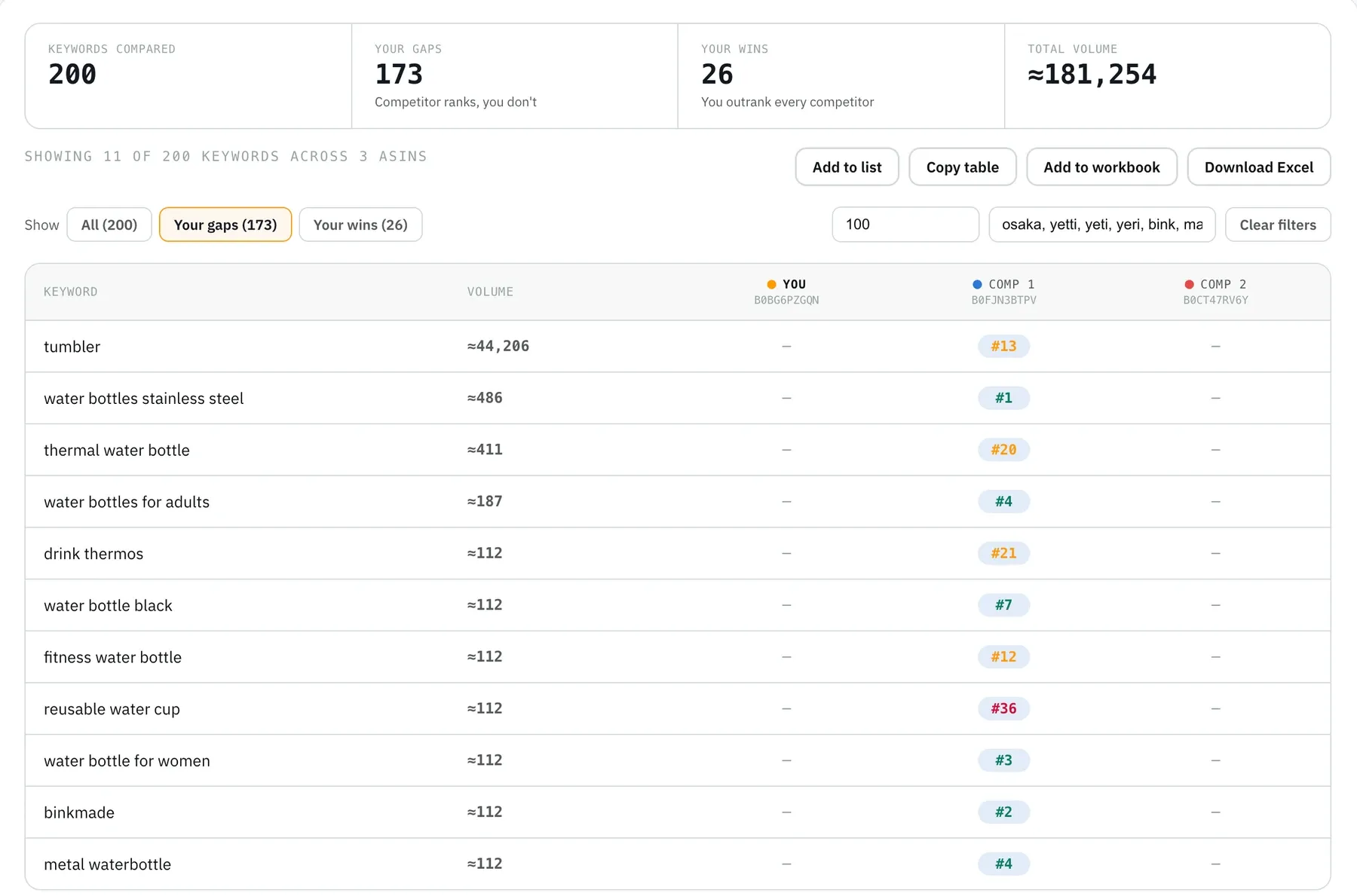
| Keyword | ≈ Monthly searches | Owala position | Verdict |
|---|---|---|---|
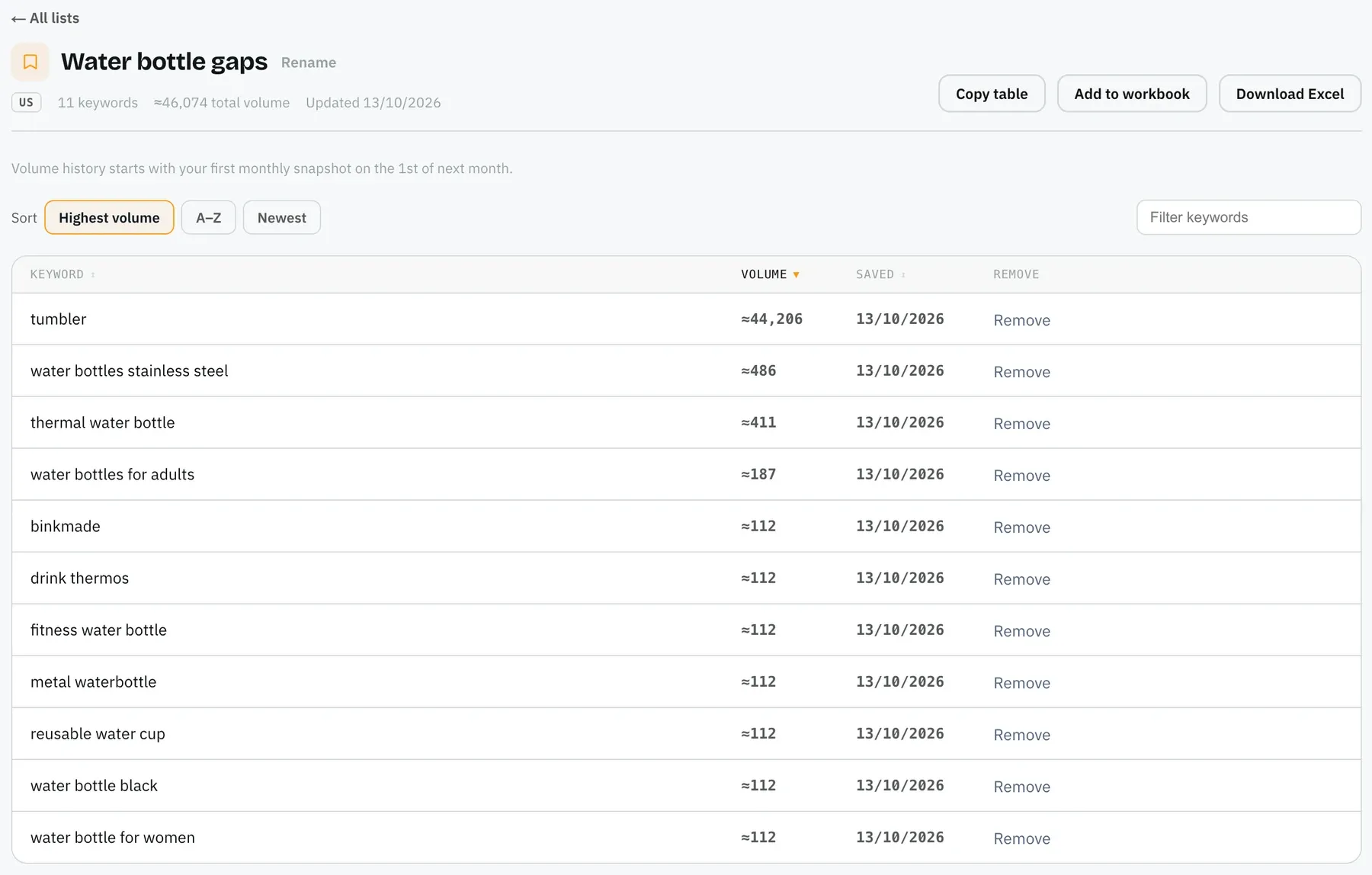
| water bottles stainless steel | 486 | 1 | Add: describes the product exactly |
| thermal water bottle | 411 | 20 | Add: matches the insulation claim |
| water bottles for adults | 187 | 4 | Add to bullets or backend |
| water bottle for women | 112 | 3 | Backend, if the brand targets it |
| metal waterbottle | 112 | 4 | Backend only (spelling variant) |
| fitness water bottle | 112 | 12 | Add if a gym use case is in the copy |
| drink thermos | 112 | 21 | Backend, lower priority |
| tumbler | 44,206 | 13 | Test in ads first: big volume, different product shape |
Look at your near wins too. Hydro Flask's own brand terms ranked between 12 and 28, so "hydro flask 32 oz" (≈972 searches) and "hydro flask wide mouth" (≈299) are page-two rankings the listing already owns. Moving those onto page one is usually easier than starting from zero on a new term.
Every row in that table passed one test before volume: is it true of this product? Gap lists are where unsupported claims get into listings. "Personalized water bottle" ranks for Owala at position 8, and copying it into a stock Hydro Flask listing would promise something the product doesn't offer. Amazon SEO Ranking's rewriter treats the listing's spec table and your brand fact sheet as the source of truth, and flags health claims and unsupported claims before you paste anything.
Step 6: Put the keywords in the right fields
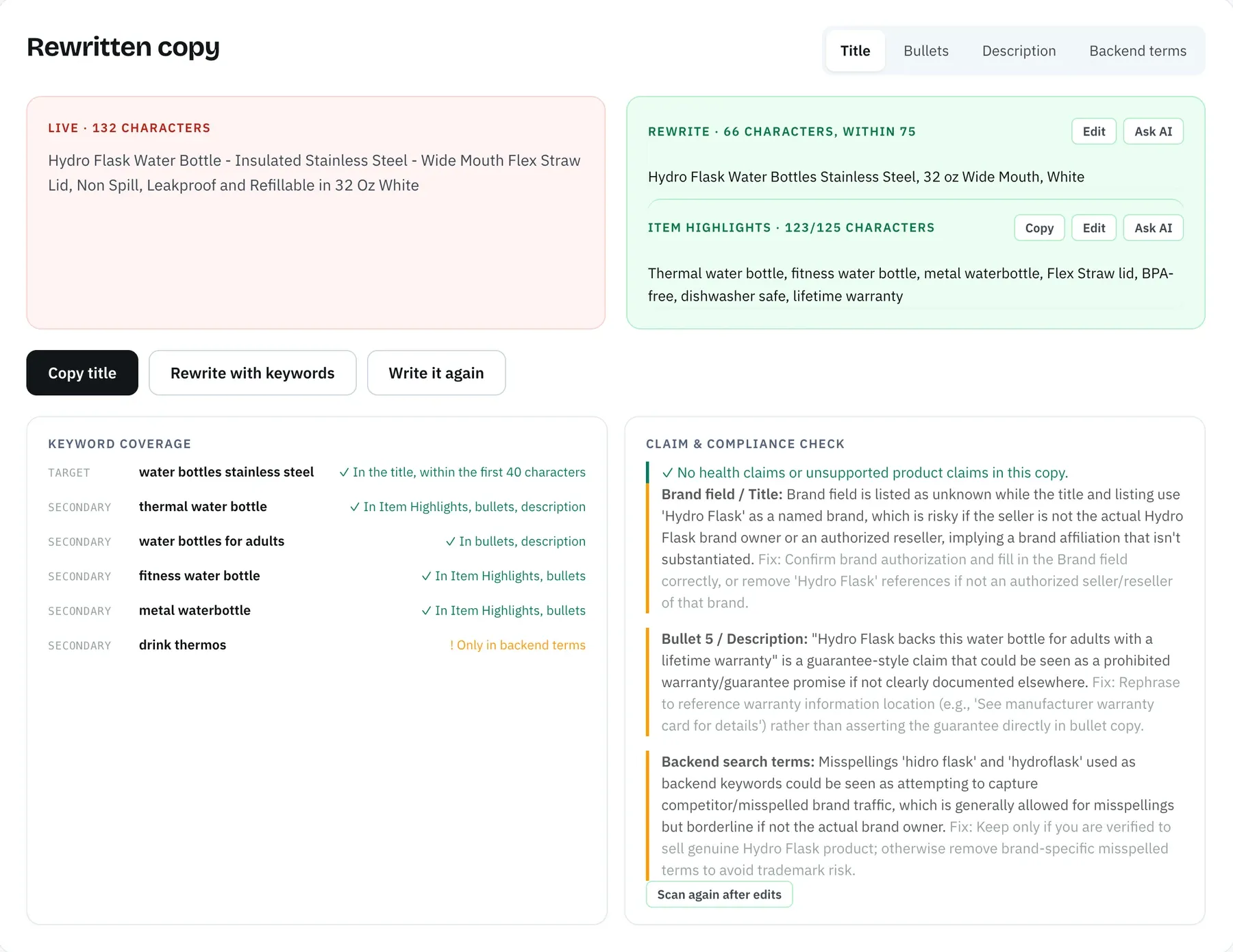
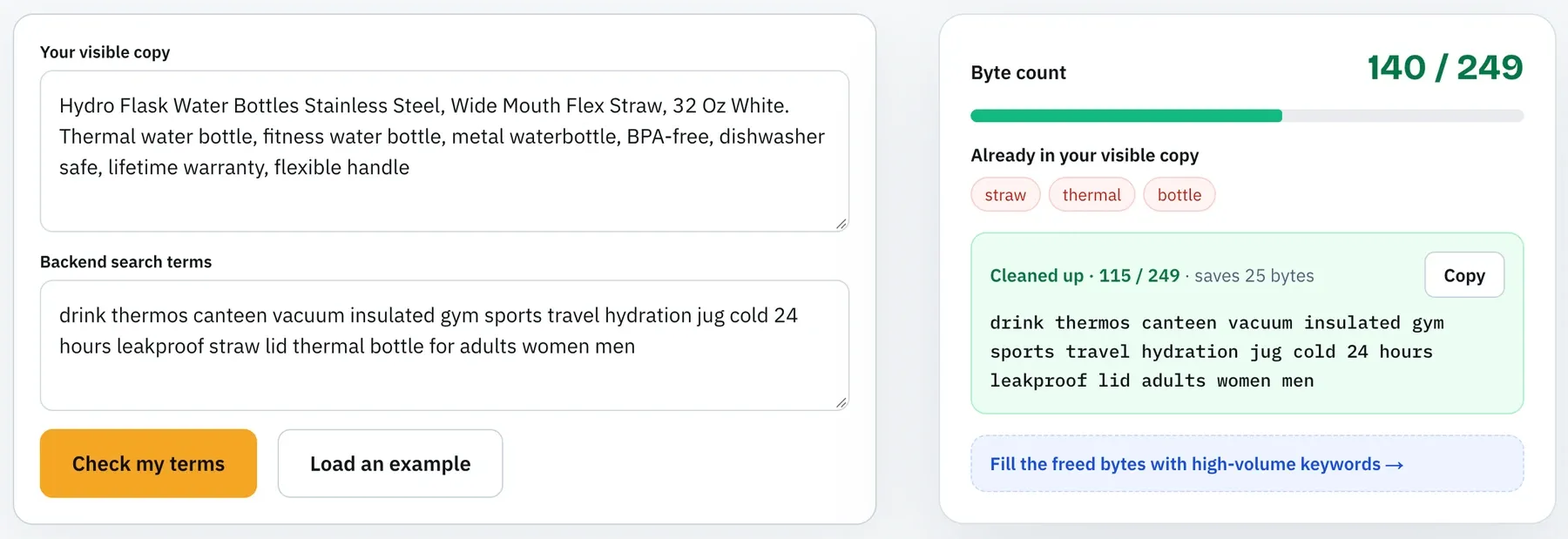
Place the strongest keyword early in the title, and keep the title inside Amazon's limit; our note on the Amazon title character limit covers the current rules. Work secondary keywords into Item Highlights (up to 125 characters) and the five bullets (under 200 characters each). Lower-priority terms and spelling variants go in backend search terms, which hold 249 bytes and shouldn't repeat words already visible on the page.
Leave competitor brand names out of every field. Amazon's search terms guidelines tell sellers not to include other brands' names, and the backend search terms guide covers what else to keep out. The AI Copy Rewriter takes your gap shortlist as a target keyword plus secondary keywords, shows where each one landed, and runs the same claim and pack-count checks on the draft. You can then score the new copy as a draft audit before it goes live, and run the result through the backend search terms checker to confirm it fits in 249 bytes.
Step 7: Re-run the comparison every month
Rankings move faster than most sellers expect. We ran the same Keyword gap twice, minutes apart, and got 171 gaps the first time and 173 the second.
Re-run your competitor set monthly and before any listing rewrite. Saved lists keep monthly volume snapshots, and on Agency the ranking visibility view counts how many of each tracked ASIN's keywords sit at #1, #2-3, #4-10 and #11-100. For the positions themselves over time, see our guide to Amazon keyword rank tracking.
Free Ways to See Competitor Keywords
There's no reverse keyword search Amazon gives every seller, but brand owners get close. To find competitor keywords, Amazon's own Brand Analytics is the first place to check, and it costs nothing beyond the selling plan.
Brand Analytics: Top Search Terms
The Top Search Terms dashboard shows search frequency rank, top-clicked brands and categories, and the three top-clicked products for each search term with their click share and conversion share, according to Amazon. You can filter it by ASIN, brand, category or keyword, so filtering by a competitor's ASIN works as a limited reverse lookup.
The limit is the top-three cutoff. A competitor only appears for terms where it's one of the three most-clicked products, so mid-ranking keywords stay hidden. Access needs a Professional selling plan ($39.99 a month plus selling fees) and Brand Representative status for a brand enrolled in Brand Registry.
Search Query Performance and manual checks
Search Query Performance, also in Brand Analytics, lists the top queries that led shoppers to your own products and your brand's share of clicks against all brands. That's your side of the gap; pair it with competitor rank data to see where you trail.
Without Brand Registry, the free options are manual: read competitor titles and bullets, type your main term into Amazon's search bar to see autocomplete, and note which brands buy sponsored slots. None of these show positions or volumes. Amazon SEO Ranking's free plan adds Competitor Comparison, which audits your listing and a competitor's side by side on the same 12 criteria (our guide to Amazon competitor listing comparison walks through it), plus a Search volume preview of 3 results per search. No card is required for either.
What to Look for in an Amazon Competitor Research Tool
Most tools return a keyword list. The differences show up in how much noise you have to clean by hand and how many steps stand between the list and an updated listing. Amazon SEO Ranking is our product, so read its column with that in mind.
| Criterion | Why it matters | Amazon SEO Ranking |
|---|---|---|
| Published scoring method | You can see why a listing scores what it does, and show a client | All 12 criteria and pass rules published, each weighted equally |
| Multi-ASIN gap view | One table beats comparing separate lists | Keyword gap, up to 20 ASINs, gaps and wins views (Agency) |
| Noise filters | Brand names dominate raw lists by volume | Exclude words, minimum volume |
| Claim check on new copy | Competitor keywords can add claims your product can't back | Spec-table grounding, brand fact sheet, health and unsupported claim flags |
| Draft scoring | A rewrite can fix keywords and break another criterion | Draft audit with a before and after score, 1 audit |
| Flat pricing | Catalog size shouldn't change what you pay | Same plan price at any SKU count |
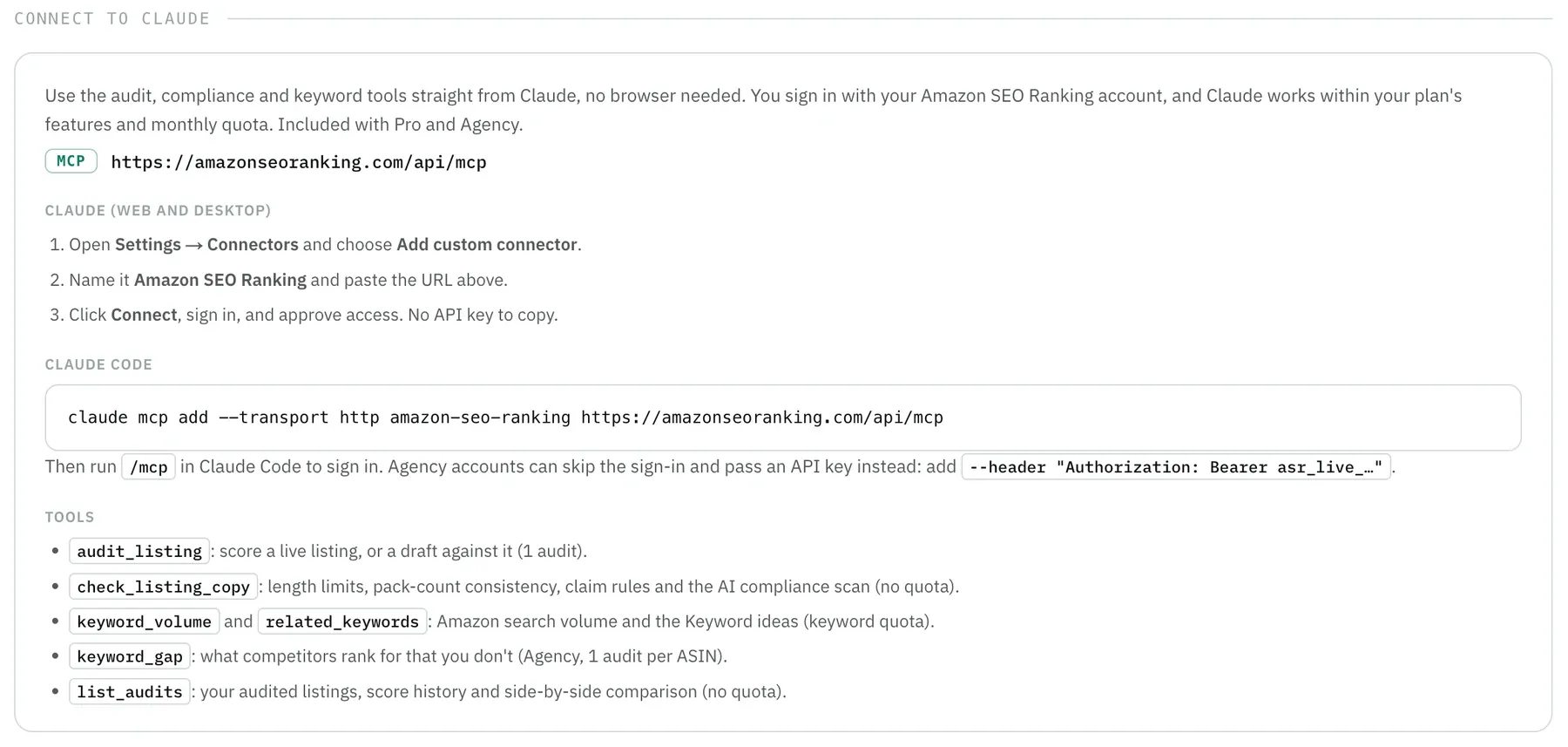
| AI assistant access | Teams running listing work through Claude | Claude connector on Pro and Agency; keyword_gap on Agency |
Marketplace coverage is where other tools win. Our reverse ASIN tools cover the US, Egypt, Saudi Arabia and UAE (Search volume covers 16 marketplaces), while Helium 10 and Jungle Scout cover more countries for keyword data, so a seller whose competitors sit mainly on amazon.de or amazon.co.jp needs one of them for this job; our Amazon SEO Ranking vs Helium 10 comparison lays out that trade-off. For a wider roundup, see the best Amazon keyword research tools.
Agencies get the most from Keyword gap: one run takes a client's ASIN plus up to 19 rivals. Copy table pastes the result into Google Sheets or Excel, and Add to workbook collects several runs into one linked .xlsx, with a Keywords tab showing which tables each term appears in.
The test data in this article came through the Claude connector. We asked Claude to run Keyword gap on the three ASINs, then to rerun it with the brand exclusions, without opening a browser.
What a reverse ASIN lookup costs
| Plan | Price | Reverse ASIN tools | Audits a month |
|---|---|---|---|
| Free | $0 | Not included; Competitor Comparison and Search volume preview | 3 |
| Pro | $79/mo or $799/yr | What I rank for, Competitors (1 audit per lookup) | 100 |
| Agency | $189/mo or $1,899/yr | Adds Keyword gap, up to 20 ASINs (1 audit per ASIN) | 500 |
| Enterprise | Custom | Custom limits and API | Custom |
A 3-ASIN Keyword gap like ours uses 3 of the Agency plan's 500 monthly audits. Every paid plan starts with a 7-day free trial, and every charge has a 14-day money-back guarantee.
Everything You Need to Know About Amazon Competitor Keywords
This table covers the whole guide in one place, for readers who want the reference version.
| Topic | Summary |
|---|---|
| Definition | Search terms a competing ASIN ranks for organically on Amazon |
| Main method | Reverse ASIN lookup, or a keyword gap across your ASIN and 2 to 4 competitors |
| First check | Competitor Comparison scores both listings on 12 criteria; keywords may not be the gap |
| Choosing competitors | Organic page-one listings for your main term, exact child variant |
| Raw list quality | 173 gaps out of 200 in our test; 9 of the top 15 were brand names or misspellings |
| Cleaning | Exclude brands, misspellings, characters, other languages, wrong attributes; set a minimum volume |
| Relevance | Only add terms that are true of your product; competitor phrases can become unsupported claims |
| Prioritizing | Competitor in top 10 plus relevant to your product; check your own page-two near wins |
| Placement | Title, Item Highlights (125 chars), 5 bullets (under 200 chars), backend terms (249 bytes) |
| Rules | No competitor brand names in any listing field |
| Free option | Brand Analytics Top Search Terms filtered by ASIN; Brand Registry and Professional plan needed |
| Cadence | Monthly and before every rewrite; rankings shifted between two runs minutes apart |
| Amazon SEO Ranking access | What I rank for on Pro ($79/mo); Keyword gap on Agency ($189/mo); US, EG, SA, AE |
If you only keep one habit from this guide, make it the exclude filter. It turned 173 gaps into 30 rows and saved the sorting work for keywords that could go in the listing.
Find Your Keyword Gaps and Fix the Listing in One Place
Amazon SEO Ranking connects the competitor list to the copy that ships. Keyword gap shows what rivals rank for that you don't. The AI Copy Rewriter writes the terms that are true of your product into a title, bullets and backend terms, checked against your spec table for unsupported claims and against Amazon's length limits, and the draft audit scores the result on the published 12-criteria rubric before it reaches Seller Central.
What I rank for comes with Pro at $79 a month, against $129 for Helium 10 Platinum. Keyword gap is on Agency at $189, against $359 for Helium 10 Diamond, both billed monthly.
It's built for sellers and agencies improving listings that already exist, in the US, Egypt, Saudi Arabia or UAE for competitor keyword data, and in any of 20 Amazon storefronts for the audit. Agencies comparing a client's catalog against several rivals get the most from Keyword gap on the Agency plan.
Start a 7-day free trial to run your first gap analysis, with no charge until the trial converts. If you want to check the listing itself first, the free Amazon listing audit shows which of the 12 criteria it fails in about 20 seconds, with no card required. Amazon SEO Ranking ranked #1 Product on IndieHunt.
FAQ
How do I find out what keywords my competitors rank for on Amazon?
You find out what keywords your competitors rank for on Amazon by running their ASIN through a reverse ASIN lookup, which returns each search term the product ranks for organically, its position and its estimated monthly search volume. To see what your listing is missing, run your own ASIN first and two to four competitor ASINs after it in a keyword gap view. In our October 2026 test on three water bottle ASINs, that comparison covered 200 keywords and flagged 173 as gaps, so filter out brand names, misspellings and off-category terms before acting. Brand-registered sellers can also filter Amazon's Top Search Terms dashboard by ASIN at no extra cost.
What is a reverse ASIN lookup on Amazon?
A reverse ASIN lookup on Amazon is keyword research that starts from a product's 10-character ASIN and returns the search terms that product ranks for. Standard keyword research runs the other way, from a search term to the products ranking for it. Results usually list each keyword with the ASIN's organic position and an estimate of monthly Amazon searches. Amazon SEO Ranking's version, What I rank for, uses 1 audit per lookup on the Pro plan.
Is there a free way to find competitor keywords on Amazon?
The free way to find competitor keywords on Amazon is Brand Analytics, whose Top Search Terms dashboard can be filtered by ASIN and shows the three top-clicked products for each search term. Access requires a Professional selling plan at $39.99 a month and Brand Representative status for a brand in Brand Registry. Without Brand Registry, reading competitor listings, Amazon autocomplete and sponsored placements costs nothing but shows no positions or volumes. Amazon SEO Ranking's free plan includes Competitor Comparison and a 3-result Search volume preview, while its reverse ASIN tools start on Pro at $79 a month.
How many competitor ASINs should I compare?
You should compare two to four competitor ASINs at first, all organic page-one results for your main search term with a similar price and format. Each extra ASIN adds keywords and also adds noise to clean. Keyword gap accepts up to 20 ASINs and uses 1 audit per ASIN, so a 4-ASIN run uses 4 of the Agency plan's 500 monthly audits. A keyword that appears for three of four competitors is a stronger signal than one tied to a single listing.
Can you see what keywords an ASIN ranks for on Amazon?
You can see what keywords an ASIN ranks for on Amazon through a reverse ASIN tool or, for top search terms only, through Brand Analytics, because the Amazon storefront shows no keyword rankings. A reverse ASIN tool returns each keyword with the ASIN's organic position and estimated monthly volume. Brand Analytics lists a product only where it's one of the three most-clicked results for a term. Amazon SEO Ranking's What I rank for covers the US, Egypt, Saudi Arabia and UAE marketplaces.
Can I use competitor brand names as keywords on Amazon?
You can't use competitor brand names as keywords in your listing copy or backend search terms, because Amazon's search terms guidelines tell sellers not to include other brands' names. In our water bottle test, 9 of the 15 highest-volume gaps were other brands or misspellings of them, so they're the first words to add to an exclude filter. Bidding on another brand's term in Sponsored Products falls under Amazon Ads policies, which are a separate set of rules to check before you bid.
How often should I check competitor keywords on Amazon?
You should check competitor keywords on Amazon once a month, and again before any listing rewrite or when a new competitor appears on page one. Rankings shift quickly: two Keyword gap runs on the same three ASINs, minutes apart on October 13, 2026, returned 171 and 173 gaps. Amazon SEO Ranking's audits reset on the 1st of each month, and Saved lists store monthly volume snapshots so you can compare one month with the next.
Is a reverse ASIN tool worth it if I already use Helium 10?
A reverse ASIN tool from Amazon SEO Ranking is worth it if you already use Helium 10 and your job is improving listings you sell in the US, Egypt, Saudi Arabia or UAE. The gap keywords go into an AI rewrite checked against your spec table for unsupported claims, and the new copy is scored as a draft before it goes live. Pro costs $79 a month against $129 for Helium 10 Platinum, and Agency, which includes Keyword gap, costs $189 against $359 for Helium 10 Diamond, both billed monthly. Helium 10 covers more marketplaces for keyword data and also handles product research and PPC, which Amazon SEO Ranking doesn't offer.