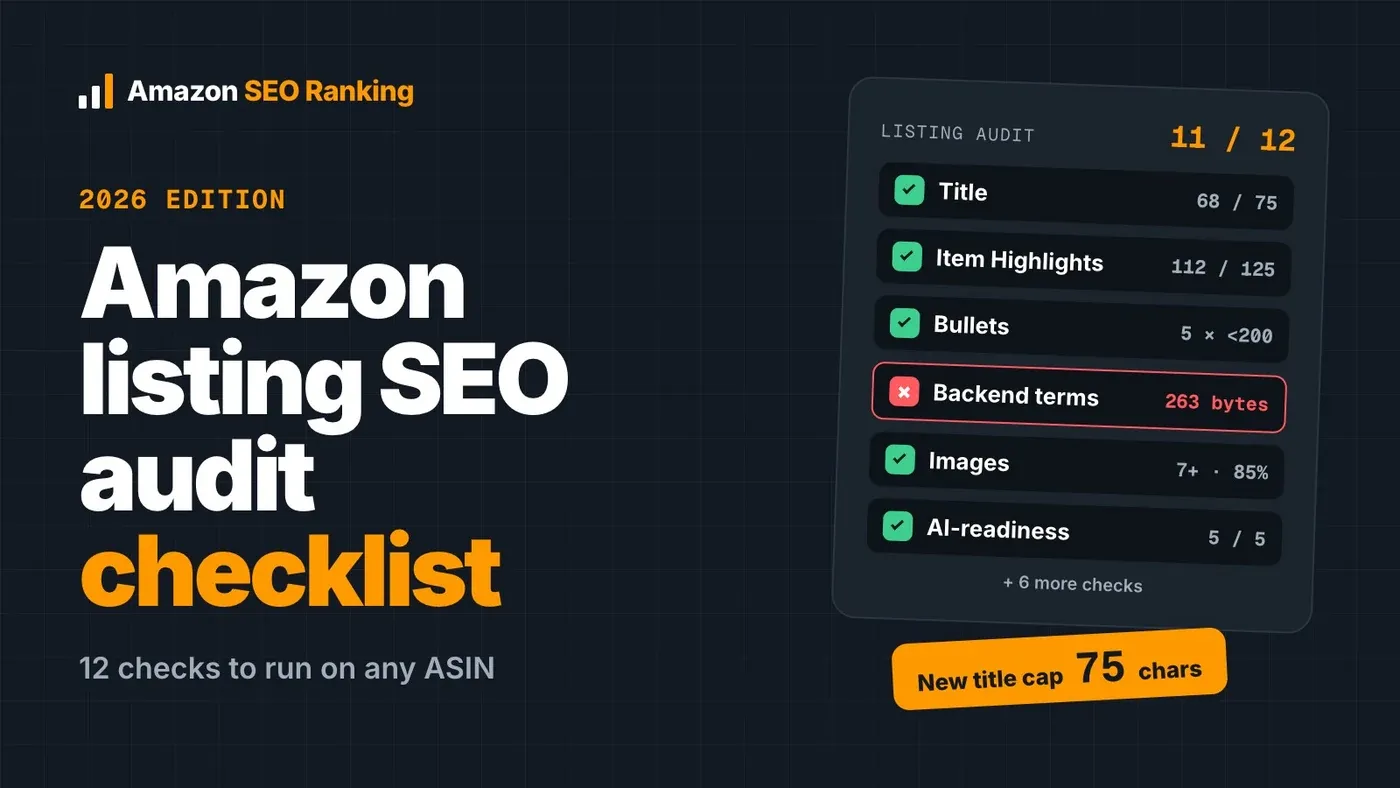
This Amazon listing SEO audit checklist covers the 12 things that decide whether a product page ranks: title, Item Highlights, bullets, description, backend search terms, attributes, images, reviews, Prime status and how well the copy answers Amazon's AI shopping assistants.
The rules changed this summer. Since July 27, 2026, Amazon caps titles at 75 characters in every category except media, and titles left over the limit get rewritten by Amazon's own AI. A checklist written before that date will pass titles that Amazon now trims.
Each check below tells you where to look on the live page, the pass rule, and what a fail usually costs. Our audit tool scores a live ASIN in about 20 seconds against 12 published, equally weighted criteria in seven categories that cover most of this list; backend terms aren't visible on the public page, so check those with the free Backend Keyword Checker.
Key Takeaways (TL;DR)
- Audit the live detail page, not the Seller Central editor. Amazon's AI can rewrite an over-length title without the editor showing it.
- Titles now max out at 75 characters. Put the brand, product type and one defining attribute first, and move secondary details into the 125-character Item Highlights field.
- Bullets: five, each under 200 characters, with sentence-case headers instead of ALL CAPS.
- Backend search terms must stay under 250 bytes and should never repeat words already in the visible copy.
- Check that the pack size matches everywhere. "8 Packets" in the title and "20 packets" in a bullet is a common cause of "not as described" returns.
- Remove health claims and any product claim the spec table can't support before Amazon's compliance checks find them.
- A listing optimized on amazon.com isn't optimized on amazon.de. Audit each storefront you sell in.
- Run a full audit every quarter, and a quick one after any copy change or Amazon policy update.
Amazon Listing SEO Audit Checklist: At a Glance
Use this table as the one-page version. The detailed checks follow below.
| # | Check | Pass rule | What a fail costs |
|---|---|---|---|
| 1 | Title | 75 characters or fewer; brand + product type + key attribute | Amazon's AI rewrites it for you |
| 2 | Item Highlights | Up to 125 characters; materials and use cases, no title repeats | Lost searchable space |
| 3 | Keywords | Main keyword early in the title, backed by Amazon search volume | Ranking for terms nobody types |
| 4 | Bullets | Exactly 5, each under 200 characters, sentence-case headers | Weaker conversion, style-guide flags |
| 5 | Description | Present, not a copy of the bullets, no unsupported claims | Thin context for Amazon's AI |
| 6 | Backend search terms | Under 250 bytes, no repeats of visible words | Wasted or ignored terms |
| 7 | Category and attributes | Correct browse node, all required attributes filled | Missing from filters |
| 8 | Images and video | Compliant main image, 7+ gallery images, video if it demonstrates use | Lower click-through |
| 9 | A+ Content | Present for brand-registered listings, facts in module text | Fewer answers below the fold |
| 10 | Reviews | Rating and count close to the top 3 results | Lower conversion and rank |
| 11 | Prime and stock | Prime-eligible and in stock | Lost Buy Box and visibility |
| 12 | AI-readiness | Copy answers the category's buyer questions | Skipped by Rufus and Alexa for Shopping |
What an Amazon SEO Audit Checks in 2026
An Amazon SEO audit compares every visible and hidden field of a listing against Amazon's published rules and against what shoppers search for. The goal is a short list of fixes, ranked by how much each one costs you.
Three readers now look at your listing. The A9 search engine ranks it on keyword relevance and sales. Amazon's AI assistants (Rufus, and since May 2026, Alexa for Shopping) answer shopper questions using your copy, reviews and Q&A. The shopper still makes the final call.
Before you open the listing, set two ground rules:
- Audit the live page. The Seller Central editor shows what you typed. The detail page shows what Amazon published, and after the title change those two can differ.
- Pull your Search Query Performance report first. A listing with few impressions has a keyword problem. A listing with impressions and few clicks has a title or image problem. The checklist can't tell those apart on its own.
The 12-Point Amazon Listing SEO Audit Checklist
The checks follow the order a shopper reads the page, top to bottom. Each one counts equally in our scoring, so a perfect title can't hide five weak bullets.
1. Title under 75 characters
Count the characters on the live page, spaces included. Amazon's July 2026 title update set the limit at 75 for all categories except media, and titles still over the limit are being replaced with Amazon's AI recommendation in phases.
Pass rule: 60–75 characters, in this order – brand, product type, one defining attribute. Remove ALL CAPS words, promotional phrases ("best seller", "free shipping") and repeated keywords.
Then open Manage All Inventory → View Change History. If Amazon already rewrote your title, that version is the one being indexed. Brand owners get up to 14 days to review AI changes before they go live; other sellers don't.

2. Item Highlights that don't repeat the title
Item Highlights is the new 125-character line under the title. Amazon indexes it for search and shows it in results, so it's where the details cut from the title now go.
Fill it with materials, sizes and use cases. Amazon's own example moves "keeps drinks cold 24 hours, hot 12 hours" out of a water-bottle title and into this field.
Some sellers get error 100476 ("Item Highlight is currently unsupported") on listings already under the cap. That's an Amazon-side issue. Note it and move on.

3. Keywords backed by real search volume
List the 5–10 phrases you want to rank for, then check each one against Amazon search volume, not Google's. A keyword with 40 monthly Amazon searches doesn't deserve a spot in a 75-character title.
Pass rule: the main keyword appears in the first half of the title, and each secondary keyword appears at least once in Item Highlights, bullets or description. Filter out off-topic ideas. Keyword tools often suggest terms that match a word in your seed but describe a different product.

4. Five bullets under 200 characters
Count them. Amazon's style guides ask for five bullet points, and each should stay under 200 characters so it displays in full on mobile.
Open each bullet with a short header in sentence case. ALL CAPS headers are still common and still break most category style guides.
Read each bullet against one buyer question. Who is it for? What size is it? How do I clean it? What's in the box? A bullet that lists features without answering a question gives the AI assistants nothing to quote.

5. A description that adds context
On brand-registered listings, A+ Content replaces the description visually, but the description field is still read by Amazon. Fill it.
Pass rule: it exists, it isn't a paste of the bullets, and it puts the product in a situation ("a 2-litre press for a household that brews for four"). Cut any claim you can't back with the spec table.

6. Backend search terms under 250 bytes
The backend search terms field is invisible to shoppers and to every outside audit, which is why it's often wrong for years. Amazon reads up to 249 bytes and may ignore the field if you go over.
Bytes aren't characters. An accented letter (é, ü) or a Japanese character uses 2–3 bytes, so a German or Japanese listing hits the limit sooner than an English one.
Pass rule: space-separated words, no commas, no repeats, nothing already in the title or bullets, no competitor brand names. Use the space for synonyms, alternate spellings and other-language terms shoppers use.

7. Category, browse node and attributes
Confirm the product type and browse node match what the product is. A French press filed under kettles competes with kettles and gets the kettle attribute set.
Then fill every structured attribute: material, size, color, unit count, target audience, intended use. These fields feed Amazon's filters. An empty "unit count" can drop you out of a filtered search entirely.

8. Images and video
The main image has fixed requirements: a pure white background, the product filling at least 85% of the frame, no text or logos, and at least 1,000 pixels on the longest side so zoom works.
For the gallery, aim for seven or more images. Read them in order on a phone. Each one should answer the next shopper objection: scale, materials, what's included, who uses it. Add a video if the product needs a demonstration.

9. A+ Content
If you're brand-registered, check that A+ modules are live and that the module text states facts – dimensions, doses, compatibility – rather than slogans. Add a comparison chart if you sell several variations.

10. Reviews and rating
Compare your star rating and review count against the top three organic results for your main keyword. Half a star below them is a conversion gap, and Amazon ranks on sales.
Read the last 30 reviews for repeated complaints. Three people saying "smaller than expected" means your bullets don't state the size clearly.

11. Prime eligibility and stock
A listing that's out of stock or not Prime-eligible loses visibility no matter how good the copy is. Check fulfillment status and the Buy Box on the live page before you spend time on copy.

12. AI-readiness for Rufus and Alexa for Shopping
Write down the five to ten questions shoppers ask about your category. Pull them from the customer questions block, your reviews and question-shaped search queries. Then check whether your title, Item Highlights, bullets and description answer each one in plain words.
Pass rule: at least the top five questions are answered in the listing copy, with numbers and units where they apply.

Three Checks Most Amazon Listing Audits Skip
The top-ranking checklists we reviewed cover the 12 areas above. None of them check whether the facts inside the listing agree with each other, or whether the listing holds up outside amazon.com.
Pack-count and unit consistency
Read the pack size in every field: title, Item Highlights, bullets, description and the spec table. We regularly see listings with "8 Packets" in the title, "20 packets" in a bullet and "8.0 Count" in the spec table. Shoppers who buy expecting 20 send it back as "not as described".
Health and unsupported claims
Search the copy for words like "detox", "weight loss", "cure" and "meal replacement". Amazon restricts health claims, and they can get a listing suppressed.
Then check product claims such as "protein", "organic" or "vegan". If the spec table or your certificates don't support them, cut them. AI-written copy is a frequent source of these: general models add claims that sound plausible for the category.
Each marketplace on its own terms
If you sell on amazon.com, amazon.de and amazon.co.jp, audit each one. Byte limits bite harder in German and Japanese, keyword demand differs by country, and a translated title can exceed 75 characters even when the English one doesn't.
How Often to Run an Amazon Listing Audit
Run a full Amazon listing audit once a quarter for every listing that drives meaningful revenue. Run a quick one after any of these:
- You change the title, bullets or images
- Amazon announces a listing policy change (like the July 2026 title cap)
- Sessions or conversion rate drop for two weeks in a row
- You launch the product in a new marketplace
For new copy, audit it before it goes live. Scoring a draft against the live listing's images, rating and Prime status shows whether the rewrite improves the score before shoppers see it.
If you compare tools for this job, our Amazon SEO Ranking vs Helium 10 comparison covers where each one fits, including what Helium 10 does that we don't.
Everything You Need to Know About an Amazon Listing SEO Audit Checklist
| Topic | Short answer |
|---|---|
| What it is | A field-by-field review of a live listing against Amazon's rules and real search demand |
| Fields covered | Title, Item Highlights, bullets, description, backend terms, attributes, images, A+, reviews, Prime and stock |
| Title limit | 75 characters, all categories except media (since July 27, 2026) |
| Item Highlights limit | 125 characters, indexed for search |
| Bullet limit | 5 bullets, each under 200 characters |
| Backend search terms limit | Under 250 bytes; non-English characters use more bytes |
| Main image | White background, product fills 85%+ of frame, 1,000px+ on the long side |
| Most-missed checks | Pack-count consistency, unsupported claims, per-marketplace differences |
| Where to audit | The live detail page, plus View Change History in Seller Central |
| How often | Quarterly, plus after any copy change, policy update or traffic drop |
| Time by hand | About 30–60 minutes per ASIN |
| Time with a tool | About 10–20 seconds per ASIN on Amazon SEO Ranking |
Score Your Listing Against the Checklist
Amazon SEO Ranking runs this checklist on any live ASIN across 23 Amazon storefronts and returns a 0–100 score with each failed check named.
Three things set it apart from the big seller suites. All 12 criteria and their pass rules are published, so you can see why a listing scored 64 and show a client the same logic. Every AI rewrite is grounded in the listing's own spec table and your brand fact sheet, then checked in code for health claims, unsupported claims, pack-count mismatches and Amazon's character limits. And you can score new copy as a draft before it goes live.
It's built for sellers about to update or launch a listing, sellers expanding into a new marketplace, and agencies that need audits they can explain to clients.
FAQ
What is an Amazon listing SEO audit checklist?
An Amazon listing SEO audit checklist is a list of pass-or-fail checks you run on a product page to find what holds back its search rank and conversion. A complete one covers 12 areas: title, Item Highlights, keywords, bullets, description, backend search terms, attributes, images, A+ Content, reviews, Prime and stock, and AI-readiness. Each check has a measurable pass rule, such as a title of 75 characters or fewer. The output is a ranked list of fixes rather than a general impression.
How long does an Amazon listing audit take?
An Amazon listing audit takes about 30–60 minutes per ASIN by hand, once you include pulling reports and reading reviews. An automated audit on Amazon SEO Ranking takes about 10–20 seconds per listing. For a 50-ASIN catalog, that's the difference between a full working week and a single afternoon. Most sellers audit their top 10–20 revenue listings by hand first and automate the rest.
What is the Amazon title character limit in 2026?
The Amazon title character limit in 2026 is 75 characters including spaces, for all categories except media, effective July 27, 2026. Titles still over the limit are gradually replaced with Amazon's AI-recommended version. Amazon added a separate 125-character Item Highlights field for the details that no longer fit. Brand owners can review AI title changes up to 14 days before they go live.
How many bytes are allowed in Amazon backend search terms?
Amazon backend search terms allow fewer than 250 bytes on most marketplaces, which means 249 bytes is the safe maximum. English letters use 1 byte each, while accented letters use 2 bytes and Japanese characters use 3. A German listing can therefore hit the limit with far fewer characters than an English one. Going over the limit can cause Amazon to ignore the field.
How do I check my Amazon listing quality?
You can check your Amazon listing quality in Seller Central through the Listing Quality Dashboard, found under the Catalog menu. It flags missing attributes, suppressed listings and incomplete fields. It doesn't grade whether your title, bullets or keywords are any good, so pair it with a scored audit against the 12 checks above. Run both every quarter.
How often should you audit an Amazon listing?
You should audit an Amazon listing at least once every quarter, and again after any copy change, policy update or two-week drop in sessions. High-revenue listings in competitive categories benefit from a monthly check. A listing launched in a new marketplace needs its own audit on day one, since keyword demand and byte limits differ by language.
Can I use ChatGPT or Claude to audit my Amazon listing?
You can use ChatGPT or Claude to audit your Amazon listing copy, but a general model can't see the live page, its spec table or Amazon search volume on its own. Models also miscount characters and bytes, which matters when the limits are 75 characters and 249 bytes. They can add claims like "detox" or "protein" that the product doesn't support. Amazon SEO Ranking's Claude connector gives Claude live listing data and code-based limit checks on the Pro and Agency plans.
Is a free Amazon listing audit tool good enough?
A free Amazon listing audit tool is good enough if it publishes its scoring rules and reads the live listing. Amazon SEO Ranking's free plan includes 3 audits a month with the same 12 criteria as paid plans, plus an AI rewrite on every audit. Paid plans add bulk audits (up to 100 ASINs per run on Pro), keyword volume data and compliance scans. Test the free tier on a listing you know well before paying for any tool.
Amazon's 75-character title cap is being applied in phases right now. Audit your top listings before Amazon's AI rewrites the titles for you. The free plan includes 3 audits a month, no card required.
Run free audit