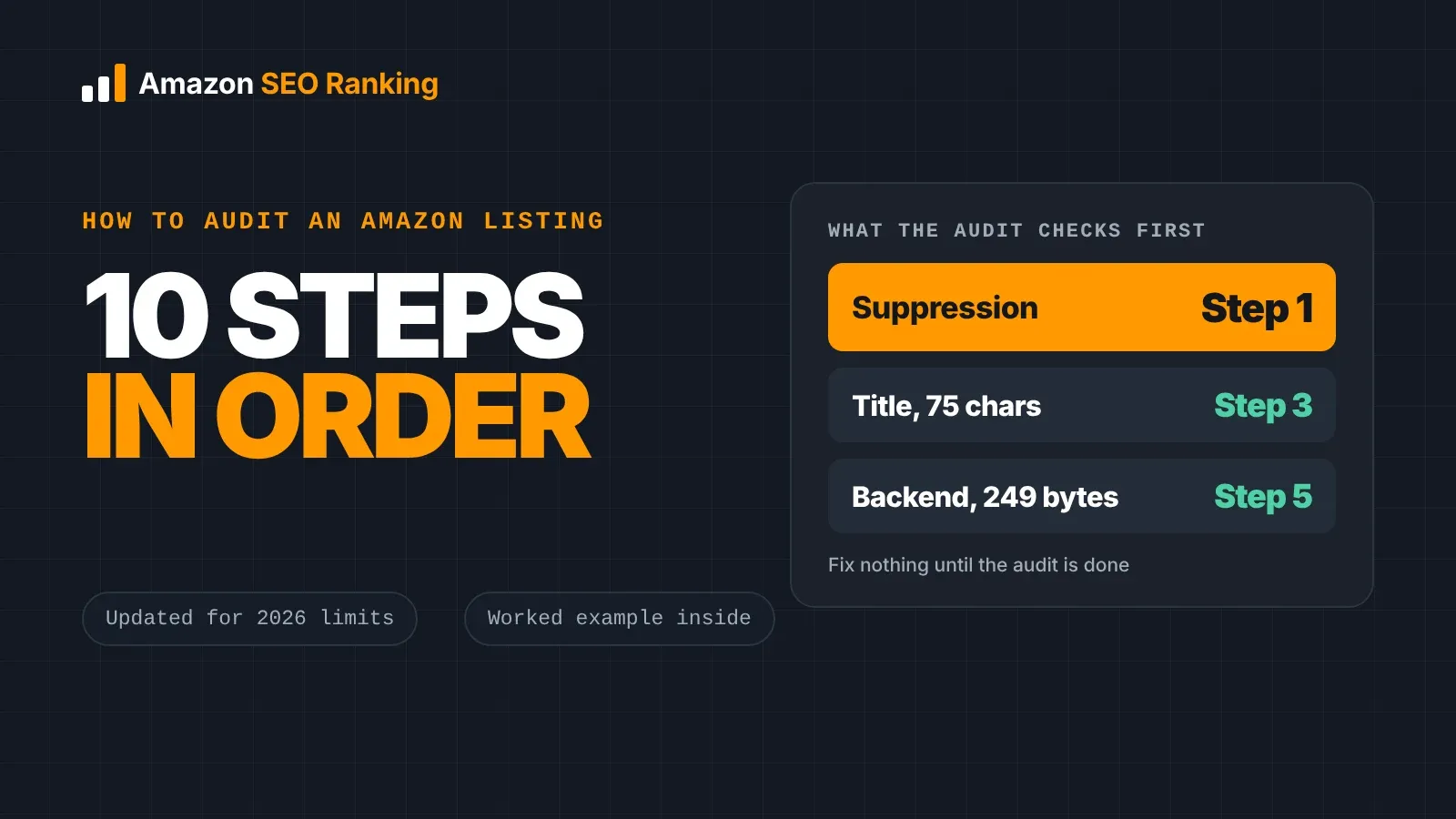
To audit an Amazon listing for SEO, check it in this order: make sure it isn't suppressed, confirm the keywords it should rank for, then test each indexed field against Amazon's limits (75-character title, 125-character Item Highlights, five bullets, a backend field under 250 bytes). After that, check claims and numbers against the spec table, review images and offer signals, and search Amazon for your ASIN plus each target phrase to confirm it's indexed.
Order matters because a perfect bullet rewrite does nothing for a listing Amazon has hidden from search, and a backend field one byte over the limit is ignored in full, whatever words are in it. Most audit checklists online still quote the old 200-character title limit, which Amazon replaced on July 27, 2026.
This guide is for sellers and agencies with a live listing that should rank higher than it does. It covers the 10 steps, what to look for in each field, a worked example where one water bottle listing failed 13 checks, and a scorecard you can copy for your own audits.
Key Takeaways (TL;DR)
- Start with suppression and keyword choice. Field-by-field edits come after.
- Since July 27, 2026, titles in every category except media are capped at 75 characters, and Amazon rewrites titles that break it.
- Item Highlights adds 125 searchable characters under the title. Fill it: it's where secondary phrases go now.
- A backend search terms line over 249 bytes (most marketplaces) is ignored in full.
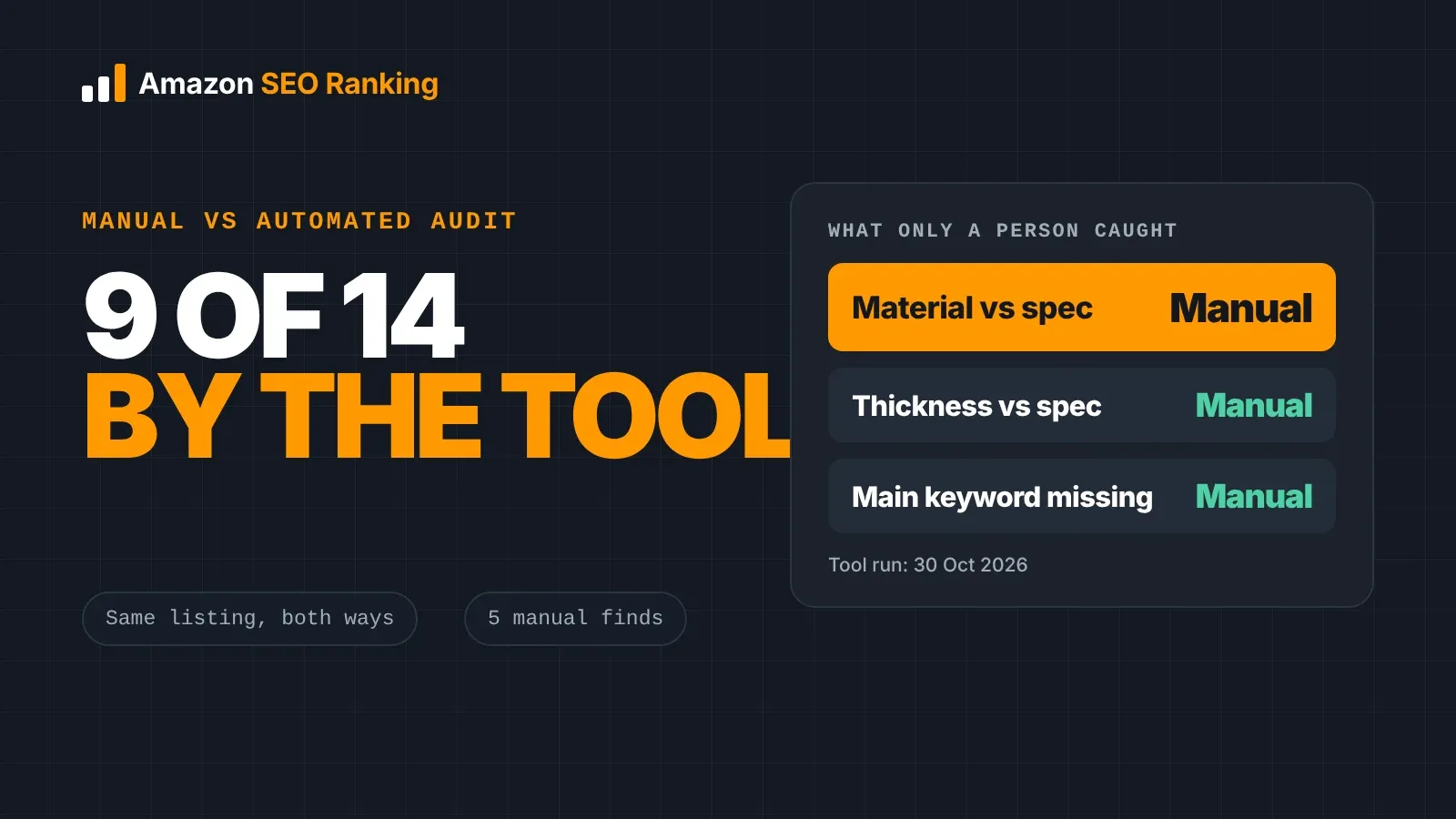
- Compare every number and claim against the spec table. In our example, a "2 Pack" title sat above a bullet promising "One 32 oz bottle", and no automated check caught it.
- Confirm indexing with an ASIN plus phrase search in a private window. Count a keyword as working only once that test passes.
- Audit each marketplace on its own. The same ASIN has its own copy, language and limits in every storefront.
How to Audit an Amazon Listing for SEO: at a Glance
The 10 steps below follow the order the problems cost you: first whether Amazon shows the listing at all, then whether it matches the right searches, then whether shoppers click and buy.
The third column shows a free way to run each check, and the last shows where each step sits in the 12 criteria Amazon SEO Ranking scores. Steps 1, 2, 8, 9 and 10 need Seller Central or an Amazon search; the rest can be checked from the copy alone.
| Step | What you check | The rule or test | Free way to check | Scored in the audit? |
|---|---|---|---|---|
| 1. Suppression and marketplace | Listing status, storefront | Must show in search, not only by URL | Seller Central, Fix a Hidden Listing guide | No: only Seller Central shows the reason |
| 2. Target keywords | Main and secondary phrases | Relevance first, search volume second | Amazon autocomplete, keyword preview | Partly: keyword use is graded in the title and bullet criteria |
| 3. Title and Item Highlights | Length, order, repeats | 75 characters, 125 characters, a word max twice | Character Limit Checker | Yes: Title & Item Highlights (3 criteria) |
| 4. Bullets and description | Facts, case, length | Five bullets under 255 (200 for mobile), 2,000-character description | Character Limit Checker | Yes: Bullet Points (3) and AI-Readiness (2) |
| 5. Backend and attributes | Bytes, repeats, brands | Under 250 bytes in most marketplaces | Backend Keyword Checker | Partly: Backend & Attributes (1) scores the category; the hidden backend line needs the checker |
| 6. Claims and numbers | Health claims, pack counts | Every claim and count matches the spec table | Free audit consistency check, plus a manual read | Flagged on every audit |
| 7. Images and video | Main image, gallery size | White background, 85% fill, 1,000 px, 7 images | Free audit counts the gallery | Yes: Images & Video (1) |
| 8. Reviews, price and offer | Rating, Buy Box, stock | Competitive with page one | Amazon search results | Partly: Reviews & Social Proof (1), Stock & Fulfillment (1); price and Buy Box aren't scored |
| 9. Indexing | Each target phrase | ASIN plus phrase returns your product | Private browser window | No: a manual test (What I rank for on Pro covers 4 marketplaces) |
| 10. Competitors and priorities | Page-one listings | Fix the biggest gap first, re-test | Side-by-side comparison | Yes: Competitor Compare runs the same 12 criteria |
The 12 criteria sit in seven categories and each counts equally, about 8.3 points of the 100. Every criterion and its pass rule is published, so you can see what a lost point is worth and check a score yourself. The steps marked "No" or "Partly" are the ones where a person still has to look.
What an Amazon SEO Audit Covers (and What It Doesn't)
An Amazon SEO audit checks whether a listing can be found for the searches that matter and whether it gives shoppers reason to click and buy once it appears. Amazon ranks in two stages: it decides whether a product matches a search from the words in the fields it indexes, then orders the matches by how shoppers respond. Our guide on how to rank for keywords on Amazon covers both stages in depth.
An Amazon product listing audit is narrower than an account audit. It won't tell you about account health, FBA fees, ad bids or inventory planning. It's also different from optimizing: the audit finds and ranks the problems, and the rewrite comes afterwards. Keeping the two apart stops you from rewriting copy that was fine while the real issue sits in the backend field or the main image.
Before You Start: Read the Symptoms
Before opening the listing, look at what changed. The symptom tells you which steps to run first, so an hour of auditing goes to the field that's costing you sales.
| What you see | Most likely cause | Start with |
|---|---|---|
| Listing gone from search, still opens by URL | Suppression | Step 1 |
| Few impressions for a phrase you target | Not indexed, or wrong keyword | Steps 2, 5 and 9 |
| Impressions but few clicks | Title, main image, price or rating | Steps 3, 7 and 8 |
| Clicks but few sales | Bullets, claims, images or offer | Steps 4, 6, 7 and 8 |
| Rank dropped after an edit | New copy broke a limit or lost a keyword | Steps 3, 5 and 9 |
| Ranks on amazon.com, missing on amazon.de | Marketplace copy, language or limits | Step 1, then the full audit for that storefront |
If you're brand registered, Search Query Performance in Brand Analytics shows impressions, clicks and purchases per search query, which is the most direct way to tell a visibility problem from a conversion problem. Unit Session Percentage in Business Reports blends every kind of traffic, so treat it as a rough guide. Our post on Amazon conversion rate and ranking explains why.
How to Audit an Amazon Listing for SEO in 10 Steps
Work through the steps in order and write down every finding as you go. Fix nothing until the audit is finished, since an issue found in step 9 can change what you'd rewrite in step 3.
Step 1: Rule out suppression and pick the marketplace
A suppressed listing still opens by its URL but drops out of search results, so no keyword work will show up until it's fixed. Seller Central shows the reason under the listing's status. The common causes are title length and style, a non-compliant main image, missing required attributes, restricted claims and price. Our guide to fixing a listing that's search suppressed walks through each one.
Then decide which storefront you're auditing. Each Amazon marketplace carries its own title, bullets, backend line and language. A listing that passes on amazon.com can fail on amazon.co.uk or amazon.de, so run one audit per storefront and keep the findings separate.
Step 2: Set the target keywords before reading any copy
You can't judge a title without knowing what it should rank for. Write down one main keyword and four to eight secondary phrases. Sort candidates by relevance first and search volume second: ask whether a shopper typing the phrase would be happy to receive your product.
Amazon autocomplete gives you phrases shoppers type, with no volume attached. Amazon SEO Ranking's Amazon keyword research tool adds estimated monthly Amazon searches in 16 marketplaces, and the free account shows the first 3 results of each search. Its Keyword ideas tab grades each idea as Close match, Related or All, so off-topic phrases drop out before you look at volume. Volumes are estimates, and lower volumes are reported in steps, so treat small differences between phrases as noise.
Step 3: Audit the title and Item Highlights
Amazon posted the change in Seller Central on June 10, 2026: titles in all categories except media must be 75 characters or fewer, spaces included, from July 27. Titles still over the limit get rewritten by Amazon's AI while the listing stays live, which means Amazon picks which of your keywords survive.
Check four things in the title:
- Length: 75 characters or fewer, counted with spaces.
- Order: brand, then the main keyword, then the attribute that matters most (size, count or material).
- Repeats: no word more than twice.
- Style: no ALL CAPS, no "best" or "#1", no symbols or emoji.
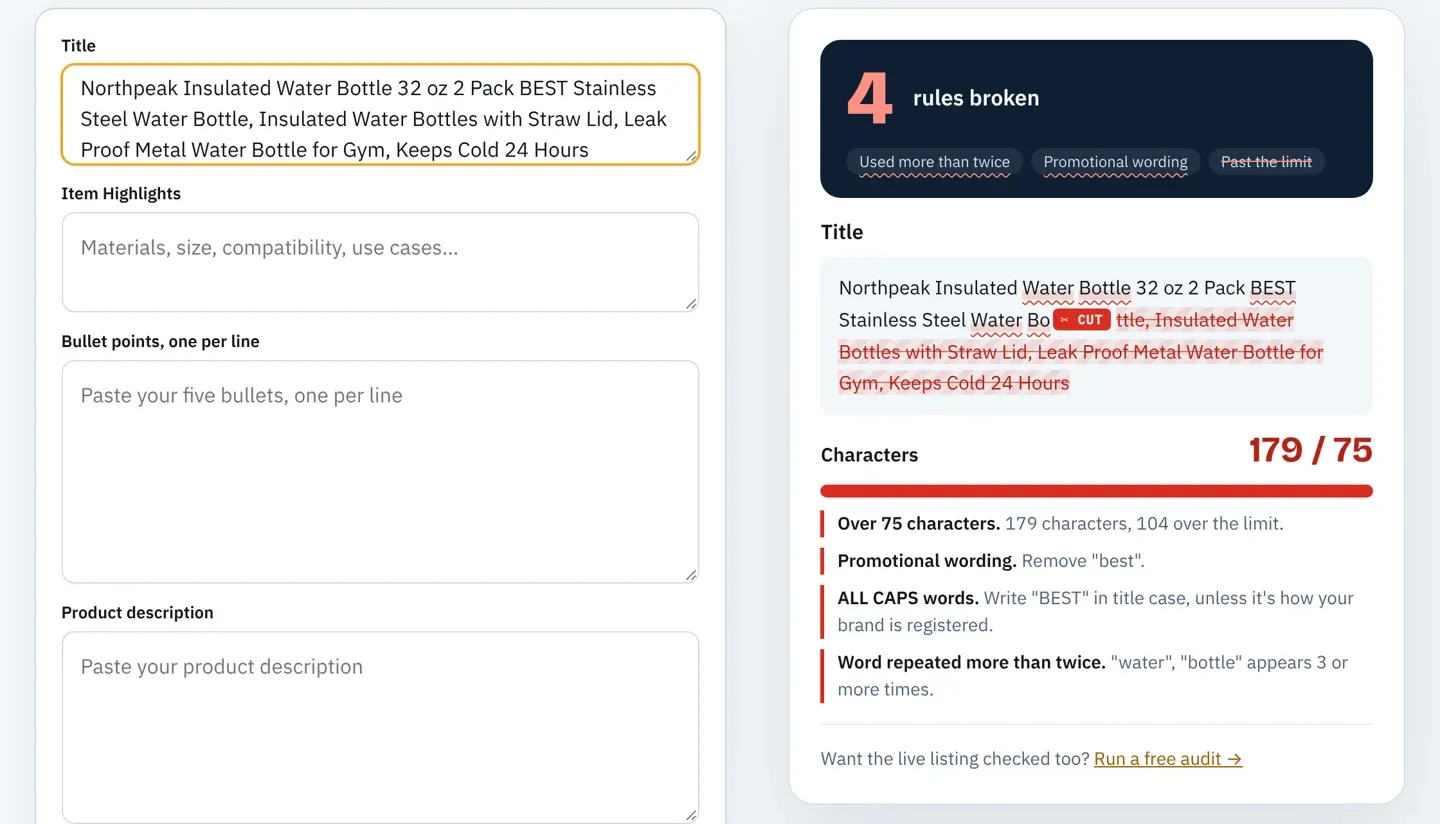
Then check Item Highlights, the 125-character field shown under the title. It's searchable, and since the title cap it's where most secondary phrases belong. Paste both fields into the free Amazon character limit checker to see exactly where Amazon cuts each one and which words it flags.
Step 4: Audit the bullets and description
Amazon allows bullets up to 255 characters. Mobile shows about 200 in full, so we hold bullets under 200 and treat anything longer as a warning. Check that there are five, that each header is in sentence case, and that each bullet states a fact a shopper would ask about: size, fit, material, what's in the box, how to clean it.
Vague bullets also cost you with Amazon's shopping assistant. Rufus was renamed Alexa for Shopping on May 13, 2026, and it answers shopper questions from listing content, reviews and Q&A. Amazon has said that customers who use the assistant are 60% more likely to complete a purchase, as Modern Retail reported. "Premium quality" gives it nothing to quote; "fits most car cup holders" answers a question someone will ask. Our post on Rufus, COSMO and Amazon SEO covers how to write for it. Two of the audit's 12 criteria score AI-Readiness: whether your bullets and description give these systems plain facts to work with.
The description holds up to 2,000 characters. Use it for detail the bullets don't cover, and check it for the same claims and numbers you check everywhere else.
Step 5: Audit backend search terms and attributes
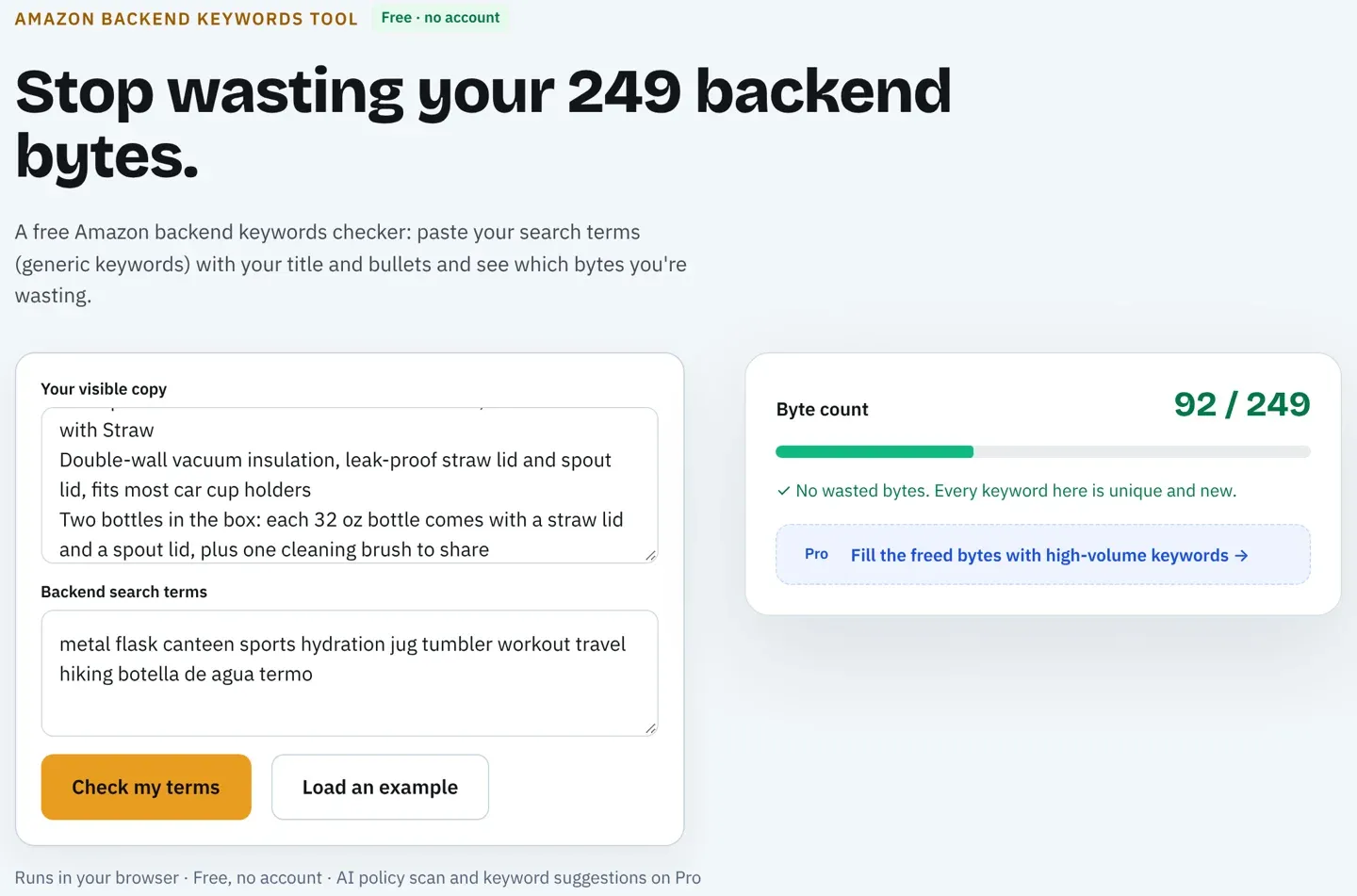
The backend search terms field holds under 250 bytes in most marketplaces, under 200 in India and under 500 in Japan. Per Amazon staff, a value over the limit means Amazon ignores the whole attribute. Accented letters take 2 bytes each, so a Spanish or German line can look short and still be over.
Copy the line from Seller Central and check it for four things: the byte count, words already in the title, Item Highlights or bullets, competitor brand names, and filler such as "best", "#1" or ASINs. The free Amazon backend keywords tool counts bytes and finds the repeats with no account. Our full guide to checking Amazon backend search terms covers the rest.
Attributes come next. Material, size, color, intended use and target audience feed Amazon's filters, and a shopper who filters by "Stainless Steel" never sees a bottle whose material field is empty. Check that the browse node matches what the product is, since a listing filed in the wrong category competes in the wrong results.
Step 6: Check every claim and number against the spec table
Keyword-only audits often skip this step, and it's where many policy flags come from. Read each claim in the title, bullets, description and backend, and ask where it's proven. Health claims ("detox", "boosts immunity", "antibacterial"), guarantees, contact details and ranking claims ("#1 choice") can get a listing flagged or suppressed.
Then compare every count, size and quantity across all fields and the spec table. A title that says "2 Pack" over a bullet that says "One bottle" passes every length check and still produces "not as described" returns. Every Amazon SEO Ranking audit flags health claims, claims the spec table doesn't support and pack counts written as a number and unit ("8 packets") for free. Looser wording can get past it, as the example below shows, so read the numbers yourself too.
Step 7: Audit the images and video
The main image needs a pure white background (RGB 255, 255, 255), with the product filling 85% or more of the frame and no text, logos or watermarks. Images under 1,000 pixels on the longest side don't zoom. A full gallery shows seven images, and many listings stop at three or four.
Look at the gallery as a shopper on a phone. Is there a scale shot, a what's-in-the-box shot and a close-up of the feature you sell on? Our page on Amazon product image requirements has each rule with a passing and failing example, and our post on Amazon images and click-through rate covers which shots earn the click. The free audit counts your gallery; on Pro, the AI Vision Image Audit checks the images themselves for main-image compliance, unreadable infographic text and missing lifestyle or scale shots.
Step 8: Review reviews, price, stock and the Buy Box
Reviews, price, stock and the Buy Box decide whether the clicks your keywords earn turn into the sales Amazon ranks on. Search your main keyword and note the rating, review count, price and delivery promise of the page-one listings next to yours. If your listing sits well below them on rating or above them on price, rewriting bullets won't close the gap.
Check stock and the Buy Box too. A listing that runs out of stock or loses the Buy Box to another seller loses the sales that hold its position. If a recurring complaint shows up in reviews or buyer messages, add the answer to a bullet. When an unhappy buyer messages you directly, Reply to Reviews drafts a private reply to send through Buyer-Seller Messaging, without mentioning or asking about their review.
Step 9: Test indexing for every target phrase
Open a private browser window on the right marketplace and search for your ASIN followed by each target phrase. If your product comes back, the listing is indexed for those words. If it doesn't, the words are missing, sit in a field Amazon is ignoring, or the listing has a deeper problem from step 1.
Re-run the test a day or two after any edit. Amazon indexes individual words from each field, so the test also tells you whether a phrase split across the title and backend still matches. On Pro, What I rank for lists every keyword an ASIN already ranks for, with positions, in the US, Egypt, Saudi Arabia and the UAE. In other marketplaces, the manual test is the check.
Step 10: Compare against page one, then rank the fixes
Pick the two listings that rank above you for your main keyword and run the same checks on them. The gap is usually obvious in the table: a fuller gallery, a title with the attribute you left out, a hundred more reviews. Amazon SEO Ranking's Amazon competitor analysis tool runs the same 12-criteria audit on your listing and up to two competitors side by side.
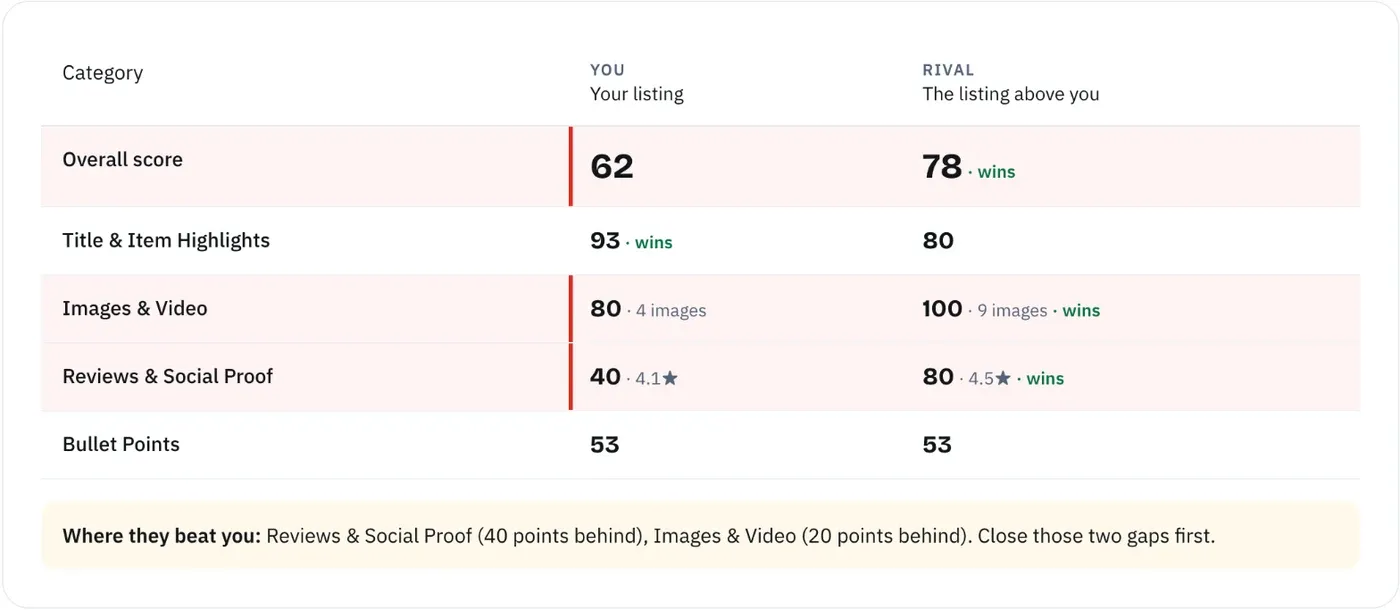
Then order the fixes. Suppression and ignored backend lines come first, because nothing else counts until they're fixed. Claims and pack counts come next, since they carry policy risk. Title, Item Highlights and bullets follow, then images and offer.
Before you save anything in Seller Central, score the new copy as a draft. Amazon SEO Ranking's draft audit scores pasted copy against the live listing's images, rating and Prime status and shows the score before and after, so a fix that loses a keyword or breaks a limit shows up while it's still a draft. After you save, re-test indexing and log the date. On Pro, score history covers every audited listing and email alerts watch 5 listings for score changes (25 on Agency), so a drop after an edit or a rule change doesn't wait for your next manual audit.
Worked Example: Auditing a Water Bottle Listing
Take a fictional listing, Northpeak Insulated Water Bottle, sold as a 2 pack with a spec table that says 32 fl oz, stainless steel, 2.0 count. On 30 October 2026 we ran its copy through the same checks the audit uses: the length rules and the consistency check that every audit runs for free, and the Compliance Risk Scanner on Pro. On the website, both run when you score copy as a draft audit; we ran them through the Claude connector because this listing isn't live. The original title:
Northpeak Insulated Water Bottle 32 oz 2 Pack BEST Stainless Steel Water Bottle, Insulated Water Bottles with Straw Lid, Leak Proof Metal Water Bottle for Gym, Keeps Cold 24 Hours
Item Highlights was empty. The bullets opened with ALL CAPS headers, one claimed the steel "detoxifies your water and boosts your immune system", one said "One 32 oz bottle", and the last offered a guarantee with a support email. The backend held three competitor brands, "best", "#1" and an ASIN. The audit found 13 problems:
| Problem | Where | Caught by | Severity |
|---|---|---|---|
| Title at 179 characters (limit 75) | Title | Length check (free) | Fail |
| "Detox" and "immune" health claims | Bullet 2 | Consistency check (free) and Compliance Risk Scanner | High |
| Guarantee, refund promise and an email address | Bullet 5 | Compliance Risk Scanner (Pro) | High |
| Three competitor brands | Backend | Compliance Risk Scanner (Pro) | High |
| "BPA free" not in the spec table | Bullet 2 | Consistency check (free) | Medium |
| "BEST" in capitals | Title | Compliance Risk Scanner (Pro) | Medium |
| "#1 choice for athletes" | Bullet 1 | Compliance Risk Scanner (Pro) | Medium |
| "#1", "best" and an ASIN | Backend | Compliance Risk Scanner (Pro) | Medium |
| ALL CAPS bullet headers | Bullets 1 to 5 | Compliance Risk Scanner (Pro) | Low |
| "Gift for kids" with no age context | Description | Compliance Risk Scanner (Pro) | Low |
| "2 Pack" in the title vs "One 32 oz bottle" in a bullet | Title, bullet 3 | Manual read (step 6) | High |
| Item Highlights empty | Item Highlights | Manual read (step 3) | Medium |
| "Water" four times in the title | Title | Manual read (step 3) | Medium |
The pack-count mismatch is the one to notice. Neither the free consistency check nor the Compliance Risk Scanner flagged it. The consistency check compares counts written as a number and a unit, such as "8 packets" against "20 packets". "One 32 oz bottle" puts the count in a word and the unit on the size, so the check reads it as a capacity. That's the gap step 6 tells you to close by reading the numbers across fields side by side.
Here's the rewrite:
- Title (73 of 75 characters): Northpeak Insulated Water Bottle 32 oz 2 Pack, Stainless Steel with Straw
- Item Highlights (92 of 125): Double-wall vacuum insulation, leak-proof straw lid and spout lid, fits most car cup holders
- Bullet 2: Two bottles in the box: each 32 oz bottle comes with a straw lid and a spout lid, plus one cleaning brush to share
- Backend (92 of 249 bytes): metal flask canteen sports hydration jug tumbler workout travel hiking botella de agua termo
The first rewrite still had a problem. Its backend line included "thermos", and the Compliance Risk Scanner flagged it as a registered trademark, so it came out. The final check passed every length limit with no consistency issues and one low flag: "leak-proof" is an absolute claim, so keep it only if the lid has been tested. On a live listing, the next step would be scoring this copy as a draft against the live page before saving it.
Here's what the fields cover, with estimated monthly US Amazon searches from Amazon SEO Ranking's Search volume tool on 30 October 2026:
| Search phrase | Est. monthly US searches | Covered by |
|---|---|---|
| stainless steel water bottle | ≈11,257 | Title |
| insulated water bottle | ≈10,397 | Title |
| water bottle with straw | ≈4,001 | Title |
| metal water bottle | ≈2,131 | Title + backend (metal) |
| 32 oz water bottle | ≈2,057 | Title |
| sports water bottle | ≈1,084 | Title + backend (sports) |
| insulated water bottle with straw | ≈785 | Title |
| leak proof water bottle | ≈523 | Title + Item Highlights |
| gym water bottle | ≈523 | Title + bullets |
| botella de agua | ≈448 | Backend |
Four high-volume phrases were left out on purpose. "Owala water bottle" (≈71,359), "hydro flask" (≈34,819) and "thermos" (≈24,945) are other companies' brands, and "best water bottle" (≈1,608) needs the word "best". The three highest-volume phrases on the list were all brand names this listing can't use.
An Amazon Listing Audit Checklist You Can Copy
Use this as a scorecard. Mark each line pass or fail, note the field, and fix the fails in the order of the steps above. It works as an Amazon listing optimization checklist too, once the audit tells you what to change.
Keep one copy per marketplace and date it. When rank moves, the dated scorecard shows what the listing looked like before and after the edit.
| Area | Check | Pass when | Audit category |
|---|---|---|---|
| Status | Listing shows in search | Not suppressed in Seller Central | Not scored |
| Keywords | Main and secondary phrases chosen | Each one describes your product | Not scored |
| Title | Length | 75 characters or fewer | Title & Item Highlights |
| Title | Structure | Brand, main keyword, key attribute | Title & Item Highlights |
| Title | Style | No word over twice, no caps, no "best" | Title & Item Highlights |
| Item Highlights | Filled | Up to 125 characters of secondary phrases | Title & Item Highlights |
| Bullets | Count and length | Five, each under 255 (200 for mobile) | Bullet Points |
| Bullets | Content | Facts on size, fit, material, use, care | Bullet Points, AI-Readiness |
| Description | Length and claims | Under 2,000 characters, no unproven claims | AI-Readiness |
| Backend | Size | Under 250 bytes (200 India, 500 Japan) | Not scored (Backend Keyword Checker) |
| Backend | Content | No repeats, brands, ASINs or "#1" | Not scored (Backend Keyword Checker) |
| Attributes | Filled | Material, size, color, use, audience set | Backend & Attributes |
| Claims | Proven | Every claim backed by the spec table | Flagged on every audit |
| Numbers | Consistent | Same count in every field and the spec table | Flagged on every audit |
| Main image | Compliant | White background, 85% fill, no text | Images & Video |
| Gallery | Complete | Seven images, 1,000 px or more | Images & Video |
| Offer | Competitive | Price, rating and stock in line with page one | Reviews & Social Proof, Stock & Fulfillment |
| Indexing | Confirmed | ASIN plus phrase returns your product | Not scored |
| Marketplaces | Each audited | One audit per storefront | One audit per storefront |
Manual Audit vs Audit Tool: What Each One Sees
Every check above can be done by hand. Done carefully, auditing one listing and drafting the fixes takes around an hour: counting characters and bytes, reading claims against the spec table, running indexing searches and comparing page one. For one ASIN that's fine. For a catalog of 200 across four storefronts, it's where audits stop getting done.
An audit tool runs the repeatable checks in seconds and scores the result against a fixed standard, so two people auditing the same listing get the same answer. What it can't do matters as much:
- An audit of the public product page can't see your backend search terms. Paste the line into a backend checker instead.
- It can't read your Business Reports, Brand Analytics or ad data, so the symptom step stays with you.
- It can tell you a listing is weak, but only Seller Central says why Amazon suppressed it.
Speed is the smaller difference between tools. Before you trust any audit score, ask four questions:
- Is the scoring method published? A score you can't check is a score you can't defend to a client. Amazon SEO Ranking publishes all 12 criteria and their pass rules, each counting equally. None of the five seller suites we compare ourselves against publishes how its listing score is calculated.
- Does it read the live listing every time? Each audit pulls the current page when it runs. An unchanged listing reuses its last audit, so the same copy never gets two different scores, and a criterion the data can't confirm is marked "Not verified" and left out of the score instead of counted as a fail.
- Can it score a draft before you save? The draft audit scores new copy against the live listing's images, rating and Prime status, so you see the change in score before Amazon does.
- Does it audit each storefront separately? The audit covers 23 Amazon storefronts, and rewrites come back in each marketplace's language.
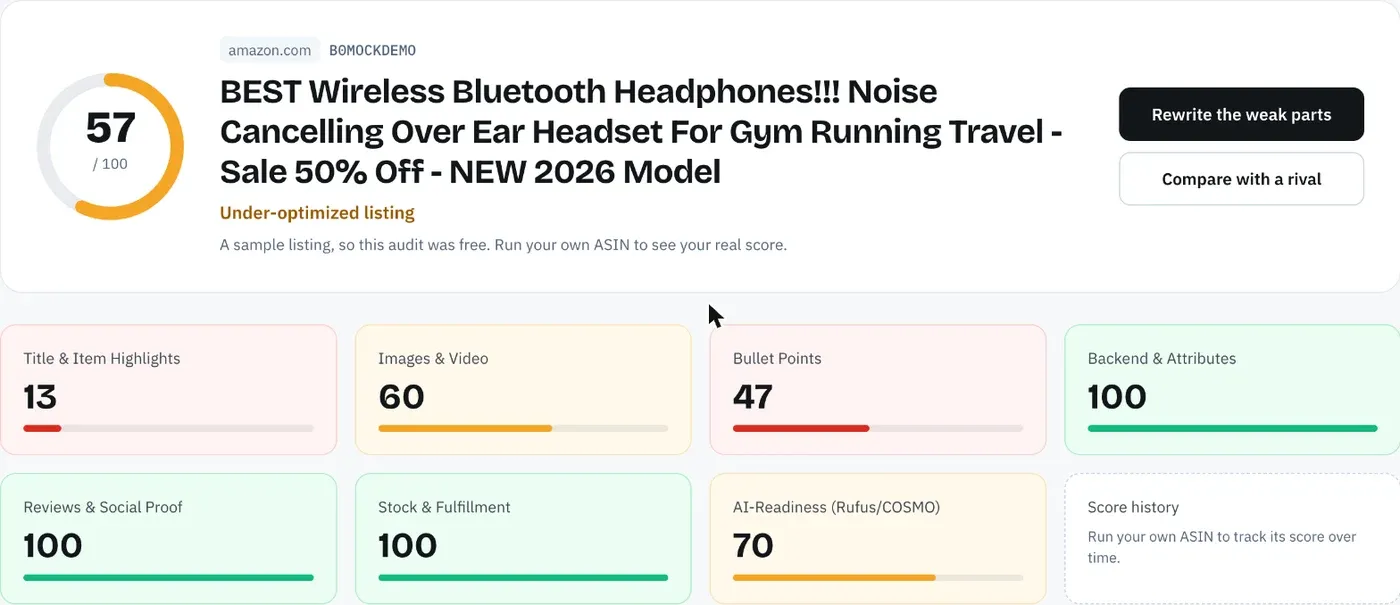
The free audit reads the live page, scores it out of 100 and lists the fixes worth the most points, in about 20 seconds. If you rewrite with our AI Amazon listing generator, every rewrite is checked in code for Amazon's length limits, pack counts written as a number and a unit, and unsupported claims before you see it.
Agencies can run the audit and rewrite across a client's catalog with the Amazon bulk listing tool, up to 500 ASINs per run on the Agency plan. Portfolio comparison then lines up every tracked listing by category and shows which one to use as the template, and the white-label PDF report, with its own methodology section, is the audit you hand the client.
Everything You Need to Know About an Amazon Listing SEO Audit
The table collects every rule and number from this guide in one place, in the order you'd check them.
Limits are current as of 30 October 2026. Amazon changed the title rule this year, so check Seller Central's style guide for your category before relying on any single number.
| Topic | What to know | Rule or number |
|---|---|---|
| Order | Suppression and keywords before copy | 10 steps |
| Title | Brand, main keyword, one attribute | 75 characters since July 27, 2026 |
| Item Highlights | Searchable line under the title | 125 characters |
| Bullets | Five facts a shopper would ask about | Up to 255, 200 shows in full on mobile |
| Description | Detail and care, same claim rules | 2,000 characters |
| Backend | Synonyms, no repeats or brands | Under 250 bytes most, 200 India, 500 Japan |
| Over the backend limit | Amazon ignores the whole field | 0 words count |
| Claims | Back each one with the spec table | No health, guarantee or ranking claims |
| Pack counts | Same number in every field | Read them side by side |
| Main image | White, product fills the frame | RGB 255, 85%, 1,000 px |
| Gallery | Scale, contents, close-ups | 7 images |
| AI shopping assistant | Plain facts it can quote | Alexa for Shopping since May 13, 2026 |
| Indexing | ASIN plus phrase in a private window | Re-test after each edit |
| Competitors | Run the same checks on page one | Two listings above you |
| Marketplaces | Separate copy, language and limits | One audit per storefront |
| Frequency | After edits, rule changes and rank drops | Every listing, every marketplace |
Run a Free Amazon Listing Audit on Your ASIN
Amazon SEO Ranking scores a live listing against 12 equally weighted criteria in seven categories, with every criterion and pass rule published on the site, so you can see why a listing lost points and check the method yourself. Each AI fix targets the criterion your listing failed. Every rewrite is checked in code for Amazon's length limits, unsupported and health claims, and pack counts written as a number and a unit, and you can score it as a draft before it goes live. The audit covers 23 Amazon storefronts and rewrites in each marketplace's language.
It's built for sellers and agencies whose listings are live but not ranking, including teams auditing one product across several storefronts. It's trusted by eRetail Search specialists at Nestlé and eCommerce SEO services agencies such as Reach AI.
The free plan includes 3 full audits a month with no credit card required. Run a free Amazon listing audit on your ASIN to see which of the 10 steps it fails, or see Pro and Agency pricing if you're auditing a whole catalog. Monthly Pro is $79 and starts with a 7-day free trial.
FAQ
What is an Amazon listing audit?
An Amazon listing audit is a field-by-field review of a product page to find what keeps it from ranking or converting. It checks the title, Item Highlights, bullets, description, backend search terms, attributes, images, claims and offer against Amazon's rules and against the listings that outrank it. It ends with a ranked list of fixes, and the rewrite comes afterwards. A full audit also confirms indexing by searching the ASIN plus each target phrase.
How long does an Amazon listing audit take?
An Amazon listing audit takes around an hour per listing by hand, including drafting the fixes, covering limits, claims, indexing searches and a page-one comparison. An audit tool runs the repeatable checks much faster: Amazon SEO Ranking's audit takes about 20 seconds, or 20 to 40 seconds with AI recommendations. The symptom review and competitor read still need a person. Multiply the manual time by every storefront you sell in.
How often should you audit an Amazon listing?
You should audit an Amazon listing after every edit, after every Amazon policy change and whenever rank drops for a phrase you held. The July 27, 2026 title cap made many listings non-compliant overnight, so an audit from before July no longer holds. Audit each marketplace separately, since each has its own copy and limits. Amazon SEO Ranking's free plan covers 3 audits a month, and Pro adds unlimited score history and email alerts on 5 listings.
What should an Amazon listing audit checklist include?
An Amazon listing audit checklist should include suppression status, target keywords, title length and structure, Item Highlights, bullets, description, backend bytes and repeats, attributes, claims, pack counts, images, offer signals and indexing. Each item needs a pass rule, such as 75 characters for the title or under 250 bytes for the backend in most marketplaces. Order matters, since an ignored backend field or a suppressed listing cancels every other fix. The checklist in this guide has 19 lines across those areas.
How do I check if my Amazon listing is indexed for a keyword?
You check if your Amazon listing is indexed for a keyword by searching Amazon for your ASIN followed by the phrase, in a private browser window on the right marketplace. If your product appears, it's indexed for those words. If it doesn't, the words are missing, sit in an ignored field such as an over-limit backend line, or the listing is suppressed. Re-run the test a day or two after any edit.
What is the difference between auditing and optimizing a listing?
The difference between auditing and optimizing a listing is that the audit finds and ranks the problems, and optimizing fixes them. An audit tells you the title is 179 characters and the backend holds competitor brands. Optimizing is the rewrite that follows, ideally checked against the same rules before it goes live. Running them as separate steps stops you from rewriting copy that was already working.
Should you audit one ASIN or the whole catalog?
You should audit your top-selling ASINs one by one first, then run the whole catalog once you know which problems repeat. Catalog-wide issues, such as titles written for the old 200-character limit or the same backend line pasted across variations, usually show up in dozens of listings at once. Agencies can run Amazon SEO Ranking's audit and rewrite across up to 500 ASINs per run on the Agency plan. Portfolio comparison then shows which listing to use as the template for the rest.
Can't I ask ChatGPT to audit my Amazon listing?
You can ask ChatGPT to audit your Amazon listing, but it won't see the live page, the spec table or real Amazon search volume, and it often miscounts characters. Check every length, claim and number it reports before acting on it. Amazon SEO Ranking pulls the live listing, counts limits in code and grounds its rewrites in the spec table. On Pro and Agency, the Claude connector gives Claude the same audit and copy checks inside the chat.
Score your listing against the same 12 criteria and see which of the 10 steps it fails. Free, 3 audits a month, no card required.
Run free audit