A good Amazon listing optimization routine reviews every live listing once a month and edits only what a failed check or a clear trigger points to. Keep weekly checks for things that break (suppression, stock, the Buy Box), keep keyword research, images and A+ tests on a quarterly cycle, and re-audit within the week whenever Amazon changes a rule or rank drops for a phrase you held.
The monthly review and the edit are separate decisions. Most months, a listing that passes its checks should stay as it is. When one fails, change one thing, score the new copy before you save it, and log the date so next month's numbers tell you whether it worked.
This guide is for sellers and agencies with listings that are already live. It covers how often to re-optimize (and when a full Amazon listing refresh is worth it), the weekly, monthly and quarterly checks, the triggers that justify an edit outside the schedule, how to tell whether a change worked, and a checklist you can copy.
Key Takeaways (TL;DR)
- Review monthly, edit when a check fails. A listing that passes this month's checks doesn't need new copy.
- Weekly checks cover breakage: suppression, stock, the Buy Box and new low-star reviews.
- Change one element per listing per cycle, so you can tell which edit moved the numbers.
- Score new copy as a draft before saving it, then re-test indexing a day or two after it goes live.
- Amazon recommends running Manage Your Experiments tests for 8 to 10 weeks, which is why image and A+ tests belong on a quarterly cycle.
- Amazon rule changes reset the clock. The 75-character title cap from July 27, 2026 made many compliant listings non-compliant overnight.
- Run the routine per marketplace. Each storefront has its own copy, language and limits.
Amazon Listing Optimization Routine: at a Glance
The routine has three fixed cadences and one set of triggers. Each layer has a different job: weekly catches what broke, monthly decides what to change, quarterly covers the work that needs weeks of data.
| Cadence | What you check | What it decides | Free way to check |
|---|---|---|---|
| Weekly | Suppression, stock, Buy Box, new 1 to 3 star reviews, rank on the main keyword | Whether something needs fixing today | Seller Central, an Amazon search |
| Monthly | Listing score, search query data, keyword volume, indexing, page one, review themes | Which listing gets one change this month | Free audit (3 a month), Brand Analytics if brand registered |
| Quarterly | Full keyword research, images, A+ Content, experiment results | Larger rewrites and creative tests | Manage Your Experiments, keyword tools |
| Triggered | Amazon rule changes, rank drops, new competitors, product changes, seasonal peaks | Whether to re-audit outside the schedule | Seller Central news, your change log |
The monthly layer is where most of the decisions get made. It's also the layer sellers skip most often, because nothing looks broken until rank has already slipped.
How Often Should You Re-Optimize Amazon Listings?
Re-optimize an Amazon listing when a monthly check fails, when Amazon changes a rule that affects it, or when rank drops for a phrase it held. Review every live listing once a month to find out which of those applies. Keep larger rewrites and creative tests to once a quarter at most, per listing.
The reason for the gap between reviewing and editing is measurement. Each edit needs time to index and time to collect enough sessions to compare against the month before. Amazon's own guidance for A/B tests in Manage Your Experiments says the recommended experiment duration is 8 to 10 weeks, and that's with Amazon splitting traffic for you. A seller who rewrites the title every two weeks never gets a clean read on any version.
A yearly refresh is too slow in the other direction. On June 10, 2026, Amazon announced that titles in all categories except media must be 75 characters or fewer from July 27. Amazon's AI rewrites titles that break the rule, so a listing nobody checked for three months may already be running a title Amazon picked. A monthly review would have caught it in the first cycle.
| Approach | What goes wrong |
|---|---|
| Edit weekly | No change runs long enough to measure, and edits overlap |
| Review monthly, edit on a failed check | Changes are spaced out and each one has a before and after |
| Review quarterly | Rule changes and suppressions can sit unnoticed for weeks |
| Refresh yearly | Copy is written for limits and keywords that have since changed |
Weekly Checks That Catch Breakage
The weekly pass is the listing maintenance layer, and it's short. Its job is to catch the problems that cost sales every day they go unnoticed, and none of them need a rewrite to fix.
Open Seller Central and check five things:
- Suppressed or inactive listings. A suppressed listing still opens by its URL but drops out of search. Our guide to fixing a listing that's search suppressed covers the common causes.
- Stock. Compare units on hand and inbound against weekly sales. A stock-out stops the sales that hold a listing's position.
- The Buy Box (Featured Offer). Check you still hold it on your top ASINs. Losing it to another seller means your listing earns traffic for someone else's offer.
- New 1 to 3 star reviews. Read them for a pattern a listing can fix, such as a size that runs small or a feature shoppers expected and didn't get.
- Rank on the main keyword. Search it in a private browser window on each marketplace you sell in and note where you land.
These five are Seller Central jobs. Amazon SEO Ranking doesn't track stock, the Buy Box or ad performance, and Seller Central already shows them for free.
Write anything unusual into your change log, even if you don't act on it yet. When the monthly review comes round, a note like "lost Buy Box for 3 days, week 2" explains a dip that would otherwise look like a copy problem.
The Monthly Amazon Listing Optimization Routine, Step by Step
Run these eight steps in order once a month. The early steps collect evidence and the later ones act on it, so a finding in step 4 can change what you'd edit in step 7. Hold off on edits until you've finished step 6.
Step 1: Pull last month's numbers and read them against the change log
Start with what happened. For each listing, note sessions, unit session percentage, units, and ad spend if you run ads. Then open the change log and mark which listings had an edit, a stock-out, a price change or a new ad campaign last month.
If you're brand registered, the Search Query Performance dashboard in Brand Analytics shows impressions, clicks, cart adds and purchases per search query. Amazon lets you choose weekly, monthly and quarterly reporting ranges at the ASIN level. The monthly view suits this routine. It also offers a monthly download that splits performance with and without the Amazon's Choice badge.
Use the funnel to separate a visibility problem from a conversion problem. Low impressions on a query you target points to keywords or indexing. Impressions with few clicks points to the title, main image, price or rating. Clicks with few purchases points to bullets, images or the offer. Our post on Amazon conversion rate and ranking explains how the two feed each other.
Step 2: Re-run the audit on every listing you sell
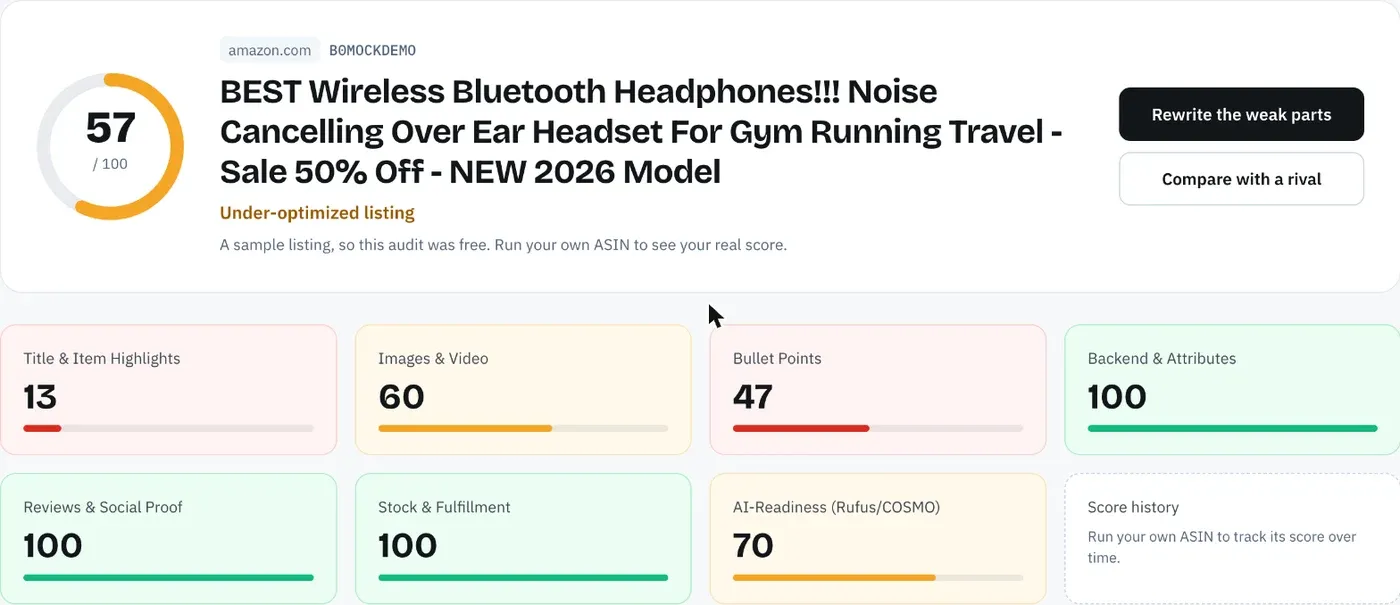
A listing that scored well in March can fail in October without anyone touching it. Amazon changes limits, a teammate edits a bullet, or a variation inherits a new parent title. Re-run the audit on each live listing, per marketplace, and compare the score with last month's.
A score that moved without an edit is the most useful finding of the month, because something changed that you didn't plan. A score that dropped after an edit tells you the new copy lost a keyword or broke a limit. A score that hasn't moved and passes every criterion means the listing can wait until next month.
Amazon SEO Ranking scores a listing out of 100 against 12 published criteria, and each audit pulls the live page when it runs. An unchanged listing reuses its last audit, so the same copy never gets two different scores from one month to the next. For the full order of checks behind an audit, see our guide on how to audit an Amazon listing for SEO.
Step 3: Check keyword demand and new search terms
Search demand moves with the season and with new products in the category. Once a month, check the main keyword and secondary phrases for each listing. Look for three things: a phrase that has dropped off, a new phrase that's climbing, and a phrase shoppers use that isn't anywhere in your listing.
Three sources cover most of it. Search Query Performance shows which queries already bring you impressions. Your Sponsored Products search term report shows which queries converted. And an Amazon keyword tool gives you volume for phrases you don't rank for yet. Amazon SEO Ranking's Amazon keyword research tool estimates monthly Amazon searches in 16 marketplaces, and Saved Lists keep a monthly volume snapshot, so you can compare a phrase against last month without re-running the search.
Treat small changes in volume as noise. Lower volumes are reported in steps, and a phrase moving from 500 to 520 searches isn't a reason to rewrite a title.
Step 4: Test indexing for each target phrase
Open a private browser window on the right marketplace and search your ASIN followed by each target phrase. If your product comes back, the listing is indexed for those words. If it doesn't, the words are missing, sit in a field Amazon is ignoring, or the listing has a deeper problem.
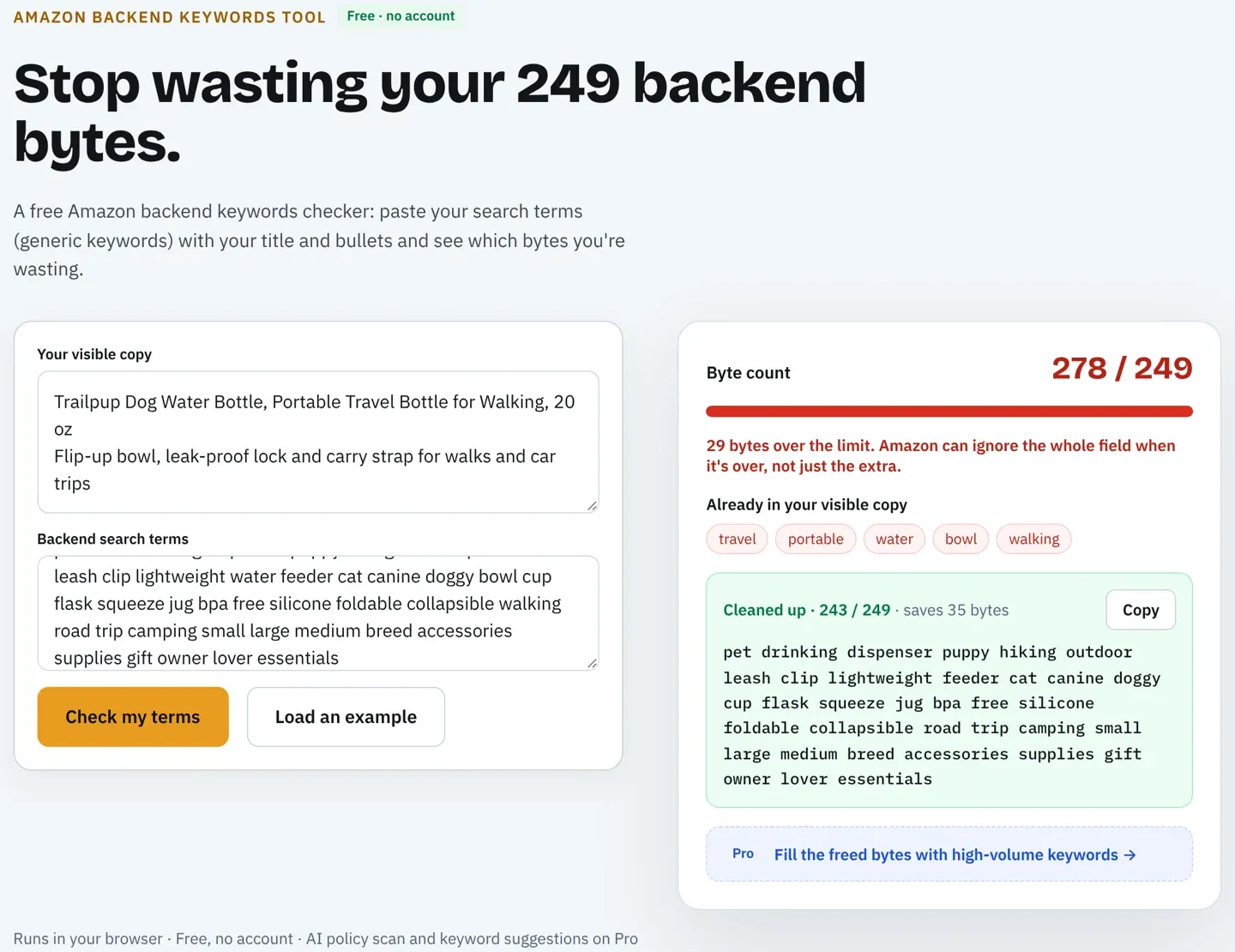
The most common cause of a phrase dropping out between months is the backend search terms field. A line over the limit (under 250 bytes in most marketplaces, 200 in India, 500 in Japan) means Amazon ignores the whole attribute. If someone added a few words last month, check the byte count with the free Amazon backend keywords tool.
Step 5: Look at page one
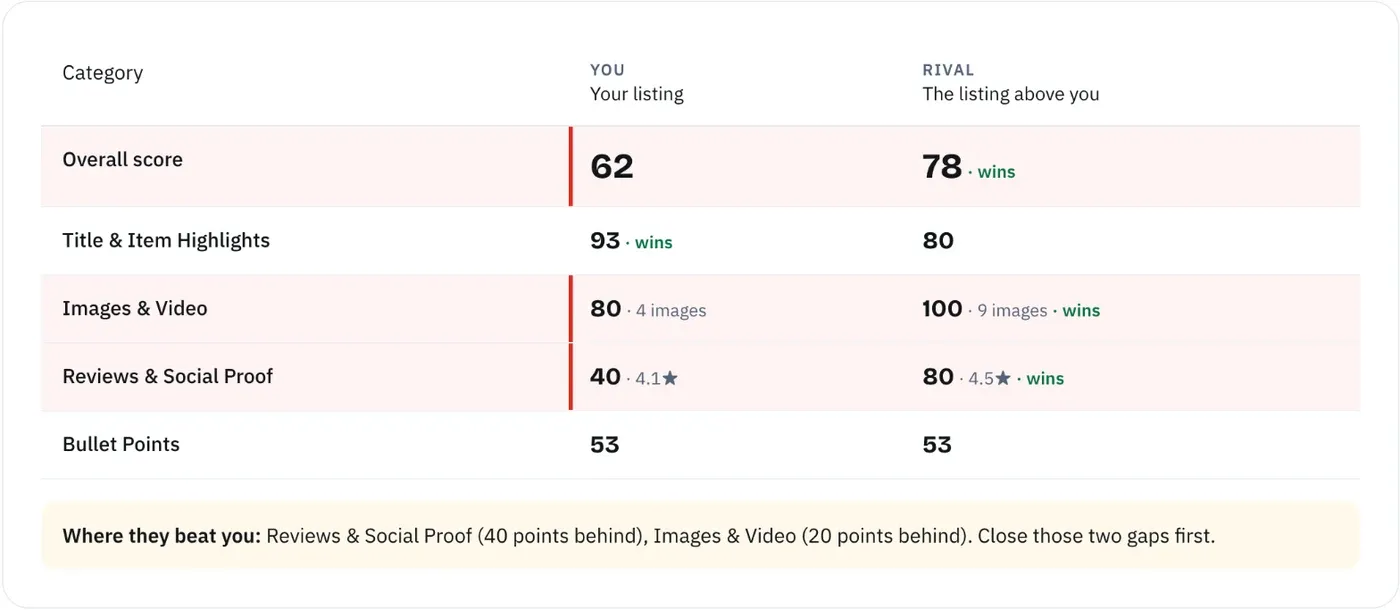
Search your main keyword and note the listings above and below yours: rating, review count, price, delivery promise, main image and gallery size. Compare it with last month's notes. A new competitor with a lower price or a fuller gallery explains a drop that no amount of keyword work will fix.
Pick the one or two listings that moved above you and check what changed. Amazon SEO Ranking's Amazon competitor analysis tool runs the same 12-criteria audit on your listing and up to two competitors side by side, so the gap shows up criterion by criterion.
Step 6: Read reviews, returns and questions for listing fixes
Some of the best monthly edits come from customers. Read the month's reviews and return reasons and sort them into problems the product has and problems the listing caused. "Smaller than expected" and "didn't fit my model" are listing problems: the answer belongs in a bullet or an image.
Shopper questions matter more than they used to. Amazon's shopping assistant, renamed Alexa for Shopping on May 13, 2026, answers questions from listing content, reviews and Q&A. If the same question keeps coming up, put the plain answer in the listing so the assistant has something to quote. Our post on Rufus, COSMO and Amazon SEO covers how to write for it.
Step 7: Pick one change per listing, score it as a draft, then publish
Now decide. Skip any listing with a Manage Your Experiments test running (more on that below), since a second edit would spoil the test. For each other listing, take the findings from steps 1 to 6 and pick the single change most likely to fix the biggest problem. Fix suppression and ignored backend lines first, then claims and pack counts that carry policy risk, then title, Item Highlights and bullets, then images and the offer.
One change per listing per cycle is what makes next month's review useful. If you rewrite the title, the bullets and the main image in the same week and sales go up, you won't know which edit did it, and you can't repeat it on the next listing.
To write the change, start from the criterion that failed. Amazon SEO Ranking's AI Amazon listing generator rewrites the field tied to each failed criterion, down to a single bullet, so the one change you make answers the problem the audit found. Every rewrite is checked in code for Amazon's length limits, pack counts and unsupported claims before you see it.
Before you save anything in Seller Central, score the new copy as a draft. The draft audit scores pasted copy against the live listing's images, rating and Prime status and shows the score before and after. A rewrite that drops a keyword or runs past 75 characters shows up while it's still a draft.
Step 8: Log the change and set a date to check it
Write down the date, the listing, the marketplace, the field you changed, the old text, the new text and the reason. Keep the old text. If the change hurts, rolling back is a paste instead of a guess.
Then set two checks: an indexing test a day or two after the edit goes live, and a comparison in next month's step 1. Our post on Amazon listing SEO mistakes covers the edits that most often go wrong at this stage.
Quarterly Work: Keywords, Images and A+ Tests
Some work needs more time than a month gives you. Once a quarter, set aside time for three jobs.
Full keyword research. The monthly check in step 3 watches the phrases you already target. The quarterly pass starts from scratch: new phrases in the category, seasonal terms for the coming quarter, and phrases your competitors rank for that you don't. Our guide on how to rank for keywords on Amazon walks through how Amazon matches and ranks products for a phrase.
Image and gallery review. Look at the gallery on a phone, as shoppers do. Check for a scale shot, a what's-in-the-box shot and a close-up of the feature you sell on, and compare the main image with the ones on page one.
A/B tests through Manage Your Experiments. If you're brand registered, test titles, main images and A+ Content with Amazon's own tool. Amazon says optimized content can help increase sales by up to 20%, and its "to significance" setting can return a result in as little as four weeks. With the recommended 8 to 10 weeks, one test fits in a quarter. Run one test per ASIN at a time and leave that listing's other fields alone while it runs. A test spans two monthly cycles, so mark the listing in your change log and skip it in step 7 until the test ends.
Triggers That Justify an Edit Outside the Schedule
The schedule covers the normal month. These events justify a re-audit the same week, whatever the calendar says.
| Trigger | What to do | Where it shows |
|---|---|---|
| Amazon changes a listing rule | Re-audit every listing the rule touches, starting with top sellers | Seller Central news, style guide updates, Compliance Risk Scanner on Pro |
| Listing suppressed | Fix the reason Seller Central gives before anything else | Seller Central inventory, weekly check |
| Rank drops for a phrase you held | Re-test indexing, check the backend bytes and the last edit | Weekly rank check, Search Query Performance |
| Score drops without an edit | Compare the live copy with your last saved version | Monthly audit, score alerts |
| New competitor on page one | Compare criterion by criterion, then decide on one change | Weekly rank check, monthly step 5 |
| Product, packaging or pack count changes | Update every field and the spec table together | Your own product changes |
| Seasonal peak coming (Prime Day, Q4) | Make edits early enough to index and check them before traffic rises | Your sales calendar |
| Listing launched in a new marketplace | Audit that storefront on its own | Each new launch |
For rule changes, the length checks run on every audit. On Pro, the Compliance Risk Scanner also flags banned terms, health claims, guarantees and competitor brands in the copy, which are the rules Amazon tends to enforce without warning.
Two of these are easy to miss. A score that drops with no edit on your side usually means someone else changed the page: a teammate, a variation parent, or Amazon rewriting a title. And a product change, such as a new pack size, has to land in the title, bullets and spec table at the same time. A title that says "2 Pack" above a bullet that says "one bottle" produces "not as described" returns.
How to Tell If a Listing Change Worked
Compare the same length of time before and after the change, on the same marketplace, and check what else changed in between. A title edit in the same month as a price cut and a new ad campaign can't be judged on its own.
Use the change log from step 8 and next month's numbers from step 1. Look first at the stage of the funnel the change was meant to fix. A title or main image edit should show up in click share for your target queries. A bullet edit should show up in purchases per click. If you're brand registered, Search Query Performance shows both per query.
| Change | Where to look first | What a good result looks like |
|---|---|---|
| Title or Item Highlights | Impressions and clicks for target queries | More impressions or click share, same or better conversion |
| Backend search terms | Indexing test, impressions for the new phrases | New phrases return your ASIN and start showing impressions |
| Bullets or description | Purchases per click, return reasons | Same traffic, more purchases, fewer expectation complaints |
| Main image | Click share on target queries | More clicks from the same impressions |
| Gallery or A+ Content | Conversion on the listing | Run through Manage Your Experiments where you can |
If the numbers got worse, roll back with the old text from your log and note the result. A rolled-back edit is still a finding: it tells you what not to try on the next listing.
A Sample Month for a Small Catalog
One way to spread the routine across four weeks for a seller with a handful of listings in one or two marketplaces. Agencies can run the same plan per client.
| Week | Work | Output |
|---|---|---|
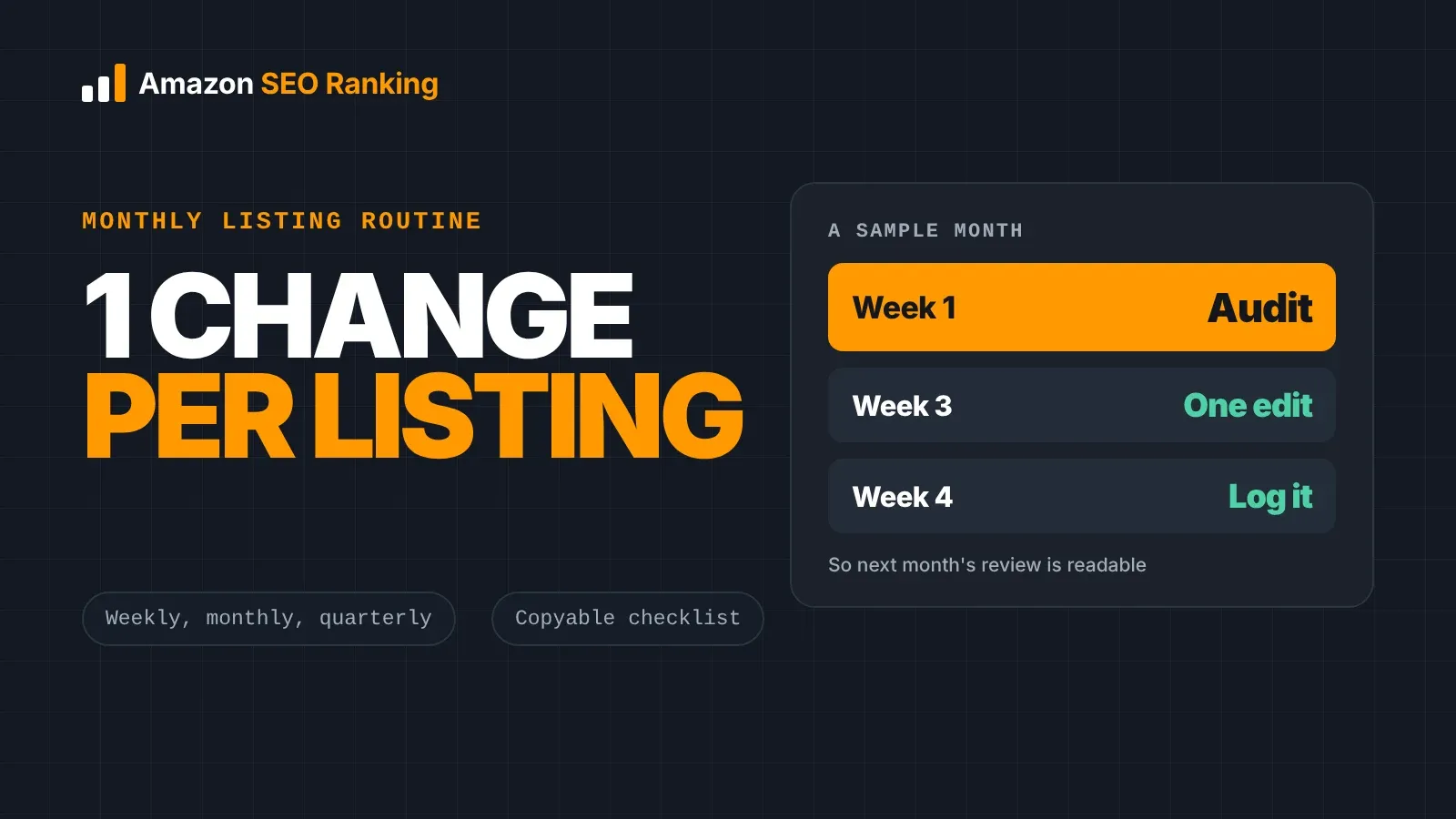
| Week 1 | Weekly checks, step 1 numbers, step 2 audits | Scores and numbers next to last month's |
| Week 2 | Weekly checks, steps 3 to 6 | A list of findings per listing |
| Week 3 | Weekly checks, step 7: one change per listing, scored as a draft | Edits published, old text saved |
| Week 4 | Weekly checks, indexing tests, step 8 log | Change log updated, check dates set |
Edits land in week 3, which leaves the rest of the month and all of the next for them to run before the next comparison. If a listing passes everything in week 2, it skips week 3. That's a normal result, and for a well-built listing it should be the most common one.
Running the Routine Across a Catalog or Several Marketplaces
With a few listings, the routine fits in a spreadsheet. Auditing one listing by hand and drafting the fix takes around an hour; Amazon SEO Ranking's audit takes about 20 seconds. With a few hundred listings across several storefronts, the monthly audit in step 2 is where manual work stops getting done, so put listings in order before you start. Sort by revenue, audit the top listings individually, and run the rest in bulk to find the problems that repeat.
Catalog-wide problems are usually the same mistake copied across listings: titles written for the old 200-character limit, or one backend line pasted into every variation. The Amazon bulk listing tool runs the audit and rewrite across up to 100 ASINs per run on Pro and 500 on Agency. Portfolio comparison then lines up every tracked listing by category and shows which one to use as the template for the rest.
To size the work, multiply listings by marketplaces. Ten listings in three storefronts is 30 audits a month, which fits inside Pro's 100. An agency running 500 a month on the Agency plan pays about $0.16 per listing, against the $50 or more per listing agencies typically bill for the same work done by hand. You don't need a 20-tool seller suite for this routine: Seller Central covers the weekly checks, and the monthly steps need an audit, a keyword tool and a backend checker.
Run the routine once per marketplace. The same ASIN carries its own title, bullets, backend line and language on amazon.com, amazon.de and amazon.co.jp, and a fix on one doesn't carry over. The audit covers 23 Amazon storefronts, and rewrites come back in each marketplace's language.
Agencies can turn step 8 into the client report. The white-label PDF report includes a methodology section, so the client can see how each score was calculated and why a listing was or wasn't changed this month. For catalogs too large for 25 alerts, Enterprise plans include unlimited score monitoring.
A Monthly Amazon Listing Checklist You Can Copy
Use this as a monthly Amazon listing optimization checklist. Keep one dated copy per marketplace, mark each line pass or fail, and fix the fails in the order of step 7.
| Cadence | Check | Pass when |
|---|---|---|
| Weekly | Listing status | Not suppressed or inactive |
| Weekly | Stock | Units cover sales until the next shipment lands |
| Weekly | Buy Box | You hold it on top ASINs |
| Weekly | New 1 to 3 star reviews | Read, and any listing fix noted |
| Weekly | Main keyword rank | Logged per marketplace |
| Monthly | Numbers vs change log | Every move explained by an edit, stock, price or ads |
| Monthly | Listing score | Same or higher than last month, or the drop explained |
| Monthly | Title | 75 characters or fewer, brand then main keyword |
| Monthly | Item Highlights | Filled, up to 125 characters |
| Monthly | Backend search terms | Under the byte limit, no repeats or brands |
| Monthly | Keyword demand | Main and secondary phrases still have searches |
| Monthly | Indexing | ASIN plus each phrase returns your product |
| Monthly | Page one | New competitors and changes noted |
| Monthly | Reviews, returns, questions | Listing-caused problems added to findings |
| Monthly | Edit | One change per listing, scored as a draft |
| Monthly | Change log | Date, field, old text, new text, reason |
| Quarterly | Keyword research | New and seasonal phrases checked |
| Quarterly | Images and A+ | Gallery reviewed, one experiment per ASIN |
| Triggered | Rule change, rank drop, product change | Re-audited the same week |
Everything You Need to Know About Amazon Listing Optimization Routines
The table collects the routine's rules and numbers in one place. Limits are current as of 30 October 2026, so check Seller Central's style guide for your category before relying on any one number.
| Topic | What to know | Rule or number |
|---|---|---|
| Review cadence | Every live listing, every marketplace | Monthly |
| Edit cadence | Only when a check fails or a trigger fires | One change per listing per cycle |
| Breakage checks | Suppression, stock, Buy Box, low-star reviews, rank | Weekly |
| Larger work | Keyword research, images, A+ tests | Quarterly |
| A/B test length | Manage Your Experiments | 8 to 10 weeks recommended |
| Title | Brand, main keyword, one attribute | 75 characters since July 27, 2026 |
| Item Highlights | Searchable line under the title | 125 characters |
| Backend | Ignored in full over the limit | Under 250 bytes most, 200 India, 500 Japan |
| Indexing test | ASIN plus phrase, private window | A day or two after each edit |
| Measuring a change | Same period before and after, nothing else changed | Next month's review |
| Search query data | Brand Analytics, brand registered sellers | Weekly, monthly or quarterly ranges |
| Rule changes | Re-audit affected listings | Same week |
| Marketplaces | Separate copy, language and limits | One routine per storefront |
| Change log | Keep the old text for rollback | Every edit |
Run This Month's Listing Check Free
A monthly score is only useful if you can see why it moved. Amazon SEO Ranking scores a live listing against 12 equally weighted criteria in seven categories, and every criterion and pass rule is published, so a drop between months traces back to the criterion that changed. None of the big seller suites publishes how its listing score is calculated. Each AI fix targets the criterion that failed, and the draft audit scores the new copy against the live page before you save it, which covers steps 2 and 7 of the routine.
On Pro, score history covers every listing you audit and email alerts watch 5 listings for score changes (25 on Agency), so a drop after a rule change or someone else's edit reaches you before next month's review. It's built for sellers and agencies who already have listings live and want a monthly check they can repeat and explain, including teams running the same product across several storefronts.
The free plan includes 3 full audits a month, each with the AI rewrite, and no credit card required, enough to run this month's review on your top listings. Run a free Amazon listing audit on your first ASIN today, or compare Pro and Agency plans if you're running the routine across a catalog. Monthly Pro is $79 and starts with a 7-day free trial, annual billing saves 16%, and every charge comes with a 14-day money-back guarantee.
FAQ
How often should I re-optimize my Amazon listings?
You should re-optimize your Amazon listings when a monthly check fails, when Amazon changes a rule that affects them, or when rank drops for a phrase they held. Review every live listing once a month to find out which applies, and leave listings that pass their checks alone. Keep larger rewrites and image or A+ tests to once a quarter, since Amazon recommends running Manage Your Experiments tests for 8 to 10 weeks. Run the review separately for each marketplace.
How often should you update Amazon backend search terms?
You should check Amazon backend search terms monthly and update them when keyword demand shifts or a phrase stops returning your ASIN. The monthly check covers the byte count, repeats of words already in the title or bullets, and competitor brand names. A line over the limit, under 250 bytes in most marketplaces, is ignored in full, so a small addition can cancel the whole field. Re-test indexing a day or two after every backend edit.
Does editing an Amazon listing hurt its ranking?
Editing an Amazon listing hurts its ranking when the edit removes words the listing was indexed for, breaks a limit, or lowers conversion. Amazon hasn't said that the act of editing lowers rank. The risk sits in what changes, which is why each edit should be scored as a draft first and logged with the old text. Change one element at a time so a drop can be traced and rolled back.
How long should you wait to measure an Amazon listing change?
You should wait at least until your next monthly review to measure an Amazon listing change, and compare the same length of time before and after. Check indexing a day or two after the edit goes live, but judge sales and conversion over weeks. For A/B tests in Manage Your Experiments, Amazon recommends 8 to 10 weeks. Note any price, stock or ad changes in the same period, since they affect the same numbers.
What should an Amazon listing optimization checklist include?
An Amazon listing optimization checklist should include listing status, title length, Item Highlights, bullets, backend bytes, keyword demand, indexing, page-one competitors, review themes and a change log. Each line needs a pass rule, such as 75 characters for the title or under 250 bytes for the backend in most marketplaces. Split it by cadence: weekly for breakage, monthly for the review and one edit, quarterly for keyword research and tests. The checklist in this guide has 19 lines.
How long do Amazon listing changes take to show?
Amazon listing changes have no fixed time to show, since Amazon doesn't publish one, and a few need a ticket to Seller Support before they go through. Check the live page and run an ASIN plus phrase search a day or two after saving. If the change still isn't live, check the listing's status in Seller Central for errors. Measure the effect on sales only after the change has been live for a full review cycle.
Should I update my Amazon listings before Prime Day or Q4?
You should finish Amazon listing updates before Prime Day or Q4 traffic rises, early enough to index and check them before the peak. Avoid testing new titles or main images during the peak itself, because higher traffic and deals change conversion on their own and make the result hard to read. Use the monthly review before the event to fix failed checks and add seasonal phrases. Leave larger rewrites for the quiet period afterwards.
Isn't a monthly routine too much for a small catalog?
A monthly routine is not too much for a small catalog, because most of it is reading, and a listing that passes its checks gets no edit. With a few listings, most weekly checks find nothing to fix, and the monthly review is mainly reading scores and numbers against last month's. The free plan's 3 audits a month, each with an AI rewrite, cover the monthly score check for your top three listings. The routine matters most when Amazon changes a rule, as it did with the 75-character title cap on July 27, 2026.
Run this month's check on your top listings. The audit scores each one against 12 published criteria in about 20 seconds. Free, 3 audits a month, no card required.
Run free audit