The most common Amazon listing SEO mistakes are titles still written for the old 200-character limit, keyword stuffing, backend search terms that repeat the title or break the byte limit, and claims the product can't back up. Each one either keeps your listing out of searches it should match, or gets it rewritten, flagged or suppressed by Amazon.
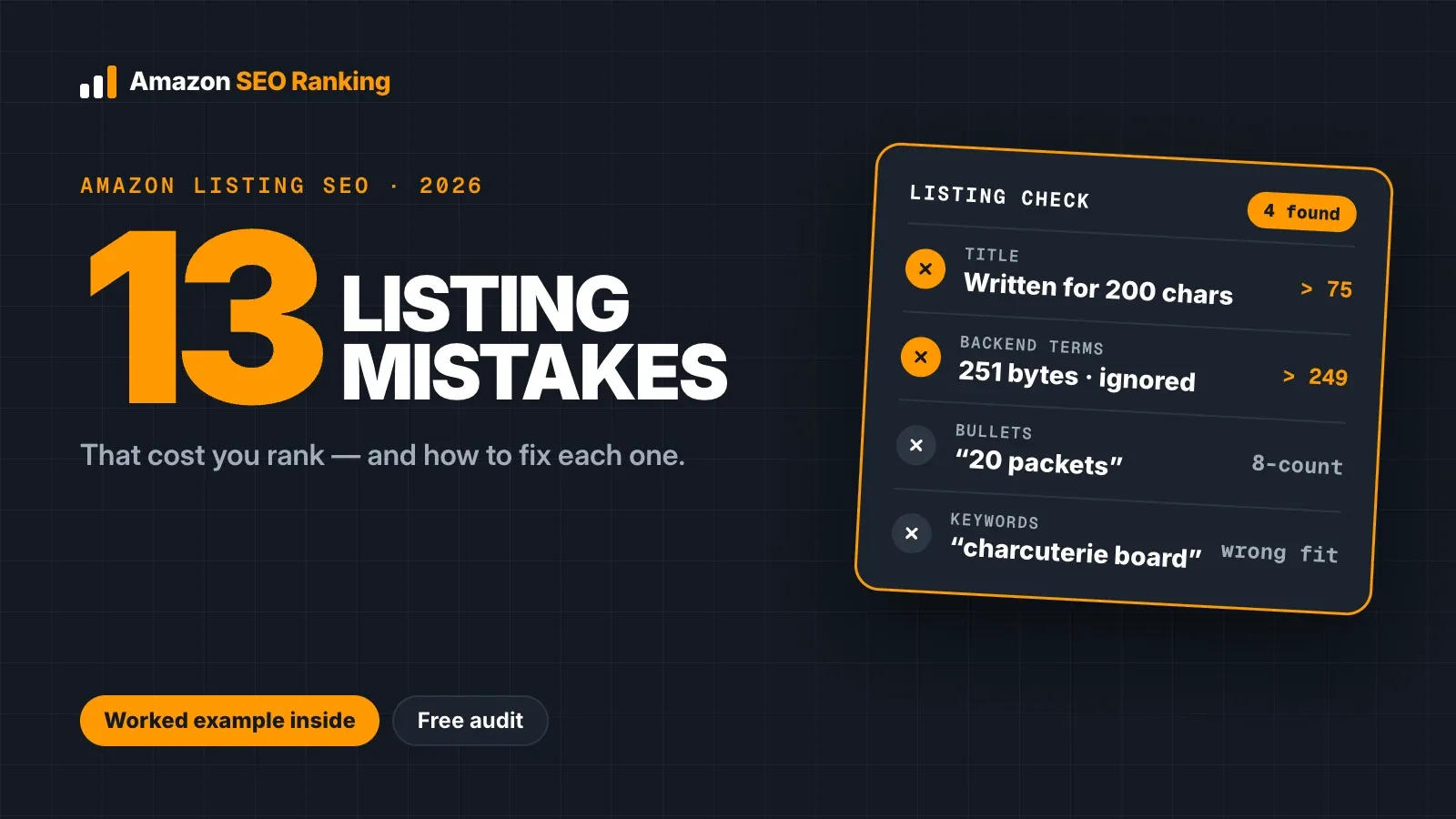
Most of them are invisible from Seller Central. A title over 75 characters still saves. A backend line at 251 bytes still saves, and Amazon then ignores every word in it. A bullet that says "20 packets" on an 8-count box saves too, and the cost shows up weeks later as returns and one-star reviews.
This guide is for sellers and agencies with live listings that rank lower than they should, including anyone selling one ASIN in several storefronts, where each marketplace carries its own copy, limits and mistakes. It covers 13 mistakes, where each one hides, how to spot it in a few minutes, and a worked example of one bad listing fixed field by field, with real Amazon search volumes.
Key Takeaways (TL;DR)
- Since July 27, 2026, titles in most categories are capped at 75 characters. Amazon may rewrite titles that break the rule.
- A backend search terms field over 249 bytes (most marketplaces) is ignored in full, so none of its words count.
- A word already in your title, Item Highlights or bullets gains nothing from a second copy anywhere else.
- High-volume phrases can be wrong for your listing: in our example, "charcuterie board" gets about 79,512 US searches a month and describes a different product.
- Competitor brands, "best", "#1" and unproven health claims add policy risk and bring shoppers who won't buy.
- Pack counts that disagree between the title, bullets and spec table are among the easiest mistakes to miss by eye.
- Each marketplace has its own listing, language and limits, so a fix on amazon.com doesn't carry over to amazon.de.
Amazon Listing SEO Mistakes: at a Glance
The table sorts the 13 mistakes by the field where they happen. The last column shows whether you can catch each one without paying.
| Mistake | Field | What it costs you | Free check |
|---|---|---|---|
| 1. Title over 75 characters | Title | Amazon may replace it with its own version | Character Limit Checker |
| 2. Keyword stuffing and repeats | All visible fields | Wasted space, weaker clicks | Read-aloud test, repeat check |
| 3. Keywords chosen on volume alone | Title, bullets | Clicks that don't convert | ASIN plus phrase search |
| 4. Backend line over the limit or full of repeats | Backend search terms | Whole field ignored, or bytes wasted | Backend Keyword Checker |
| 5. ALL CAPS, superlatives, promo words | Title, bullets | Flags, rewrites, lost trust | Character Limit Checker |
| 6. Unsupported and health claims | Bullets, description, backend | Policy flags, suppression risk | Free listing audit (claims) |
| 7. Pack counts that disagree | Title, bullets, spec table | Returns, "not as described" reviews | Free audit for "8 packets"-style counts; Pro AI scan for other wording |
| 8. Unchecked AI-written copy | Every field | Invented claims, wrong counts and lengths | Claim check on every AI rewrite (free account) |
| 9. Empty Item Highlights and attributes | Item Highlights, attributes | Missed searches and filters | Seller Central field review |
| 10. A thin or non-compliant image gallery | Images | Fewer clicks, possible suppression | Free audit counts the gallery |
| 11. Vague copy AI shopping tools can't use | Bullets, description | Missed matches in Alexa for Shopping | Free audit (AI-Readiness criteria) |
| 12. One listing copied across marketplaces | Every field | Wrong language, wrong limits | Audit per marketplace |
| 13. Never re-checking after rule changes | Every field | Old copy breaking new rules | Free audit, 3 a month |
Why Small Listing Errors Cost Rank on Amazon
Amazon ranks a listing in two stages. First it decides whether your product matches a search at all, based on the words in the fields it indexes. Then it orders the matches by how shoppers respond: clicks, sales, price, stock and reviews. Our guide to how to rank for keywords on Amazon covers both stages step by step.
Most Amazon SEO mistakes break one stage or the other. A missing word or an ignored backend field removes you from a search before ranking starts. A stuffed title, a misleading claim or a weak main image lets you match the search and then loses the click or the sale. Amazon's own seller guide warns that keyword stuffing can hurt your rankings, which is why "add more keywords" fixes so little.
13 Amazon Listing SEO Mistakes and How to Fix Them
These Amazon listing optimization mistakes are ordered by how often they turn up and how much they cost. The first four affect whether you appear in search; the rest affect what happens once you do.
1. Writing the title for the old 200-character limit
Amazon posted the change in Seller Central on June 10, 2026: titles in all categories except media must be 75 characters or fewer, spaces included, from July 27. Many listings written before July still carry titles built for 200. Since the deadline, Amazon has been rewriting non-compliant titles with its own recommendations while the listings stay live.
That rewrite decides which of your keywords survive. Put the brand, the main keyword and one key attribute in the first 75 characters, and move the rest to Item Highlights. The free Amazon character limit checker shows exactly where Amazon cuts each field, so you can see which words fall off before you save.
2. Keyword stuffing and repeating words across fields
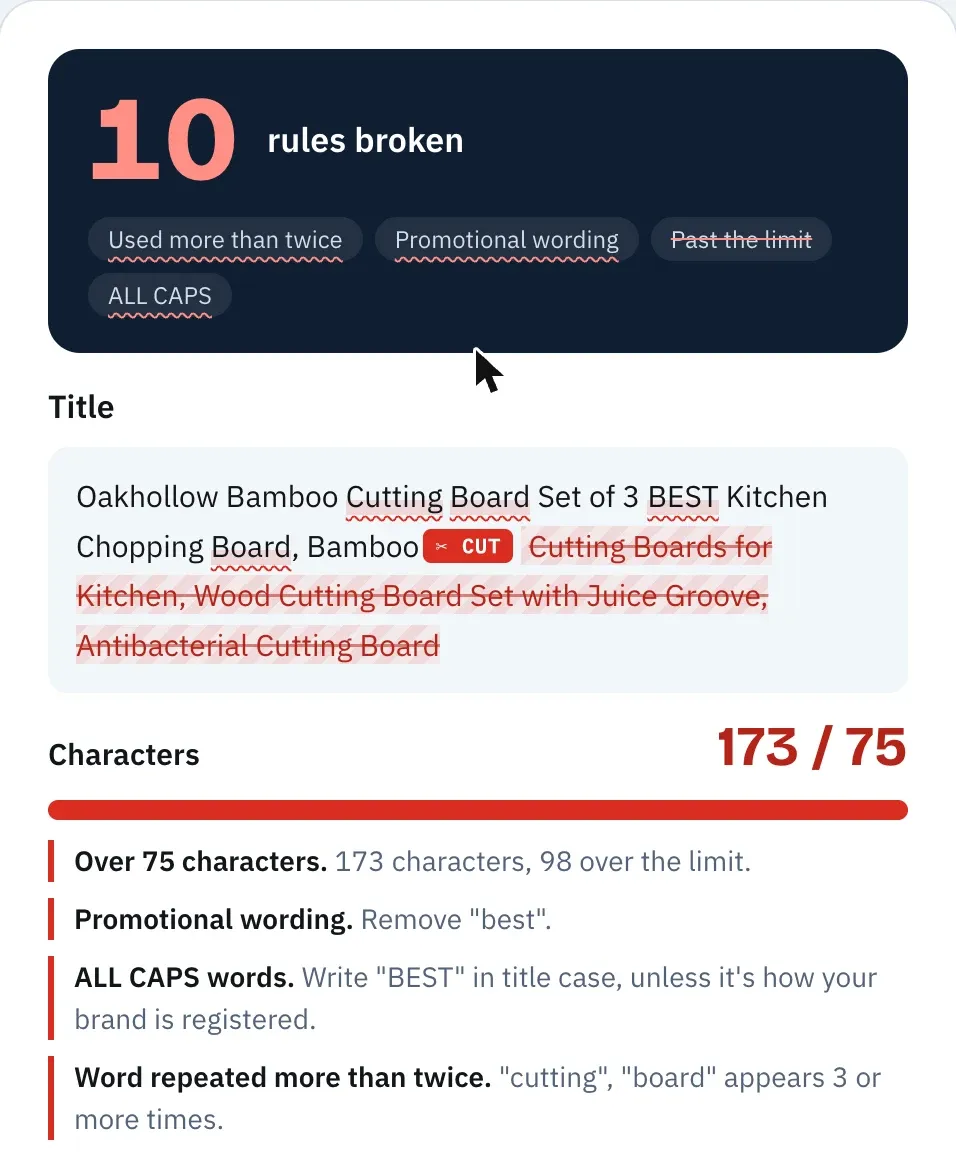
Stuffing usually looks like "Bamboo Cutting Board, Bamboo Cutting Boards for Kitchen, Wood Cutting Board". Amazon's style rules allow the same word no more than twice in a title, and a shopper scanning the results reads that line as spam.
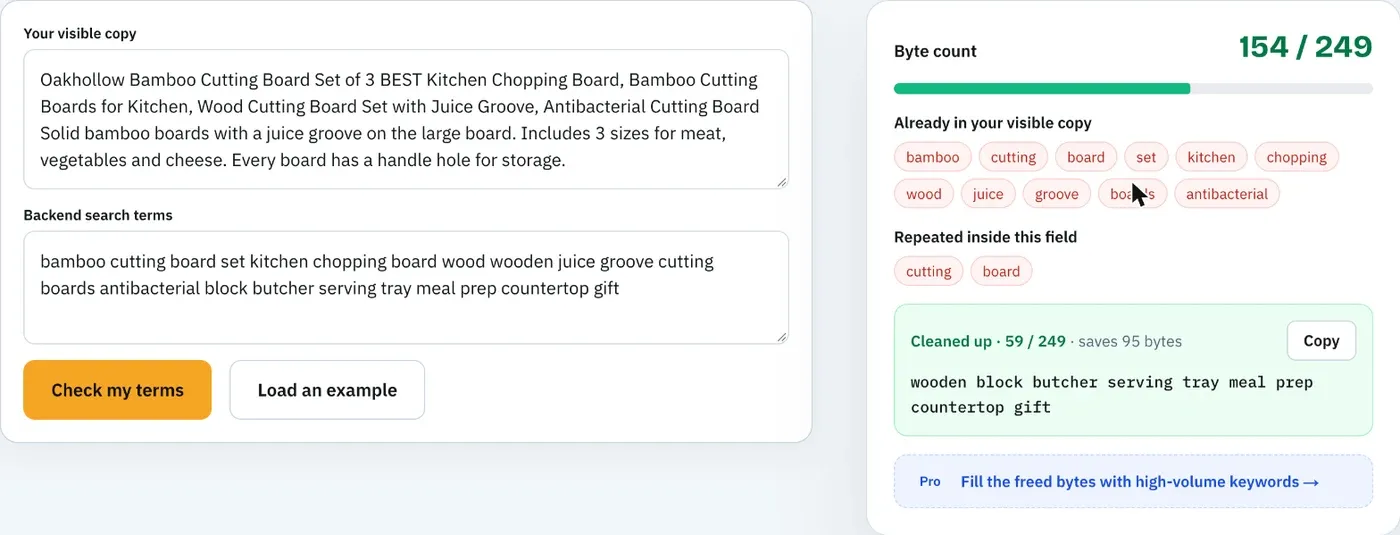
Repeats across fields are the quieter version. Amazon indexes individual words from each field, so a word in your title gains nothing from appearing again in the bullets or backend. Read your copy aloud, then list every word that appears in more than one field. Keep one copy in the field where it reads naturally and use the freed space for a synonym. Our map of keywords for Amazon listing fields shows which kind of phrase belongs where.
3. Picking keywords on search volume instead of relevance
A cutting board seller sees "charcuterie board" at about 79,512 US Amazon searches a month and wants it in the title. Those shoppers are looking for a serving board. Some will click, almost none will buy, and a low conversion rate on the phrase works against you.
Sort candidate phrases by relevance first and volume second. Ask whether a shopper typing the phrase would be happy to receive your product. Amazon SEO Ranking's Amazon keyword research tool grades idea lists as Close match, Related or All, so off-topic terms drop out before you look at the numbers. Search volume covers 16 marketplaces, and the free account shows the first 3 results of each search.
4. Breaking the backend search terms limit, or filling it with repeats
The backend field holds under 250 bytes in most marketplaces, under 200 in India and under 500 in Japan. Per Amazon staff, a value over the limit means Amazon ignores the whole attribute. Accented letters take 2 bytes each, so a Spanish or German line can look short and still be over.
Nobody else can see this field, which makes it the easiest one to get wrong for a year. The free Amazon backend keywords tool counts bytes and finds words already used in your title and bullets, with no account. Our guide to checking Amazon backend search terms covers the full five-check routine.
5. ALL CAPS headers, superlatives and promotional words
"PREMIUM QUALITY BAMBOO", "BEST" and "PERFECT GIFT" are still common in bullets. Amazon's listing style rules ban promotional wording and ALL CAPS, and words like "best" or "#1" are claims the listing can't prove.
Write bullet headers in sentence case and replace each adjective with a fact. "Premium quality" tells a shopper nothing; "solid bamboo, with a juice groove on the large board" tells them what they get. The Character Limit Checker flags promotional words, ALL CAPS and decorative symbols as you type.
6. Health claims and claims the product can't support
"Antibacterial", "kills 99% of germs", "detox" and "satisfaction guaranteed" all show up in listings that get flagged. Claims that a product treats or prevents something need approval Amazon expects you to have, and guarantee language is restricted on its own.
Check every claim against the spec table and your product documentation. If you can't point to where a claim is proven, take it out. Every Amazon SEO Ranking audit flags health claims and product claims the spec table doesn't support for free, and the AI compliance scan on Pro and Agency also checks for guarantees, contact details and banned formatting.
7. Pack counts and specs that disagree across fields
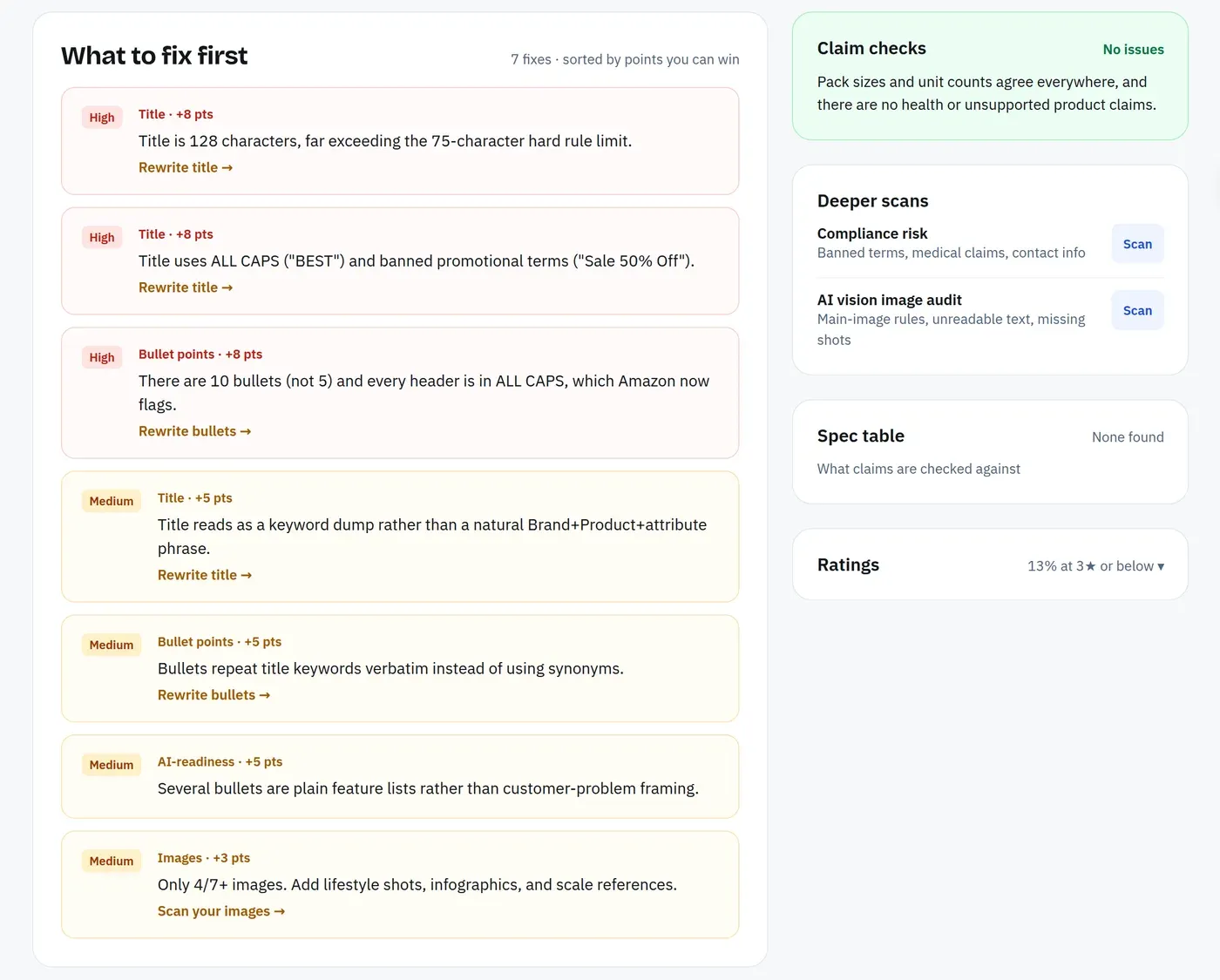
A title says "Set of 3", a bullet says "Includes 2 boards" and the spec table says 3 pieces. Each field looks fine on its own. Buyers notice the mismatch, and so do return reasons.
This mistake is hard to spot by eye because it spans fields you edit at different times. Compare every number in the title, Item Highlights, bullets, description and spec table side by side. The free audit's consistency check compares counts written as a number and a unit, such as "8 packets" against "20 packets", across the listing and the spec table. Wording like "Includes 2 boards" can get past it; in the example below, the AI compliance scan on Pro is what caught it.
8. Pasting AI-written copy without checking it
General AI assistants write a full listing in seconds, but they don't see your live listing, your spec table or the claims you're allowed to make. They add "protein" to a fruit snack, turn an 8-count box into "20 packets" and miscount characters, so one paste can repeat mistakes 1, 6 and 7 at once.
Check AI copy the way you'd check a freelancer's draft: every number against the spec table, every claim against your documentation, every field against its limit. Amazon SEO Ranking's AI Amazon listing generator grounds each rewrite in the listing's spec table and your brand fact sheet (approved facts, banned claims and market rules), then checks it in code for length limits, pack counts and restricted claims before you see it. If you already write listings in Claude, the Claude connector on Pro and Agency gives Claude the same copy check and keyword data inside the chat.
9. Leaving Item Highlights and attributes empty
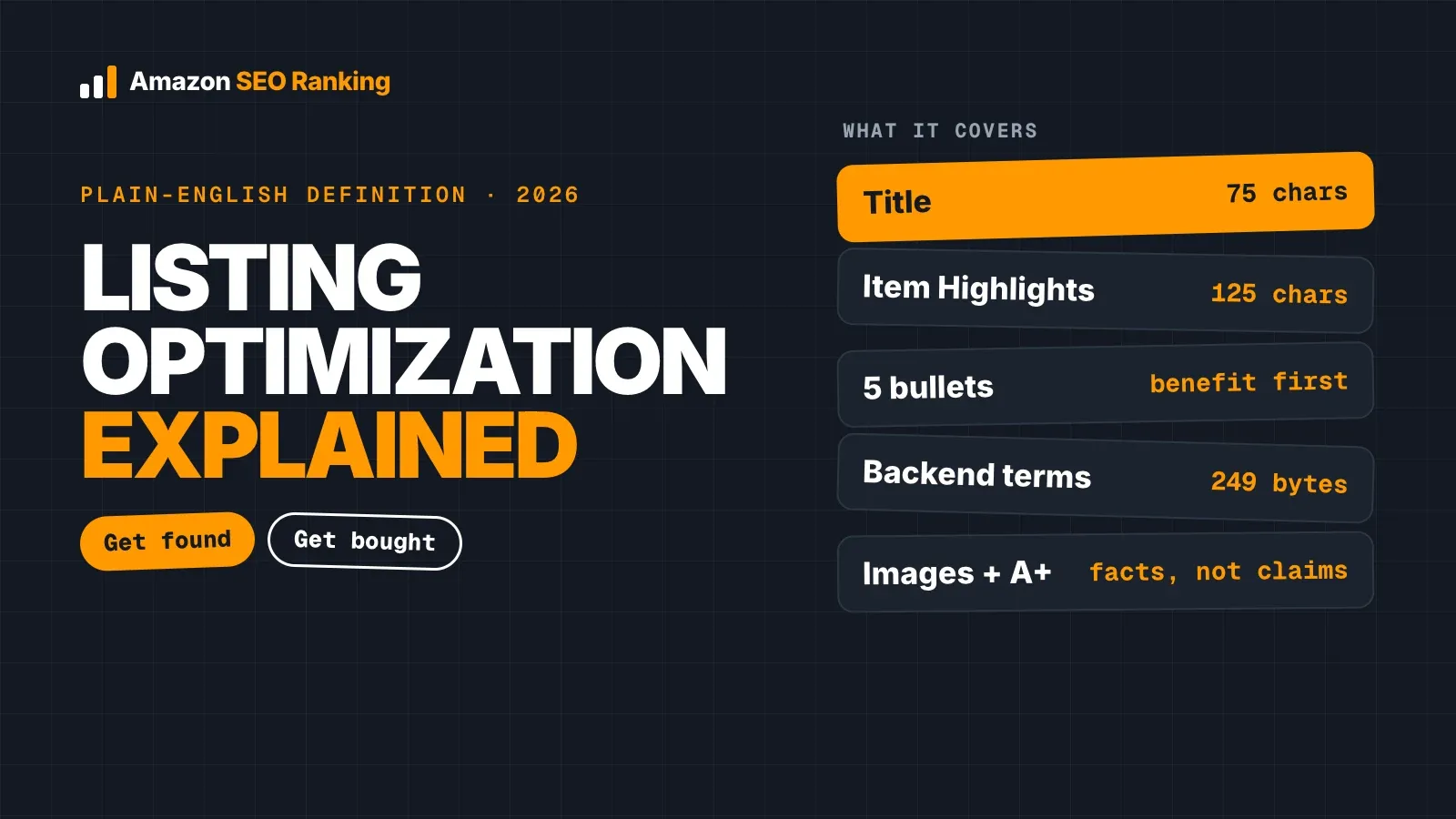
Item Highlights adds 125 searchable characters under the title. Since the 75-character cap, it's where most secondary keywords should go, and many listings still leave it blank.
Attributes such as material, size, intended use and target audience feed search filters. Fill them from the dropdowns with accurate values. A shopper who filters by "Bamboo" never sees a board whose material field is empty, however good the title is.
10. A thin or non-compliant image gallery
The main image needs a pure white background, with the product filling 85% or more of the frame, which Amazon's guide also recommends for clicks. Images under 1,000 pixels on the longest side don't zoom. A full gallery shows seven images, and many listings stop at three.
Text, logos or props on the main image can get a listing suppressed. Our page on Amazon product image requirements covers each rule with a passing and failing example. The free audit counts your gallery; the AI Vision Image Audit on Pro checks the images themselves for main-image compliance, unreadable infographic text and missing lifestyle or scale shots.
11. Vague copy that AI shopping assistants can't use
Amazon's assistant, launched as Rufus, was renamed Alexa for Shopping on May 13, 2026. It answers shopper questions using the catalog, reviews and Q&A. "Premium quality you'll love" gives it nothing to match. "Fits 13 x 18 inch half sheet pans" answers a question someone will ask.
State who the product is for, what it fits, what it's made of and how to care for it, in plain words. Two of the audit's 12 criteria score AI-Readiness, so you can see whether your bullets and description give these systems facts to quote.
12. Copying one marketplace's listing into another
Each Amazon storefront has its own listing copy, backend field and shoppers. A US backend line pasted into amazon.de matches almost nothing German shoppers type, and its accented replacements cost 2 bytes each. Japan's backend limit is twice the US one, India's is lower.
Audit each storefront separately. Amazon SEO Ranking's audit covers 23 Amazon storefronts, and the same ASIN often scores differently on each. The AI rewrite writes in 12 languages, defaulting to the language of the marketplace you audit.
13. Never re-checking after Amazon changes the rules
Listings written before July 2026 were compliant when they went live. The title cap made many of them non-compliant overnight, and few sellers went back to check.
Re-check a listing after every edit, after every Amazon policy change and whenever rank drops for one phrase. If a listing has disappeared from search altogether, our guide to fixing a listing that's search suppressed lists the five common causes and which ones our free tools catch.
On Pro, score history covers every listing you audit and email alerts watch 5 listings for score changes (25 on Agency), so a drop after a rule change or an edit shows up without a manual re-check.
Worked Example: Fixing a Cutting Board Listing
Take a fictional listing, Oakhollow Bamboo Cutting Board Set of 3, with a spec table that says 3 pieces and bamboo. We ran its copy through Amazon SEO Ranking's listing copy check, including the AI compliance scan on Pro, on 26 October 2026. The original title:
Oakhollow Bamboo Cutting Board Set of 3 BEST Kitchen Chopping Board, Bamboo Cutting Boards for Kitchen, Wood Cutting Board Set with Juice Groove, Antibacterial Cutting Board
The bullets opened with ALL CAPS headers, one said "Kills 99% of germs", another said "Includes 2 boards", and the last ended "100% satisfaction guaranteed". The backend held title repeats, two competitor brands, "best", "#1" and an ASIN. The checks found eight problems in one listing:
| Mistake | Where | Flagged by | Severity |
|---|---|---|---|
| Title at 173 characters (limit 75) | Title | Free length check | Fail |
| "Kills 99% of germs" health claim | Bullet 3 | AI scan | High |
| "100% satisfaction guaranteed" | Bullet 5 | AI scan | High |
| "BEST" in capitals | Title | AI scan | Medium |
| "Set of 3" vs "Includes 2 boards" | Title, bullet 2 | AI scan | Medium |
| Competitor brands in the backend | Backend | AI scan | Medium |
| "#1" and an ASIN in the backend | Backend | AI scan | Low |
| "Antibacterial" not in the spec table | Title | Free consistency check | Medium |
Here's the rewrite, which passed every length check with no flags from either check:
- Title (69 of 75 characters): Oakhollow Bamboo Cutting Board Set of 3 with Juice Groove for Kitchen
- Item Highlights (91 of 125): Large, medium and small boards for meat, vegetables, bread and cheese, with handles to hang
- Bullet 1: 3 sizes for every job: a large board for carving meat, a medium board for vegetables and a small board for fruit and cheese
- Backend (84 of 249 bytes): wood wooden chopping block serving tray butcher meal prep countertop tabla de cortar
The backend holds no word the title, Item Highlights or bullets already use, and it leaves 165 bytes for later research. Here's what the fields cover, with estimated monthly US Amazon searches from Amazon SEO Ranking's keyword volume tool:
| Search phrase | Est. monthly US searches | Covered by |
|---|---|---|
| cutting boards for kitchen | ≈14,324 | Title |
| bamboo cutting board | ≈10,060 | Title |
| wood cutting board | ≈6,919 | Title + backend (wood) |
| wooden cutting board | ≈5,310 | Title + backend (wooden) |
| cutting board set | ≈3,066 | Title |
| chopping board | ≈1,757 | Title + backend (chopping) |
| butcher block cutting board | ≈1,383 | Title + backend (butcher, block) |
| bamboo cutting board set | ≈561 | Title |
| cutting board with juice groove | ≈187 | Title |
| tabla de cortar | ≈37 | Backend |
Four tempting phrases were left out on purpose. "Charcuterie board" (≈79,512) describes a different product, "john boos cutting board" (≈1,944) is a competitor's brand, "best cutting board" (≈1,496) needs the word "best", and "antibacterial cutting board" (≈149) needs a claim the spec table doesn't hold. The highest-volume phrase on the list was the one that fit the product least.
How to Check a Listing for These Mistakes
You can run every check by hand. Run them in this order, since there's no point polishing bullets on a title Amazon is about to rewrite:
- Limits. Paste the title, Item Highlights, bullets and description into a character counter, and the backend line into a byte counter.
- Repeats. List every word that appears in more than one field and keep one copy of each.
- Claims. Read every claim against the spec table. Delete what you can't prove, plus competitor brands, "best" and "#1".
- Numbers. Compare every count, size and quantity across all fields and the spec table.
- Indexing. Search Amazon for your ASIN plus each main phrase. If your product comes back, the phrase is indexed.
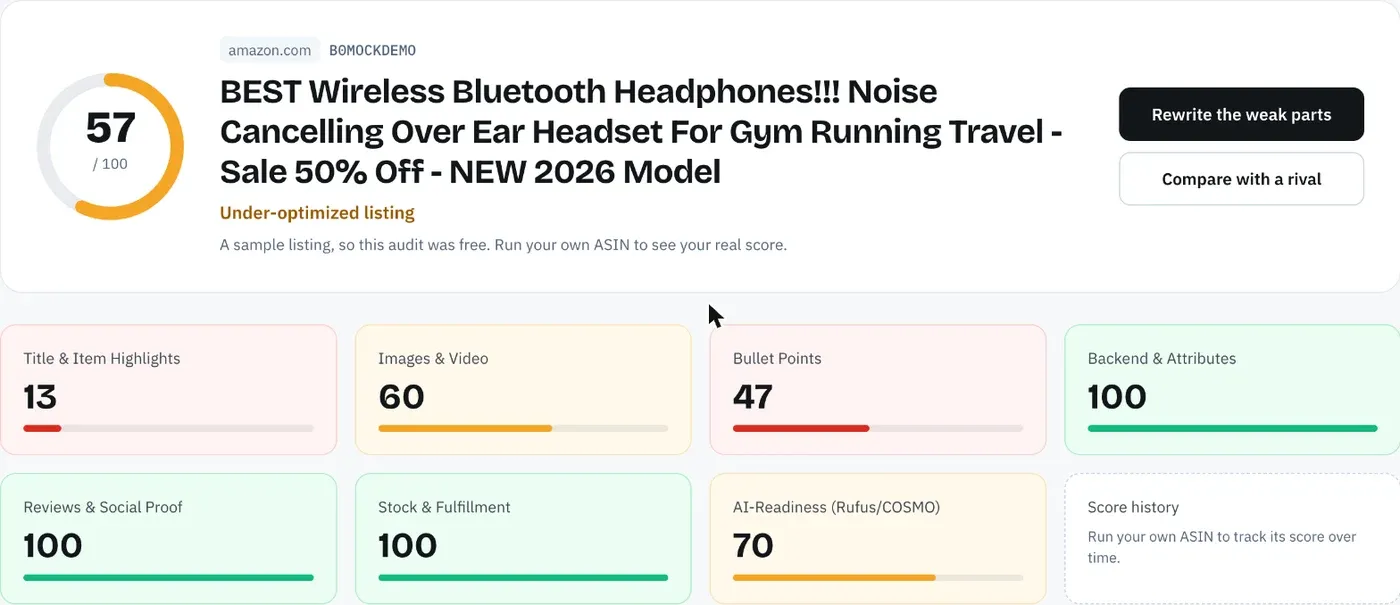
A free Amazon listing audit runs most of these at once on the live page, scores it against 12 published criteria and lists the fixes worth the most points. If you rewrite, the AI rewriter lets you score the new copy as a draft against the live listing before it goes live.
Agencies can run the same audit and rewrite across a client's catalog with Bulk Optimization, up to 500 ASINs per run on the Agency plan. Portfolio comparison then lines up every tracked listing by category and shows which one to use as the template for the rest.
Everything You Need to Know About Amazon Listing SEO Mistakes
| Topic | What to know | Rule or number |
|---|---|---|
| Title | Brand, main keyword, one attribute | 75 characters since July 27, 2026 |
| Item Highlights | Secondary keywords below the title | 125 characters |
| Bullets | Five benefit-led bullets, sentence case | Up to 255 characters, 200 shows in full on mobile |
| Description | Detail, care, what's in the box | 2,000 characters |
| Backend | Synonyms and variants, no repeats | Under 250 bytes most, 200 India, 500 Japan |
| Over the backend limit | Amazon ignores the entire field | 0 words count |
| Repeats | One copy of each word is enough | Max twice in the title |
| Keyword choice | Relevance first, volume second | Test with ASIN plus phrase |
| Claims | No health, guarantee or ranking claims | Back every claim with the spec table |
| Pack counts | Same number in every field | Check against the spec table |
| AI-written copy | Check numbers, claims and limits before pasting | Ground it in the spec table and a brand fact sheet |
| Main image | White background, product fills the frame | RGB 255, 85%, 1,000 px for zoom |
| AI shopping assistants | Plain facts about fit, use and material | Alexa for Shopping since May 13, 2026 |
| Marketplaces | Each has its own copy and limits | Audit each storefront |
| Re-checks | After edits, policy changes and rank drops | Every listing, every marketplace |
Find the Mistakes in Your Listing, Free
Amazon SEO Ranking scores a live listing against 12 published criteria, each with its pass rule on the site, so you can see which mistake costs the most points before you change anything. The AI rewrites target the exact criterion your listing fails and are checked in code for Amazon's limits, pack counts and unsupported claims before you see them. You can score the new copy as a draft first, which matters now that Amazon rewrites titles that break the 75-character rule.
It's built for sellers and agencies whose listings are live but not ranking, especially anyone selling one product in several of the 23 storefronts the audit covers. Agencies can audit and rewrite up to 500 ASINs per run with Bulk Optimization on the Agency plan.
The free plan includes 3 full audits a month with no credit card required. Pro costs $79 a month with a 7-day free trial and adds full keyword research and the AI compliance scan. Run a free audit on your listing to see which of these 13 mistakes it has, or compare plans and pricing if you're checking a whole catalog.
FAQ
What are the most common Amazon listing SEO mistakes?
The most common Amazon listing SEO mistakes are titles over Amazon's 75-character limit, keyword stuffing, backend search terms that repeat visible words or break the byte limit, and claims the product can't support. Close behind are pack counts that disagree across fields, empty Item Highlights and attributes, and a main image that breaks Amazon's rules. Each one either keeps the listing out of searches or costs clicks and sales once it appears. Since July 27, 2026, the title limit is the one affecting the most listings.
Can Amazon listing mistakes cause search suppression?
Amazon listing mistakes can cause search suppression when they break listing rules, such as a non-compliant main image, a title that breaks the style rules or missing required attributes. A suppressed listing stays live by URL but drops out of search results. Seller Central shows the exact reason under the listing's status. Since July 27, 2026, Amazon can rewrite an over-length title instead of suppressing the listing.
Does keyword stuffing hurt Amazon rankings?
Keyword stuffing hurts Amazon rankings, and Amazon's own seller guide says so. Repeating a phrase adds no new search match, because Amazon indexes each word once per listing. It also makes titles and bullets harder to read, which lowers clicks and sales, the signals Amazon ranks on. Amazon's title rules allow a word no more than twice.
Should I put competitor brand names in my Amazon listing?
You should not put competitor brand names in your Amazon listing, including the hidden backend search terms field. Competitor brands invite trademark complaints and bring clicks from shoppers looking for another product, who rarely buy. In our cutting board example, the AI compliance scan flagged both competitor brands in the backend. Use generic synonyms and materials instead.
How do I check my Amazon listing for SEO mistakes?
You check your Amazon listing for SEO mistakes by testing five things in order: field limits, repeated words, claims, pack counts and indexing. Count the title against 75 characters and the backend against 249 bytes in most marketplaces. Delete repeats, competitor brands and claims the spec table doesn't support, and compare every number across fields. Then search Amazon for your ASIN plus each main phrase to confirm it appears.
How often should I audit my Amazon listing?
You should audit your Amazon listing after every edit, after every Amazon policy change and whenever rank drops for a phrase you held. The July 27, 2026 title change made many compliant listings non-compliant overnight. Audit each marketplace separately, since each has its own copy and limits. Amazon SEO Ranking's free plan covers 3 full audits a month, and Pro adds score history and email alerts on 5 listings so a score drop shows up without a manual re-check.
Is it safe to use ChatGPT to write an Amazon listing?
Using ChatGPT to write an Amazon listing is safe only if you check the output against Amazon's limits and your product facts before pasting it. General AI tools don't see your live listing or spec table, so they can invent claims, change pack counts and miscount characters. Check every claim, number and field length by hand or with a listing copy check. Amazon SEO Ranking's rewriter grounds its copy in the spec table and checks it in code before you see it, and on Pro the Claude connector gives Claude the same check.
Do I need a paid tool to find Amazon listing mistakes?
You don't need a paid tool to find most Amazon listing mistakes, because character counts, byte counts, repeats and the ASIN plus phrase test can all be done by hand. Amazon SEO Ranking's Character Limit Checker and Backend Keyword Checker are free with no account, and a free account adds 3 full audits a month. A paid plan helps when you need search volume to choose keywords, the AI compliance scan or checks across many listings. Pro costs $79 a month with a 7-day free trial.
Run a free audit on your listing to see which of these 13 mistakes it has: 12 published criteria, 3 full audits a month and no credit card required.
Run free audit