Amazon keyword research is the process of finding the words and phrases shoppers type into Amazon's search bar, measuring how often they're searched, and deciding which ones your listing should target. The output is a short, ranked list of phrases, each assigned to a field Amazon reads: the title, Item Highlights, bullets, backend search terms or a Sponsored Products campaign.
It matters because Amazon can only show your product for a search when the words in that search appear somewhere it indexes. A listing written without research ranks for whatever words the seller happened to choose, and research done well still earns nothing if the phrases never make it into the listing within Amazon's limits. In a 2023 PowerReviews survey of 8,153 US consumers, half said they start product searches on Amazon, against 31.5% on Google.
This guide is for sellers and agencies who want a clear picture before they pick a tool or rewrite a listing. It covers what the research produces, the six places Amazon keyword data comes from, how search volume is estimated, the keyword types, and a worked example with real Amazon search volumes.
Key Takeaways (TL;DR)
- Amazon keyword research finds the phrases shoppers search on Amazon, then ranks them by relevance first and volume second.
- Your listing can only appear for a phrase whose words sit in a field Amazon indexes.
- Amazon's own data comes from autocomplete, Brand Analytics, Search Query Performance, Product Opportunity Explorer and your Sponsored Products search term report.
- No outside tool sees Amazon's exact search counts. Every third-party search volume figure is an estimate.
- Google keyword data is a poor stand-in: different shoppers, different intent, different fields.
- Since July 27, 2026, titles in most categories are capped at 75 characters, so the research has to decide which phrase gets the title and which go elsewhere.
- Research is per marketplace. A keyword list built on amazon.com doesn't carry over to amazon.de.
- Research only pays off once the phrases land in the listing: an over-length title or a backend field over its byte limit wipes out the work.
Amazon Keyword Research: at a Glance
The table below sums up what the process involves and what each part gives you. The rest of the guide explains each row.
| Question | Short answer |
|---|---|
| What is it? | Finding, measuring and ranking the phrases shoppers type into Amazon search |
| What does it produce? | A list of about 10 to 20 phrases, each mapped to a listing field or ad campaign |
| Why does it matter? | Amazon only shows your listing for searches whose words you've placed in indexed fields |
| Where does the data come from? | Amazon autocomplete, Brand Analytics, Search Query Performance, Product Opportunity Explorer, ad reports, third-party estimates |
| Is search volume exact? | Only inside Amazon. Outside tools publish estimates |
| How is it different from Google research? | Shoppers on Amazon are closer to buying, and the fields and ranking signals differ |
| How often should you redo it? | Before every listing rewrite, when entering a marketplace, and when a phrase's rank or sales change |
What Amazon Keyword Research Means
Amazon's own seller guide describes Amazon keyword research as discovering the search terms customers use in the Amazon store. In practice, the work has three parts: collecting candidate phrases, checking how often shoppers search each one, and choosing the ones that describe your product well enough to convert.
The third part is where most of the value sits. A phrase with 10,000 monthly searches that describes a slightly different product brings clicks that don't turn into orders, and Amazon ranks partly on what shoppers do after they click. A phrase with 400 searches that matches your product exactly can sell more.
What the research actually produces
A finished piece of research is a decision document, not a spreadsheet of 2,000 terms. For one product, it usually comes down to one main phrase for the start of the title, a few secondary phrases for Item Highlights and bullets, a set of synonyms and spelling variants for the backend field, and a list of exact-match phrases for Sponsored Products.
Amazon's seller guide suggests around 10 to 20 relevant keywords per product. Fewer is fine for a narrow product. More usually means the list hasn't been filtered for relevance yet.
Amazon keyword research vs Google keyword research
Sellers coming from web marketing often start with Google Keyword Planner. The habits transfer, but the data doesn't. Google data shows what people search across the web, including people who want information rather than a product, and it says nothing about how a phrase performs inside Amazon.
| Amazon keyword research | Google keyword research | |
|---|---|---|
| Searcher intent | Mostly shopping, often ready to buy | Mixed: information, navigation, shopping |
| Where the phrase goes | Title, Item Highlights, bullets, backend search terms, ads | Page title, headings, body copy, links |
| What decides rank | Relevance, then clicks, sales, price, stock and reviews | Relevance, links, content quality, page signals |
| Volume data source | Amazon's own reports or estimates from Amazon search behavior | Google Keyword Planner and web clickstream estimates |
| Phrase length | Shorter, product-led ("thick yoga mat") | Often longer and question-led |
Google data is still useful as a sanity check for new categories where Amazon data is thin. Use it to find phrasing, then confirm demand with an Amazon source before it goes in your title.
Why Amazon Keyword Research Matters
Amazon ranks a product in two stages. First it decides which listings match a search, based on the words in the listing and its structured data. Then it orders those matches by how shoppers respond: clicks, sales, price, delivery and reviews. Keyword research controls the first stage completely and feeds the second, because a well-matched phrase converts better.
Amazon's guide to Amazon SEO lists keyword research first among the levers sellers control, ahead of titles, bullets and backend search terms. Each of those fields is limited, which is why choosing phrases is a real decision:
- Titles are capped at 75 characters in most categories since July 27, 2026.
- Item Highlights adds 125 searchable characters below the title.
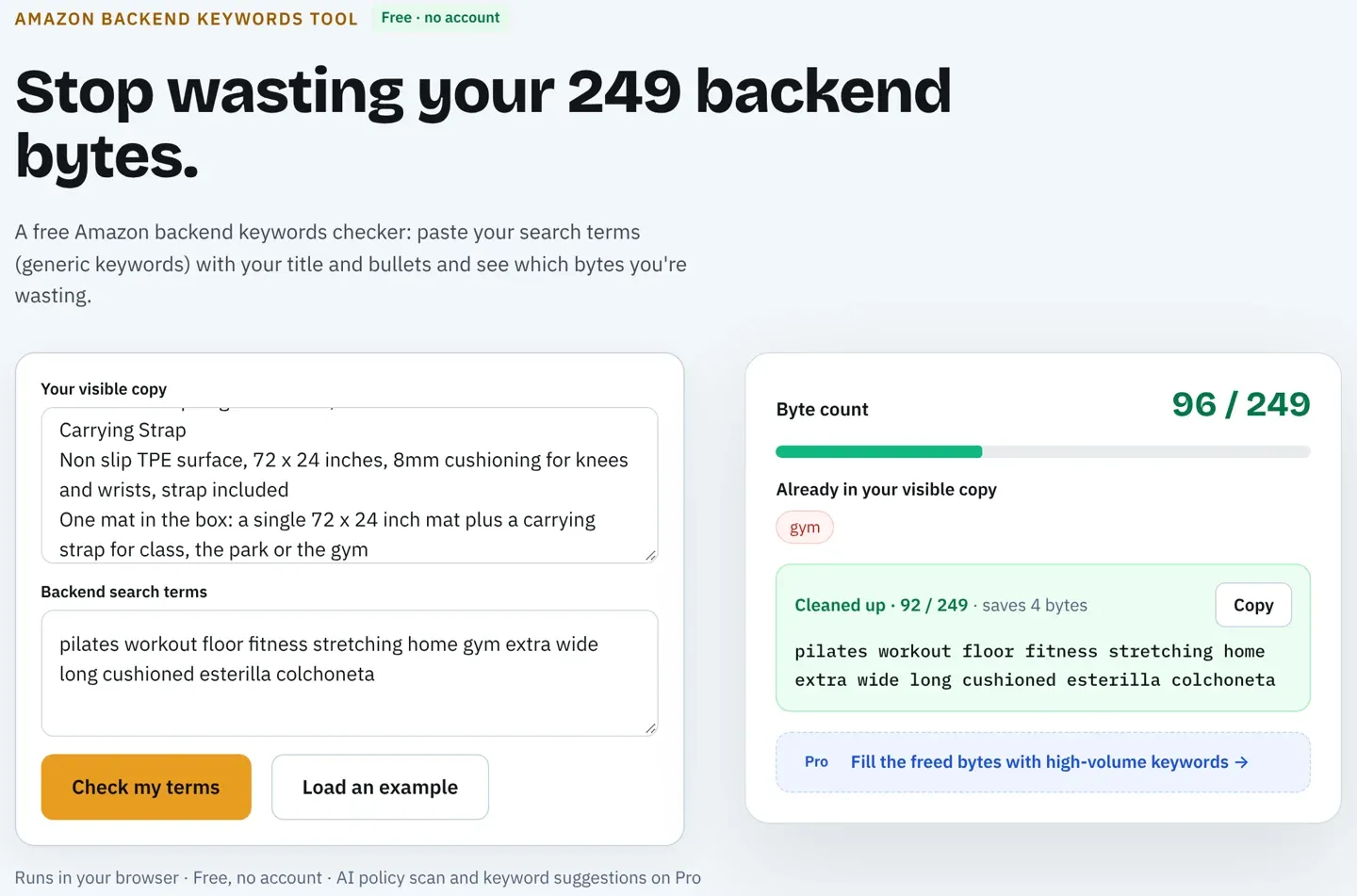
- Backend search terms hold under 250 bytes in most marketplaces, and Amazon ignores the whole field if you go over. A free Amazon backend search terms checker counts the bytes before you save.
With that little room, a title can hold one main phrase and maybe one modifier. Research tells you which phrase earns that spot. Our guide on how to rank for keywords on Amazon covers what happens after placement, from indexing checks to Sponsored Products.
Shoppers now ask questions, not only keywords
Amazon renamed its Rufus shopping assistant to Alexa for Shopping on May 13, 2026. Shoppers can ask it things like "which yoga mat is best for bad knees," and it answers using the catalog, reviews and Q&A. Those questions don't show up as tidy keywords with search volume.
That changes what research should collect. Alongside high-volume phrases, note the use cases, sizes, materials and problems shoppers mention in reviews and questions. A bullet that states "6mm thick, cushions knees on hard floors" gives both the search index and the assistant a fact to match.
Where Amazon Keyword Data Comes From
There are six places to get Amazon keyword data. Amazon owns the first five, and some need Brand Registry or an active ad account. The sixth is third-party tools, which estimate volume from outside.
| Source | What it gives you | Access | Has volume? |
|---|---|---|---|
| Amazon autocomplete | Phrases shoppers type, in rough popularity order | Anyone | No |
| Brand Analytics: Top Search Terms | The most-searched terms and top clicked products for each | Brand Registry | Rank, not count |
| Search Query Performance | Impressions, clicks, add-to-carts and purchases for your brand's search terms | Brand Registry | Yes, for your brand |
| Product Opportunity Explorer | Search trends for a niche over time | Seller Central | Yes, by niche |
| Sponsored Products search term report | Queries that triggered your ads, with clicks and orders | Ad account | Your ad traffic only |
| Third-party keyword tools | Estimated monthly searches, related phrases, competitor rankings | Paid or free tiers | Estimated |
Amazon autocomplete
Typing a seed phrase into the Amazon search bar returns suggestions based on what shoppers search. It costs nothing and reflects the marketplace you're on, which makes it the fastest way to see phrasing.
It has two limits. Autocomplete shows no numbers, so "yoga mat thick" and "yoga mat for kids" look equally important. It also personalizes, so open it in a private window when you research.
Brand Analytics and Search Query Performance
Brand-registered sellers get the closest thing to Amazon's own numbers. The Top Search Terms dashboard ranks search terms by popularity and shows the top three clicked products for each. Search Query Performance shows how your brand does on each query: impressions, clicks, add-to-carts and purchases.
The trade-off is scope. Search Query Performance only covers searches where your brand already appears, so it's better for refining a live listing than for researching a new product.
Product Opportunity Explorer
Product Opportunity Explorer groups searches into niches and shows how demand moves over time. For a product you already sell, its main use is seasonality: it shows when the phrases in your listing gain and lose searches.
That timing matters for edits. A phrase that peaks in January (fitness gear, for example) can look weak if you only check volume in August, and a listing rewrite is worth scheduling before the peak, not during it.
Sponsored Products search term report
If you run Sponsored Products, the search term report lists the real queries that triggered your ads, with clicks, spend and orders. These are phrases already proven to convert for your product, which makes the report the best source of keywords to move into the listing.
Its blind spot is everything you aren't bidding on. A broad-match or automatic campaign widens the net and collects candidates for a new listing.
Customer reviews and questions
Reviews and the questions section show how buyers describe the product in their own words, including synonyms the seller never thought of. They have no volume, but they're where use-case and problem phrases come from.
Read competitors' reviews too, especially the three-star ones. They often name the feature shoppers wanted and didn't get, which is a phrase worth testing.
Third-party keyword tools
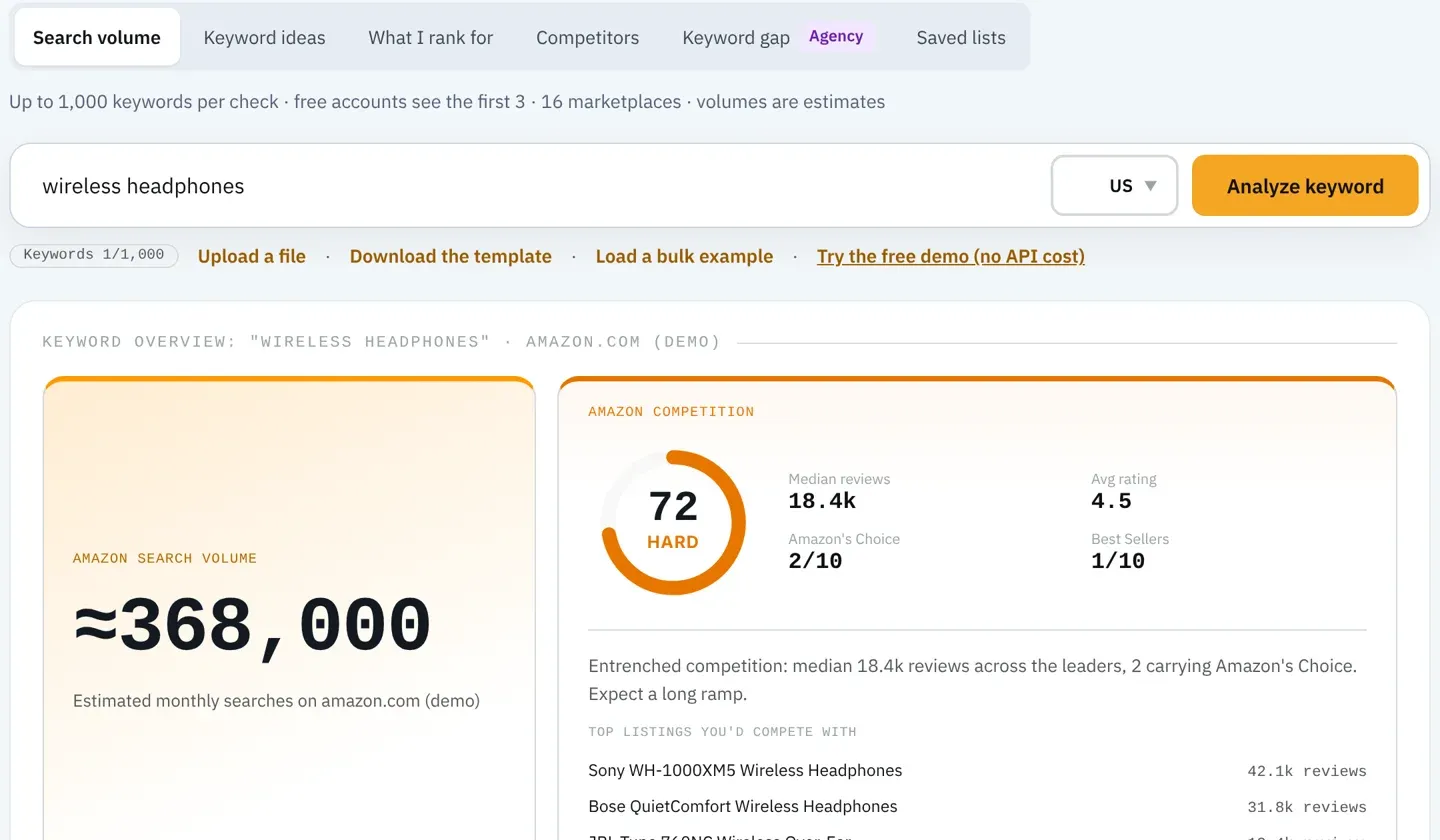
Third-party tools give you estimated monthly searches, related phrases and the keywords a competitor's ASIN ranks for. They're the only source that puts a number on any phrase, for any product, in one place.
That number is an estimate, which the next section explains. Our comparison of the best Amazon keyword search volume tools covers how each one sources its figures.
How Amazon Search Volume Is Estimated
Amazon doesn't publish search counts for every phrase, and no outside tool has direct access to them. Tools build estimates from a mix of inputs: Amazon's search frequency ranks, ad impression data, clickstream panels and their own models. Two tools can disagree by a wide margin on the same phrase.
Treat Amazon search volume as a way to compare phrases, not as a forecast. If one tool says "thick yoga mat" gets about 9,700 searches a month and "extra thick yoga mat" gets about 490, the useful fact is the ratio. Low-volume phrases are often reported in steps, so several long-tail terms can share the same figure.
Two habits make estimates more reliable. Use one tool consistently, so the numbers compare like with like. And confirm the phrases that matter with Amazon's own data once the listing is live, through Search Query Performance or your search term report.
Types of Amazon Keywords
Amazon's seller guide splits keywords into short-tail, long-tail, branded and non-branded. A fifth group is worth adding now that shoppers ask the assistant questions.
| Type | Example | Typical volume | Where it fits |
|---|---|---|---|
| Short-tail | yoga mat | High | Title, if it's your main product term |
| Long-tail | non slip yoga mat for hot yoga | Low to medium | Item Highlights, bullets, exact-match ads |
| Branded | [your brand] yoga mat | Low | Title (brand first) and brand defense ads |
| Non-branded | thick exercise mat | Medium | Title and bullets, to reach new shoppers |
| Use case and question | yoga mat for bad knees | No reliable volume | Bullets and A+ content, for search and the assistant |
Long-tail phrases are where most listings win early. They have fewer competing listings, and a shopper who types five words knows what they want. Our guide to Amazon long-tail keywords covers how to build that list.
Leave competitor brand names out of your listing entirely. They invite trademark complaints and bring shoppers looking for another product. Bidding on them in Sponsored Products is a separate decision with its own rules.
How to Do Amazon Keyword Research in 5 Steps
The steps below are the short version of how to do Amazon keyword research for one product.
- Write seed phrases. List three to five ways a shopper would describe the product: the product type, its main material or feature, and its main use.
- Expand. Run each seed through Amazon autocomplete, a related-keyword tool and your search term report, then add phrases from reviews and questions.
- Measure. Pull estimated Amazon search volume for every candidate from one tool, in the marketplace you sell in, and note how hard each phrase is to rank for: how many reviews the top listings have and how many carry Amazon's Choice or Best Seller badges.
- Filter for relevance. Delete every phrase that describes a different product, size, material or audience, however high its volume.
- Map to fields. Put the best-matching high-volume phrase at the start of the title, secondary phrases in Item Highlights and bullets, and synonyms in the backend field without repeating words.
After the listing goes live, check that Amazon indexed each phrase by searching your ASIN followed by the phrase. If your product appears, the phrase counts. If you sell in more than one marketplace, repeat steps 2 to 5 in each one, because phrasing and demand differ by country and language.
Worked Example: Researching Keywords for a Yoga Mat
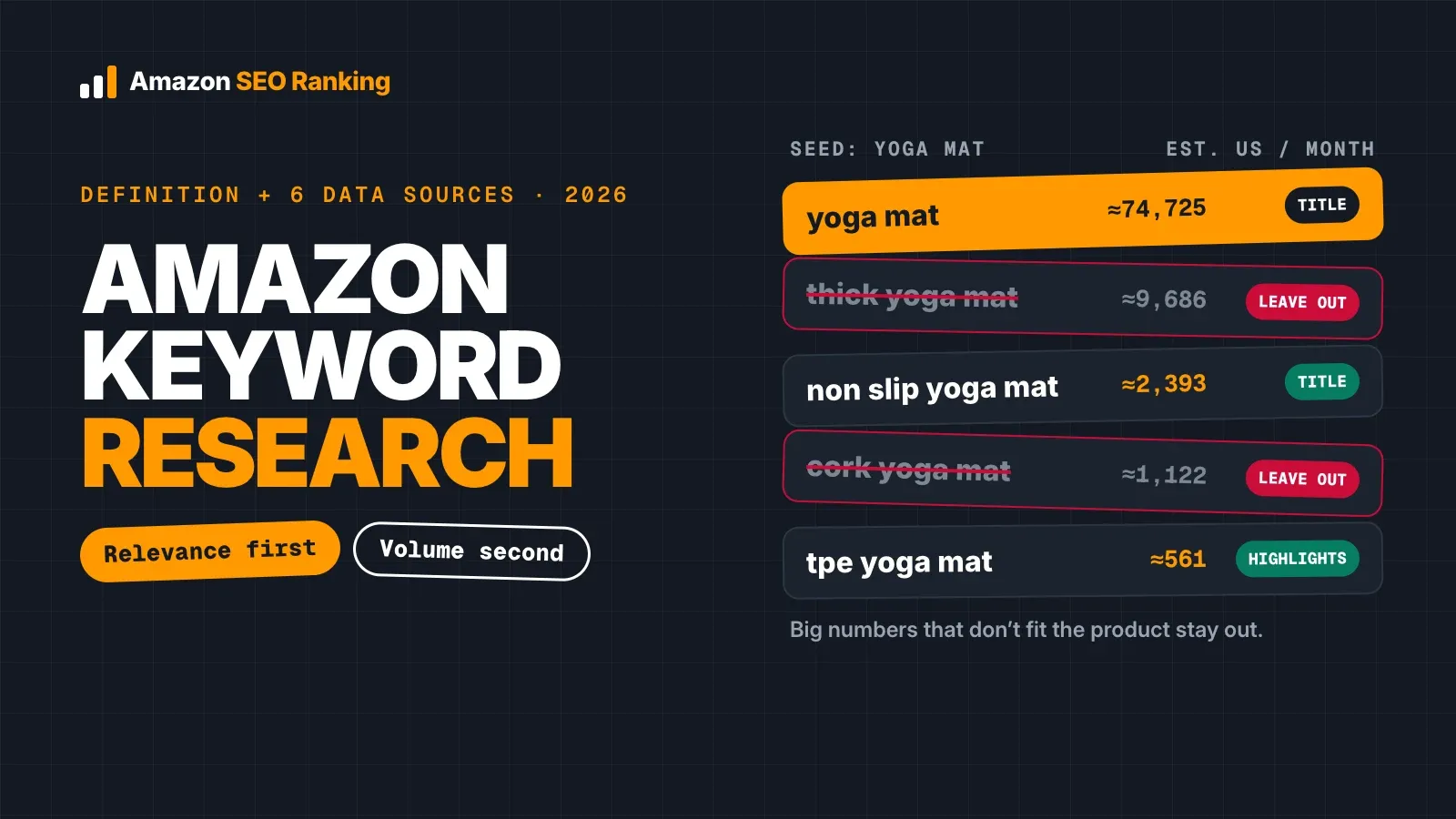
Take a fictional product: a 6mm TPE yoga mat with a non-slip texture and a carry strap. Here are the candidates after expanding the seed "yoga mat," with estimated monthly US searches pulled from Amazon SEO Ranking's Volume Checker on 5 November 2026.
| Phrase | Est. monthly US searches | Relevant? | Decision |
|---|---|---|---|
| yoga mat | ≈74,725 | Yes | Title, main phrase |
| exercise mat | ≈13,426 | Partly | Backend synonym |
| pilates mat | ≈10,472 | Partly | Backend only if the mat suits Pilates |
| thick yoga mat | ≈9,686 | No (6mm is standard) | Leave out |
| workout mat | ≈3,440 | Yes | Backend synonym |
| non slip yoga mat | ≈2,393 | Yes | Title modifier |
| cork yoga mat | ≈1,122 | No (TPE, not cork) | Leave out |
| yoga mat for women | ≈822 | Yes | Bullet |
| travel yoga mat | ≈673 | No (6mm is too heavy) | Leave out |
| tpe yoga mat | ≈561 | Yes | Item Highlights |
| extra thick yoga mat | ≈486 | No | Leave out |
Three of the higher-volume phrases didn't make the cut. "Thick yoga mat" has about 9,700 searches, but a 6mm mat isn't what those shoppers want, and listing for it would bring clicks from people who leave. "Cork yoga mat" and "travel yoga mat" describe different products.
The result fits Amazon's limits. A title such as "Brand Non Slip Yoga Mat, 6mm TPE Exercise Mat with Carry Strap" comes in at 62 characters, covers the two strongest relevant phrases and leaves the long tail for Item Highlights, bullets and the backend field. Notice that "yoga mat for women" and "yoga mats for women" have separate estimates (≈822 and ≈486). Before spending space on both forms, run the ASIN test from step 5 on each: if your listing appears for both with one form in the copy, the second form adds nothing.
What to Look for in an Amazon Keyword Research Tool
You can do everything above by hand for one product. An Amazon keyword research tool earns its place when you research many products, or when you need proof that the keywords landed in your listing after the rewrite. Ask four questions of any tool you test.
| Question to ask | Why it matters | Amazon SEO Ranking's answer |
|---|---|---|
| Can you see how the competition score is calculated? | A difficulty number you can't check is a guess you can't challenge | Competition score built from top-listing review counts and Amazon's Choice and Best Seller density, shown next to each phrase |
| Does it confirm the keywords landed in the listing? | Research is wasted if the title breaks the 75-character rule or the backend goes over its byte limit | 12-criteria listing audit and AI rewrite that places your phrases within each field's limit |
| Is the listing score's method published? | A score you can't trace to rules can't tell you which fix comes first | All 12 criteria and their weights are published |
| Can you test it free on your own product? | A demo ASIN tells you nothing about your listing | Free plan with 3 full audits a month, no credit card |
The second row is the one most keyword tools skip. They hand you a list and stop, so you find out Amazon rewrote the title or the backend field went over its limit only after rank drops. Amazon SEO Ranking connects the two: the Volume Checker and Keyword Magic Tool build the list, Ranked Keywords and Keyword Gap show phrases a listing or its competitors already rank for, and the audit checks the result on the live page. Saved Lists take a monthly volume snapshot, so seasonal swings show up without re-running every lookup.
Keyword volume in Amazon SEO Ranking covers four marketplaces: the US, Egypt, Saudi Arabia and the UAE. If most of your sales are in Europe or Japan, a suite such as Helium 10 or Jungle Scout reaches more keyword marketplaces. The listing audit runs in all 19 Amazon marketplaces, so you can still check whether the keywords you chose landed correctly on amazon.de or amazon.co.jp.
Free Amazon keyword research options
Free Amazon keyword research covers more than most sellers expect. Autocomplete, Brand Analytics (with Brand Registry), Product Opportunity Explorer and your ad reports cost nothing beyond your seller account. A free Chrome extension can speed up autocomplete expansion; our guide to the Amazon keyword tool Chrome extension explains what each type shows.
What free sources lack is volume for phrases you don't already rank or advertise for. Volume lookups and the competition score are on the Amazon keyword research tool in Pro, which includes 2,000 lookups a month. The free plan covers the other half of the job: 3 full listing audits a month and the backend search terms checker, with no credit card.
Everything You Need to Know About Amazon Keyword Research
Use this table as a reference when you brief a teammate or plan a listing rewrite.
| Topic | What to know | Rule or number |
|---|---|---|
| Definition | Finding, measuring and ranking phrases shoppers type into Amazon | Relevance first, volume second |
| Output | A short list mapped to fields and ads | About 10 to 20 phrases per product |
| Why it matters | Amazon only shows listings for words in indexed fields | Indexing comes before rank |
| Amazon sources | Autocomplete, Brand Analytics, Search Query Performance, Product Opportunity Explorer, search term report | Some need Brand Registry or ads |
| Third-party volume | Modeled from outside Amazon | Estimates, compare ratios |
| Google data | Different intent and fields | Use for phrasing, confirm on Amazon |
| Keyword types | Short-tail, long-tail, branded, non-branded, use case | Long-tail wins early |
| Title | Main phrase first | 75 characters since July 27, 2026 |
| Item Highlights | Secondary phrases | 125 characters |
| Backend | Synonyms and variants, no repeats | Under 250 bytes in most marketplaces |
| Competitor brands | Keep out of the listing | Trademark risk |
| Indexing check | Search your ASIN plus the phrase | After every edit |
| Marketplaces | Research each one separately | Language and demand differ |
See Which Keywords Your Listing Is Missing, Free
Amazon SEO Ranking connects keyword research to the listing it's meant to improve. It scores a live listing against 12 published criteria, with the weights shown, so you can see exactly why a title or backend field loses points, and its AI rewrites target the specific criterion that failed instead of producing generic copy. Pro costs 20 to 29% less than Helium 10 at comparable tiers, and the free plan needs no card.
It's built for sellers and agencies with listings already live that need to rank better, including sellers listing one product in several of the 19 Amazon marketplaces the audit covers, where a title that passes on amazon.com can fail on amazon.de. Agencies can audit and rewrite up to 500 ASINs per run with Bulk Optimization and hand clients white-label PDF reports.
The free plan includes 3 full audits a month with no credit card required. Pro costs $79 a month with a 7-day free trial, and every charge has a 14-day money-back guarantee. Audit your listing free to see which keywords it's missing, or compare plans and pricing if you're researching a full catalog.
FAQ
What is Amazon keyword research?
Amazon keyword research is the process of finding the phrases shoppers type into Amazon search, estimating how often each is searched, and choosing the ones that match your product. The result is a short list of about 10 to 20 phrases mapped to your title, Item Highlights, bullets, backend search terms and Sponsored Products campaigns. Relevance comes before volume, because a phrase that describes a different product brings clicks that don't convert. Amazon can only show your listing for a phrase whose words appear in a field it indexes.
How do you do keyword research for Amazon?
You do keyword research for Amazon in five steps: write seed phrases, expand them, measure search volume, filter for relevance and map the winners to listing fields. Expand seeds with Amazon autocomplete, a related-keyword tool, your Sponsored Products search term report and customer reviews. Pull volume from one tool in the marketplace you sell in, so the figures compare. Put the strongest relevant phrase at the start of the 75-character title and the rest in Item Highlights, bullets and the backend field.
Is Amazon keyword research different from Google keyword research?
Amazon keyword research is different from Google keyword research because Amazon shoppers search to buy, while Google searchers often want information. The fields differ too: Amazon reads titles, Item Highlights, bullets, backend search terms and attributes, and ranks on clicks, sales, price, stock and reviews. In a 2023 PowerReviews survey of 8,153 US consumers, 50% said they start product searches on Amazon and 31.5% on Google. Use Google data for phrasing ideas and confirm demand with Amazon data.
How many keywords should an Amazon listing target?
An Amazon listing should target about 10 to 20 relevant keywords, the range Amazon's own seller guide suggests. In practice that means one main phrase in the title, a few secondary phrases in Item Highlights and bullets, and synonyms or spelling variants in the backend field. The backend holds under 250 bytes in most marketplaces, which limits how many extra terms fit. A list much longer than 20 usually still contains phrases that describe other products.
Where does Amazon search volume data come from?
Amazon search volume data comes from Amazon itself, through Brand Analytics, Search Query Performance and Product Opportunity Explorer, or from third-party tools that estimate it. Amazon's dashboards are the most accurate but cover popularity ranks, niches or your own brand's queries rather than every phrase. Third-party tools model volume from Amazon search behavior, ad data and clickstream panels. Two tools can give different numbers for the same phrase, so use one consistently and compare ratios.
Can you do Amazon keyword research for free?
You can do Amazon keyword research for free with Amazon autocomplete, customer reviews, Product Opportunity Explorer and, if you advertise, your Sponsored Products search term report. Brand-registered sellers also get Brand Analytics and Search Query Performance at no extra cost. What free sources lack is volume for phrases you don't already rank or advertise for. Amazon SEO Ranking's free plan adds 3 full listing audits a month and a backend search terms checker, with no credit card, to check the keywords once they're in the listing.
How often should you redo Amazon keyword research?
You should redo Amazon keyword research before every listing rewrite, before entering a new marketplace, and whenever a keyword's rank or sales drop. Seasonal products need a check ahead of each peak, since demand for a phrase can move sharply by month. Amazon rule changes matter too: the 75-character title cap that took effect on July 27, 2026 forced many sellers to re-pick their title phrase. A quarterly review of your search term report catches new converting queries between rewrites.
Do I need a paid Amazon keyword research tool?
You don't need a paid Amazon keyword research tool for a single product, because autocomplete, reviews and Amazon's own dashboards cover the basics. A paid tool earns its cost when you need volume estimates for new phrases, competitor ranking data or research across many products and marketplaces. It's also worth checking whether the tool can confirm your keywords landed in the listing within Amazon's limits. Amazon SEO Ranking's Pro plan costs $79 a month and starts with a 7-day free trial.
Check which of your keywords actually landed in the live listing, and which fields lose points. Free, 3 full audits a month, no card required.
Run free audit