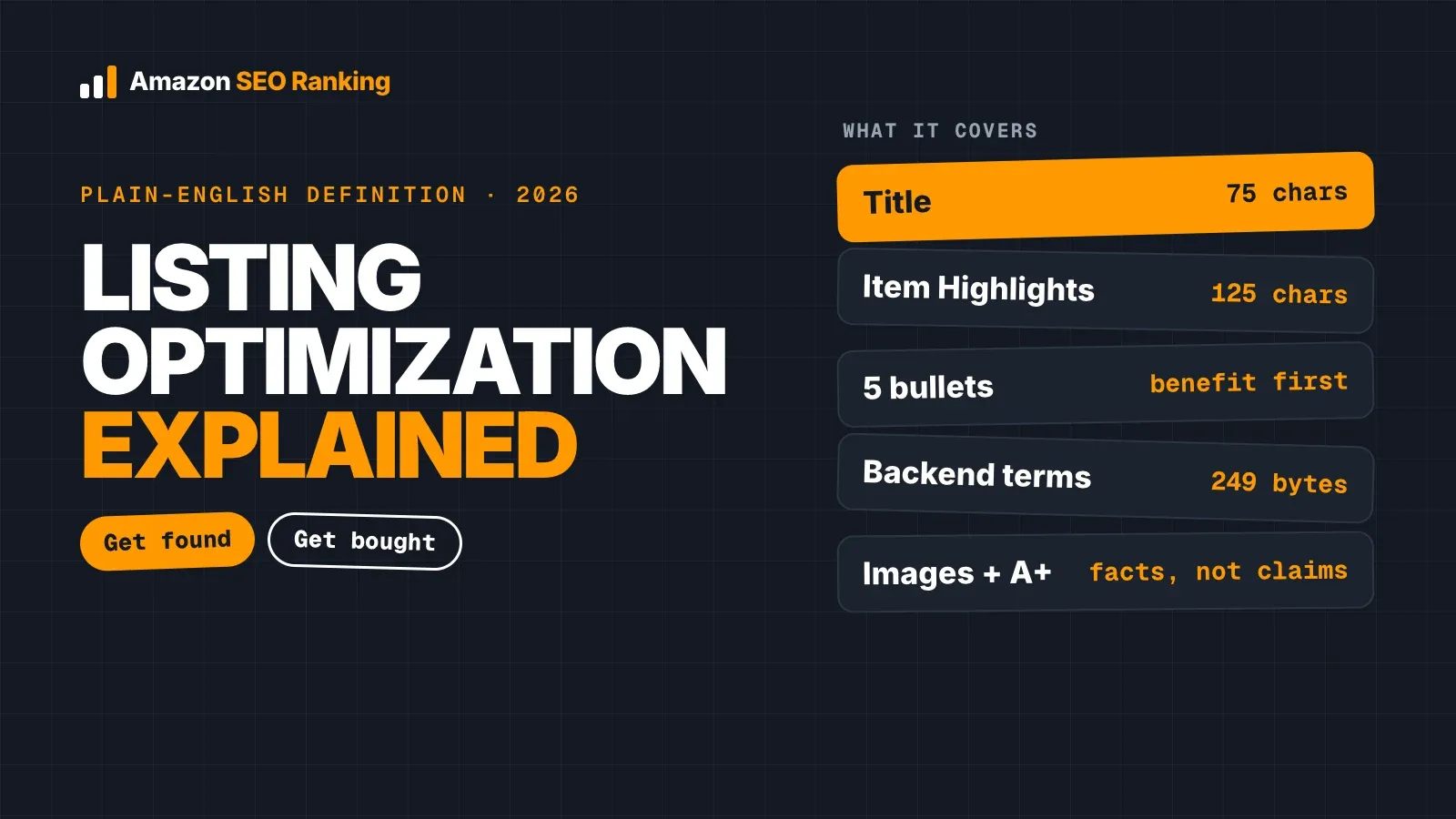
Amazon product title optimization in 2026 starts with one number: 75 characters, spaces included, in every category except media. A good Amazon product title fits your brand, the product type, your main keyword and the one attribute shoppers filter by into that space. Everything else moves to Item Highlights, the 125-character field shown under the title.
The limit has applied since July 27, 2026, and titles still over it are rewritten by Amazon's AI while the listing stays live. If you leave an old 200-character title in place, Amazon decides which of your keywords survive. Most sellers would rather make that call themselves.
This guide covers the rules as they stand now, a four-part formula with examples by category, how to decide which keywords stay in the title, a worked rewrite with real Amazon search volumes, and how to clean up titles across a catalog. It's written for sellers and agencies with live listings.
Key Takeaways (TL;DR)
- Titles are capped at 75 characters including spaces in all categories except media, since July 27, 2026.
- Item Highlights adds 125 characters under the title, for the secondary keywords that no longer fit.
- The formula: Brand + product type with main keyword + key attribute + variant.
- No word more than twice (your brand counts). Leave out !, $, ?, _, {, }, ^, ¬ and ¦.
- "Best", "#1", "free shipping" and ALL CAPS words get flagged as promotional.
- Over the limit, Amazon replaces your title with its own AI version. Brand owners get a 14-day review window first; other sellers don't appear to.
- Every marketplace holds its own title in its own language, so check each storefront separately.
Amazon Product Title Optimization: at a Glance
The table sums up the Amazon title optimization rules 2026 listings must meet, and what happens when a title breaks one. The sections below explain the reasoning and the trade-offs.
| Element | Rule in 2026 | What breaking it costs |
|---|---|---|
| Length | 75 characters or fewer, spaces included (media excluded) | Amazon rewrites the title with AI |
| Item Highlights | Up to 125 characters, shown under the title | Secondary keywords lost from the visible copy |
| Structure | Brand, product type, key attribute, variant | Lower click-through when shoppers can't tell what it is |
| Repetition | No word more than twice, brand included | Title flagged as non-compliant |
| Characters | No !, $, ?, _, {, }, ^, ¬ or ¦ | Title flagged as non-compliant |
| Promotional wording | No "best", "#1", "sale", "free shipping" | Flags and possible suppression |
| Formatting | Title case, no ALL CAPS words, numerals over spelled-out numbers | Harder to read on the search page |
| Marketplaces | One title per storefront, in its language | A US title on amazon.de matches few German searches |
What Changed in Amazon Title Optimization Rules for 2026
Amazon posted the change in Seller Central on June 10, 2026. From July 27, titles in all categories except media must be 75 characters or fewer, down from 200 in most categories. Amazon's stated reasons were full display on mobile and alignment with title lengths at other online stores.
The same notice added Item Highlights, a separate field of up to 125 characters for detail that used to sit at the end of long titles. It shows directly under the title in search results and on the product page, and EcomCrew reports its content is searchable, so moving a phrase there doesn't take it out of the index.
Many Amazon product title best practices 2025 guides still quote the 200-character limit and recommend stacking keywords at the end. Those titles are now the ones Amazon rewrites.
| Before July 27, 2026 | Since July 27, 2026 | |
|---|---|---|
| Title limit (most categories) | 200 characters | 75 characters, spaces included |
| Extra visible field | None | Item Highlights, 125 characters |
| Over-limit titles | Could be suppressed | Rewritten by Amazon's AI, listing stays live |
| Seller review | Not applicable | 14 days for brand owners |
What Amazon does with titles over 75 characters
Titles still over the limit get rewritten "gradually and without the seller taking any action", according to the announcement as reported by PPC Land. The listing stays active while that happens. Amazon's model works from your existing listing content, which means the rewrite keeps the words it judges most relevant, and those may not be the words with the most search demand for your product.
Brand owners get 14 days to review, edit or approve the AI title and Item Highlights before they go live. Sellers without Brand Registry don't appear to get that window.
Reviewing Amazon's AI title recommendations
You can see Amazon's suggested title and Item Highlights in Manage All Inventory: select Edit, then View Enhancements. Brand owners also find pending changes under Review Listing Changes, and EcomCrew notes that a bulk template sits in the Add Products spreadsheet section.
Treat the recommendation as a draft. Check that it keeps your highest-volume relevant phrase, states the pack count or size correctly, and doesn't add a claim your product can't support. Sellers on the forum reported AI-generated copy flagged for promotional claims, so read every suggestion before approving it.
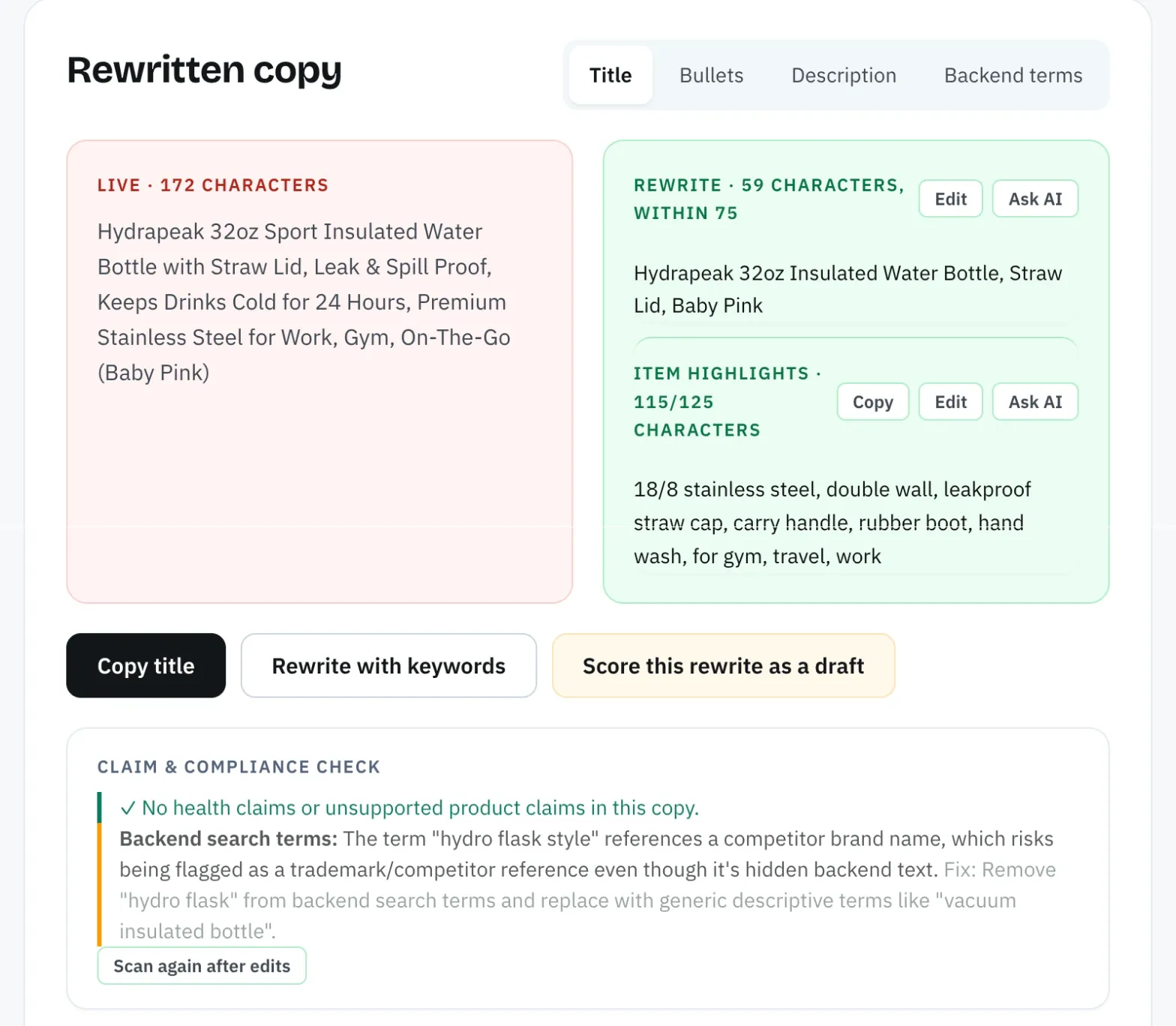
A second draft to compare against makes that review faster. Amazon SEO Ranking's Amazon listing rewriter writes from the same live listing, but it treats the spec table and your brand fact sheet (approved facts and banned claims) as the source of truth. Each rewrite is checked in code for the 75-character limit, pack-count mismatches and unsupported claims, and the title view strikes through the words it cut and highlights the ones it added, so you see which keywords stayed.
Amazon Product Title Best Practices 2026
These Amazon product title optimization best practices are the rules to check every title against. The first four are hard rules that get a title flagged; the rest decide how well it performs once it complies.
- Stay at or under 75 characters, counting spaces and punctuation.
- Repeat no word more than twice. Your brand name counts as a word, and so do small words like "for".
- Leave out the special characters Amazon prohibits in titles: !, $, ?, _, {, }, ^, ¬ and ¦. Commas, hyphens, ampersands and slashes in product names are fine.
- Cut promotional wording. "Best seller", "#1", "sale", "free shipping" and "new" describe your offer on one day, and Amazon's title rules don't allow them.
- Put the product type in plain words a shopper would type: "cutting board", "hiking socks", "USB-C cable".
- Use numerals and abbreviated units: "3 Pairs", "12 oz", "6 ft". They read faster and save characters.
- Write in title case without ALL CAPS words, except for real abbreviations like USB or LED.
- Include size, count or color when the listing is a variation, so each child listing says which one it is.
EcomCrew's summary of the new rules lists the prohibited characters and the twice-per-word limit alongside the 75-character cap. Category style guides in Seller Central can add rules of their own, such as gender for apparel or model numbers for electronics, so check yours before a full rewrite.
Two older tips no longer pay off, even though they still turn up in lists of Amazon title optimization tips 2026. Keyword lists separated by pipes or dashes waste characters and read badly at 75. And a word that already appears once in the title gains nothing from a second copy, since Amazon indexes the word wherever it sits in the field.
The Amazon Product Title Formula (With Examples)
The formula below fits most categories inside 75 characters. The character budgets are our working ranges for planning, not Amazon rules, and a short brand name gives you more room for the parts after it.
| Part | What goes in it | Typical length | Example |
|---|---|---|---|
| 1. Brand | Your registered brand name | 5 to 15 characters | Holloway |
| 2. Product type + main keyword | The phrase most shoppers search for this product | 20 to 35 characters | Bamboo Cutting Board Set |
| 3. Key attribute | The fact shoppers filter or compare on: count, size, material, compatibility | 8 to 20 characters | of 3 |
| 4. Variant or second keyword | Color, size, or the next most valuable phrase | 10 to 25 characters | Wooden Cutting Boards for Kitchen |
Put the main keyword right after the brand. Shoppers scan the start of a title on mobile, and the first words are the ones every rewrite or truncation keeps. The fourth part is where you choose between a variant detail and a second keyword: for a variation family, the variant wins, because a shopper choosing a size needs to see it.
Amazon product title examples by category
All the brands below are fictional. Each title was counted in code and sits under 75 characters.
| Category | Order that works | Example title | Characters |
|---|---|---|---|
| Home and kitchen | Brand, product type, count, use | Holloway Bamboo Cutting Board Set of 3, Wooden Cutting Boards for Kitchen | 73 |
| Apparel | Brand, gender, material, product, feature, size, count | Northvale Women's Merino Wool Hiking Socks, Cushioned, Medium, 3 Pairs | 70 |
| Electronics | Brand, product, length, feature, compatibility | Corvane USB-C Charging Cable 6 ft, Braided, for iPhone 16 and Galaxy S25 | 72 |
| Grocery | Brand, flavor, product, size, pack form, count | Bramble & Oak Dark Chocolate Almonds, 12 oz Resealable Bag, Pack of 2 | 69 |
| Beauty | Brand, key ingredient, product, size, variant | Lumen Field Vitamin C Face Serum, 1 fl oz, Fragrance Free | 57 |
The electronics example names other brands only after "for", to state compatibility. That's the one place another company's product name belongs in your title. Using a competitor's brand as a keyword invites trademark complaints and brings clicks from shoppers looking for something else.
How to Optimize Your Amazon Product Title in 6 Steps
These steps answer the questions sellers search most after the July change, from how to write a good Amazon product title to how to optimize my Amazon title without losing rank. Work through them in order, because the keyword choices in steps 1 and 2 decide what you write in step 3.
Step 1: List your target keywords with search volume
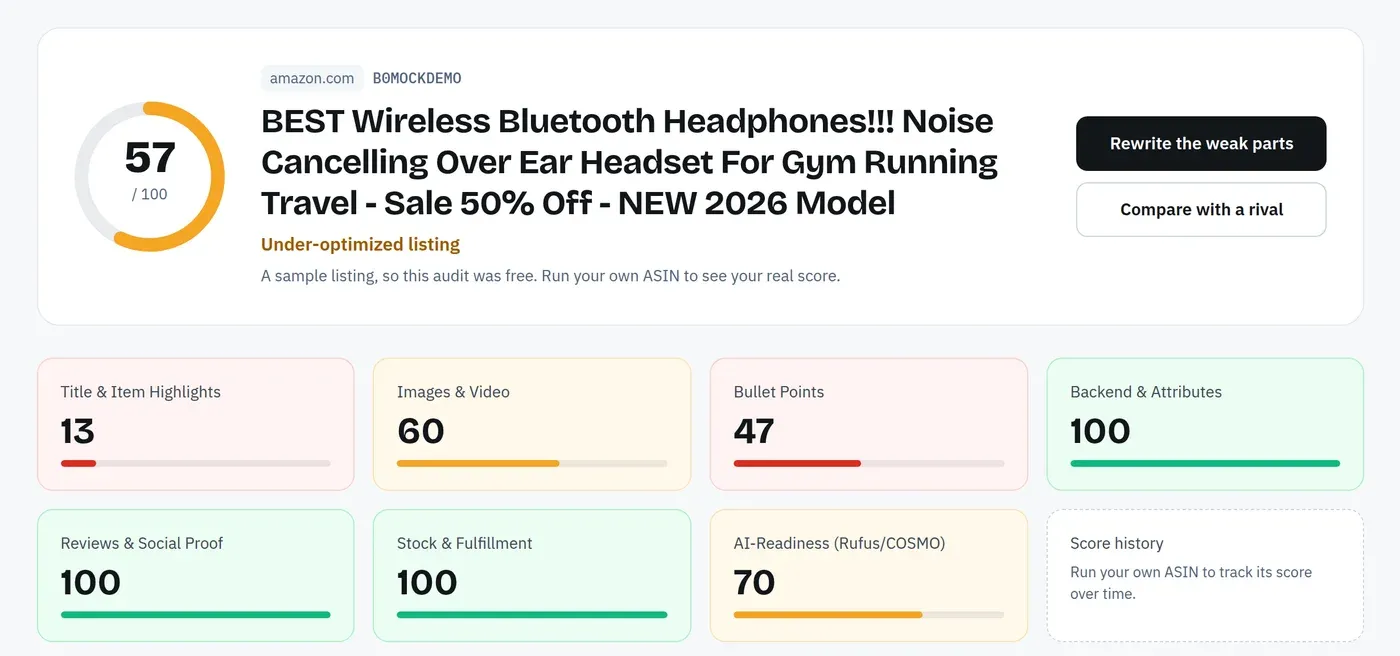
If the listing is live, start with a free audit of it. Title & Item Highlights are 3 of the 12 published criteria Amazon SEO Ranking scores, so you see where the current title loses points before you change anything.
Then write down 8 to 15 phrases shoppers use for your product. Amazon autocomplete gives you phrases with no numbers attached; a keyword tool with Amazon search volume tells you which ones carry demand. Amazon SEO Ranking's Amazon keyword research tool shows estimated monthly Amazon searches in 16 marketplaces, and the free account shows the first 3 results of each search.
Sort by relevance first, volume second. A popular phrase for a slightly different product brings clicks that don't turn into orders, and low conversion works against your rank for that search.
Step 2: Decide which phrases stay in the title
With 75 characters, the title holds two or three phrases at most. Give it your highest-volume relevant phrase and, if room allows, one more that shares words with the first. "Bamboo cutting board set" and "cutting boards for kitchen" share three words, so one title can cover both.
Send the rest to the fields after it. Our map of keywords for Amazon listing fields shows which kind of phrase belongs where:
| Field | Limit | What it should hold |
|---|---|---|
| Title | 75 characters | Brand, main keyword, key attribute |
| Item Highlights | 125 characters | Secondary keywords, use cases, sizes, compatibility |
| Bullet points | 5 bullets, up to 255 characters each | Benefits, with long-tail phrases |
| Backend search terms | Under 250 bytes in most marketplaces | Synonyms, misspellings, other-language terms |
Step 3: Write the title with the formula
Start with brand and main keyword, then add the attribute and variant until you reach the limit. Read it out loud once. If a shopper couldn't tell what the product is and how many come in the box, the title is missing a part.
Cut filler before cutting facts. Words like "premium", "high quality" and "perfect for" take 10 to 15 characters each and match almost no searches.
To start from your current title instead of a blank line, paste it into the free title checker on our Amazon listing optimization tool page. It scores the title against Amazon's rules and can rewrite it with AI in place, with no ASIN, account or audit quota needed (signed out, you get 3 rewrites a day).
Step 4: Move secondary keywords into Item Highlights
Write Item Highlights as a readable phrase, with secondary keywords, the material, the use case or compatibility. Keep it under 125 characters and avoid repeating what the title already says, since repeats spend characters without adding a single new search match.
Item Highlights shows under the title in search results, so it also works as the second line a shopper reads before clicking. Plain facts ("3 sizes, juice groove, side handles") give them more to decide on than adjectives.
Step 5: Check the copy against the rules
Run the title and Item Highlights through a checker before you save. Amazon SEO Ranking's free Amazon title character limit checker counts each field as you type, underlines promotional words, ALL CAPS and repeats, and shows where Amazon would cut the text. It runs in your browser with no account.
If you edited with an AI tool, also check that pack counts match across the title, Item Highlights, bullets and spec table. "Set of 3" in the title and "4-piece set" in a bullet is the kind of mismatch that leads to "not as described" returns.
Then score the new copy before it goes live. A draft audit in Amazon SEO Ranking takes the title and Item Highlights you haven't saved yet, scores them against the live listing's images, rating and Prime status, and shows the score before and after. It also runs the pack-count and claim checks, and it uses 1 audit, so the free plan's 3 monthly audits cover it.
Step 6: Confirm indexing and watch the results
After saving, search Amazon for your ASIN followed by each title phrase, for example B0XXXXXXXX bamboo cutting board set. If your product appears, the phrase is indexed. Run the test again a few days later, because edits can take time to show.
Brand-registered sellers can A/B test two titles with Manage Your Experiments in Seller Central, which compares how each version performs with real shoppers. Without Brand Registry, compare sessions and unit session percentage in Business Reports for the weeks before and after the change, and change one field at a time so you know which edit moved the numbers.
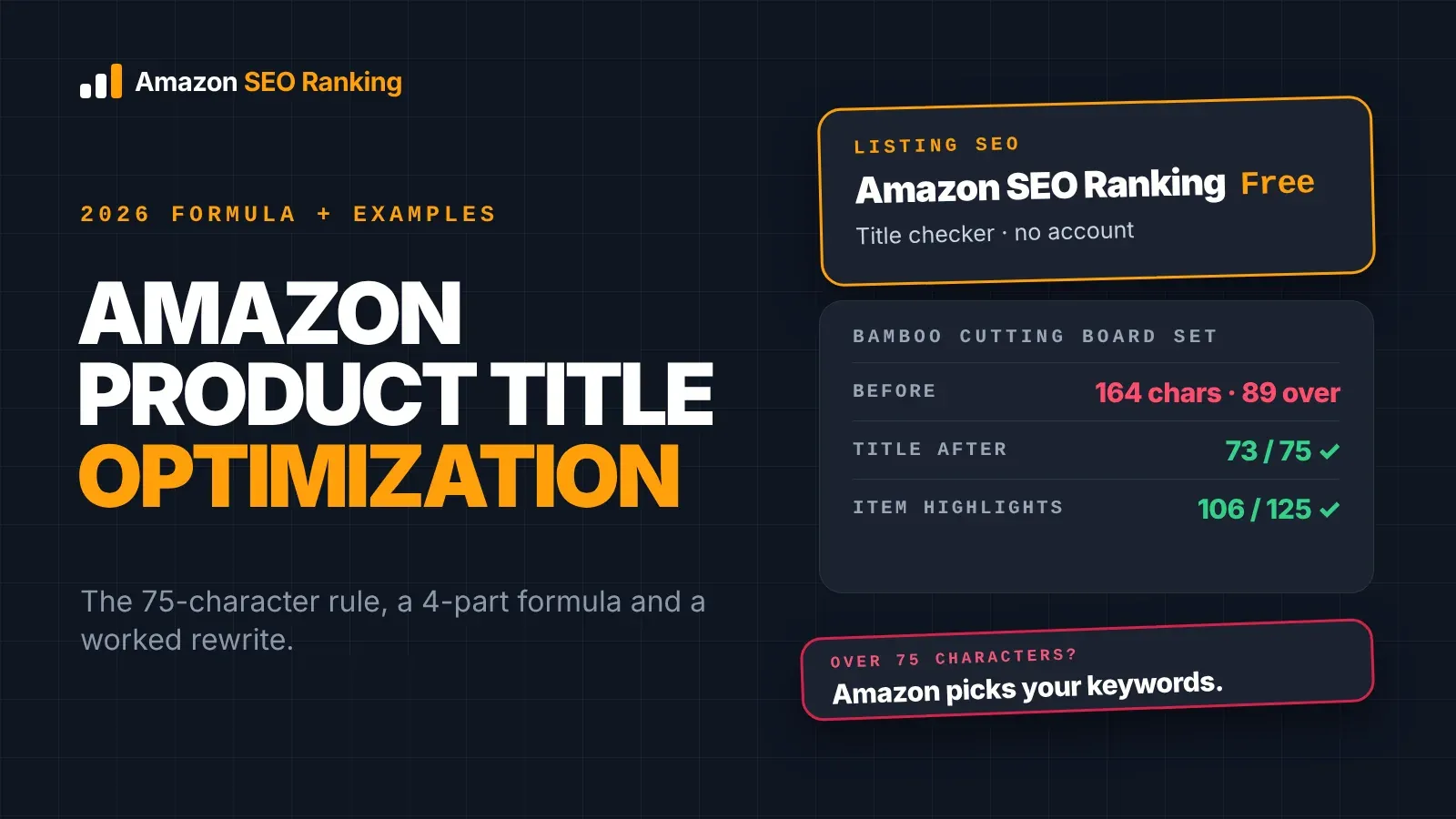
Worked Example: Cutting a 164-Character Title to 73
Take a fictional listing written for the old limit. On 13 November 2026 we ran both versions through the checks Amazon SEO Ranking applies to every rewrite and draft audit: Amazon's length limits, pack-count consistency and claim rules, plus the AI compliance scan that runs on Pro and Agency. (Through the Claude connector, the same checks are the check_listing_copy tool.)
Before (164 characters): Holloway Bamboo Cutting Board Set of 3 - Best Wooden Cutting Boards for Kitchen with Juice Groove, Large Chopping Board for Meat, Veggies & Cheese, FREE Bonus Gift!
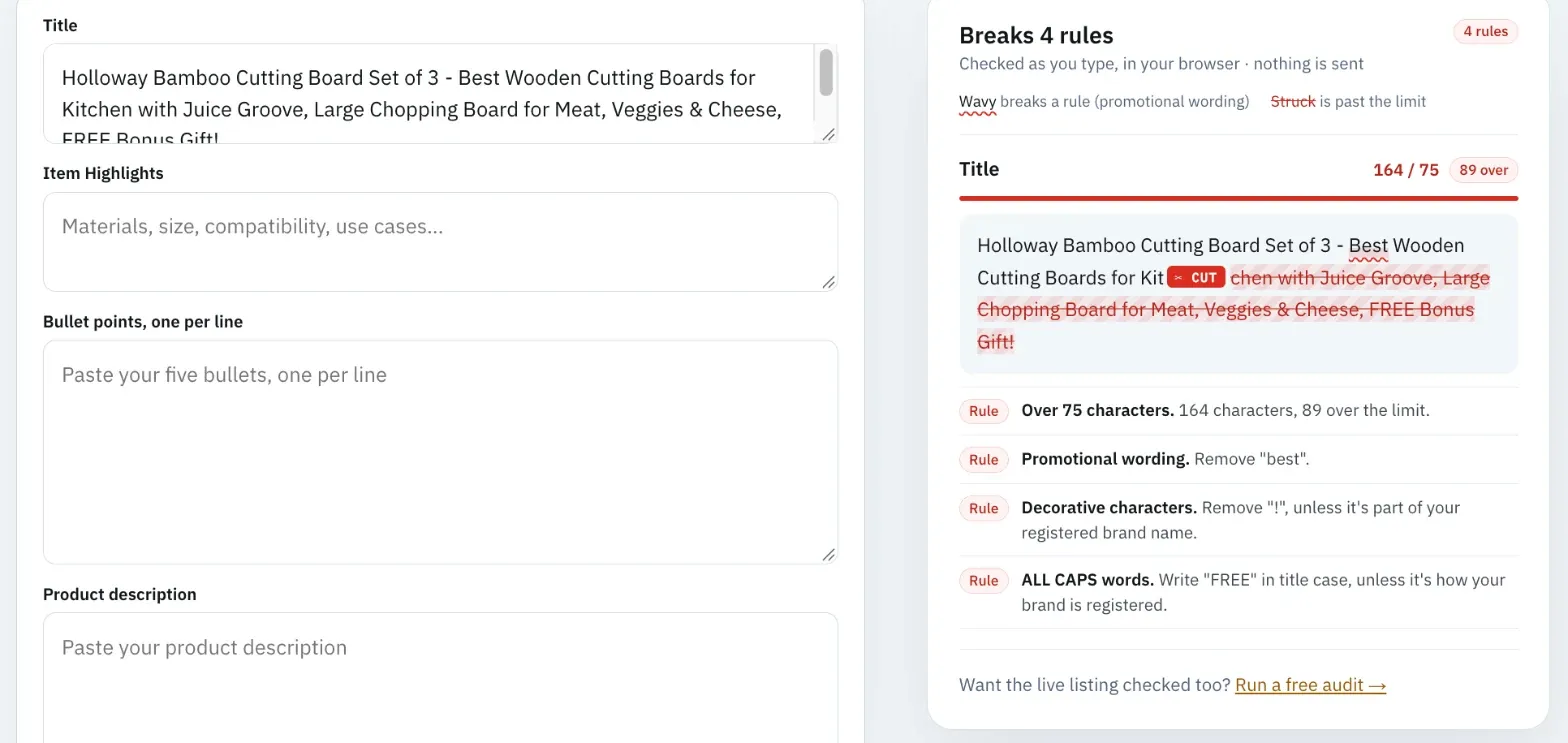
The length check flagged the first problem below, and the AI compliance scan flagged the other three.
| Problem | Where | Why it fails |
|---|---|---|
| 164 characters | Whole title | 89 over the limit, so Amazon would rewrite it |
| "FREE Bonus Gift" | End of title | Promotional wording in an ALL CAPS word |
| "Best" | After the hyphen | Unsupported superlative |
| "!" | Last character | Prohibited character in titles |
After:
- Title (73 characters): Holloway Bamboo Cutting Board Set of 3, Wooden Cutting Boards for Kitchen
- Item Highlights (106 characters): Large, Medium and Small Chopping Boards with Juice Groove and Side Handles for Meat, Vegetables and Cheese
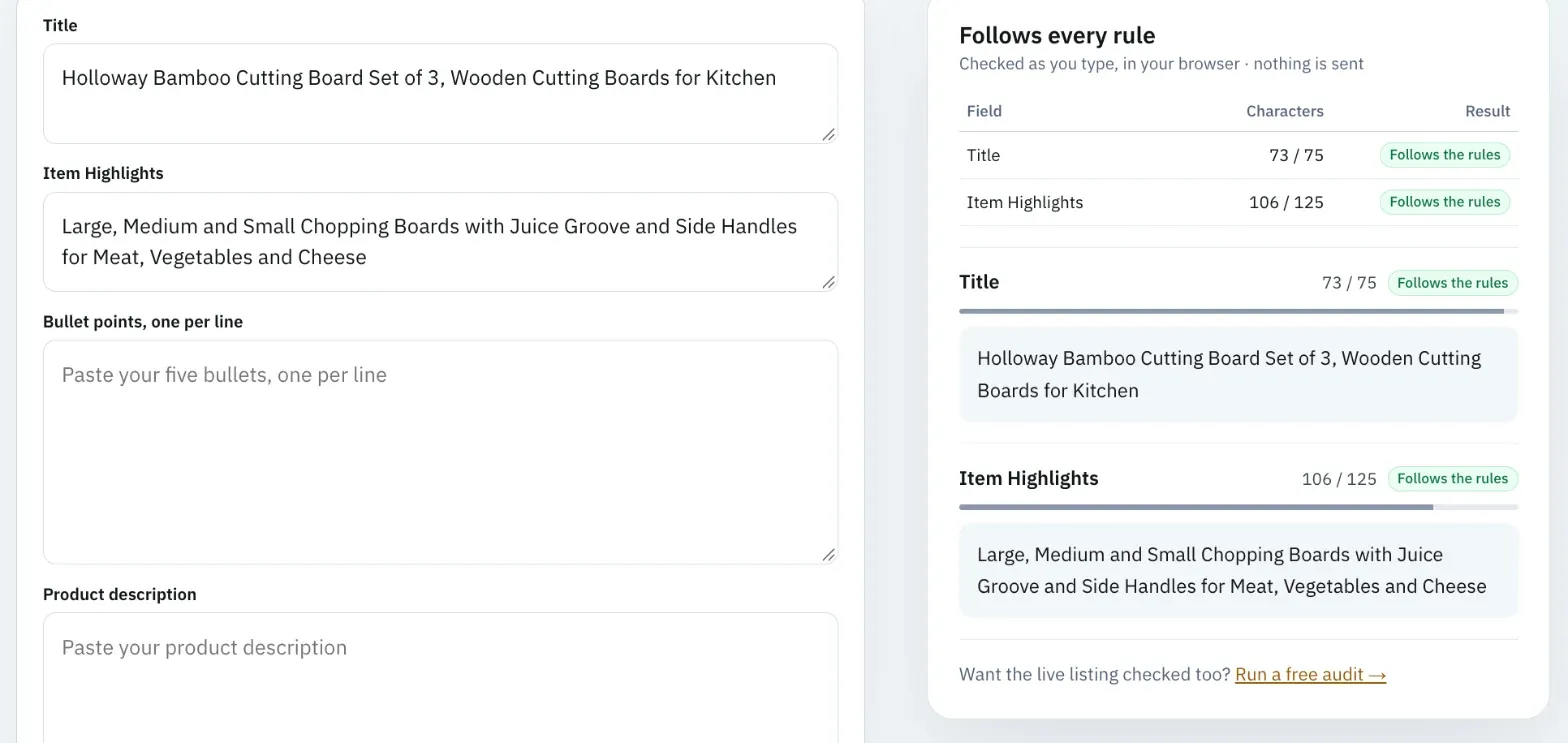
Both passed every length check, and the AI scan returned no flags. "Cutting" appears exactly twice in the title, which is the most the rules allow.
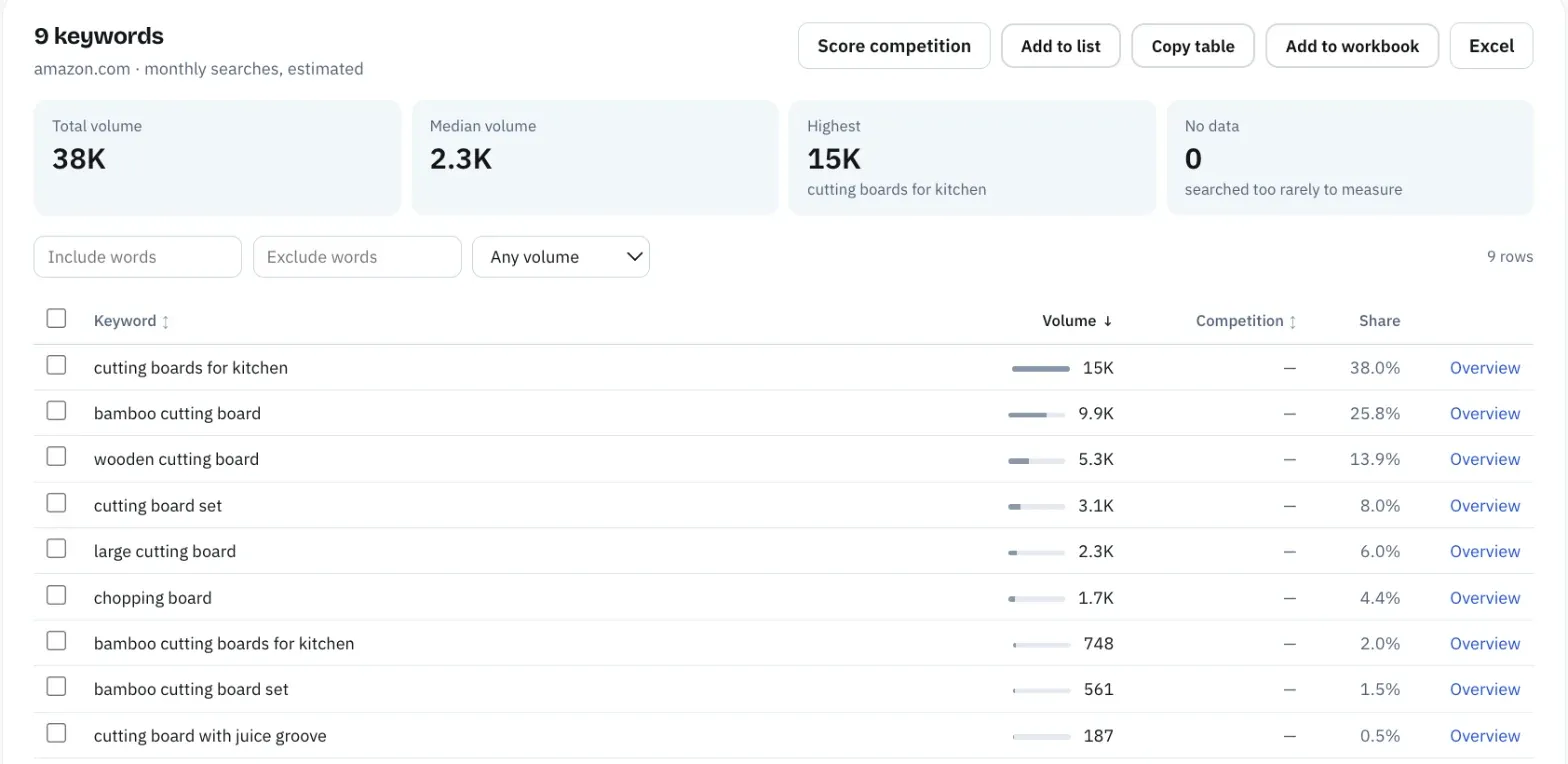
The volumes below show what the split keeps. They're estimated monthly US Amazon searches from Amazon SEO Ranking's Search volume tool, pulled the same day.
| Search phrase | Est. monthly US searches | Covered by |
|---|---|---|
| cutting boards for kitchen | ≈14,511 | Title |
| bamboo cutting board | ≈9,873 | Title |
| wooden cutting board | ≈5,310 | Title |
| cutting board set | ≈3,066 | Title |
| large cutting board | ≈2,281 | Item Highlights (large) + title |
| chopping board | ≈1,683 | Item Highlights |
| bamboo cutting boards for kitchen | ≈748 | Title |
| bamboo cutting board set | ≈561 | Title |
| cutting board with juice groove | ≈187 | Item Highlights + title |
The four highest-volume phrases all sit in the 73-character title. The cut words were "best", "FREE Bonus Gift!" and the duplicate phrasing, none of which matched a search with demand. "Veggies" became "Vegetables" in Item Highlights, since the full word is the one shoppers more often type. The old title had more words, but nearly all the search demand it reached is still covered by the two new fields.
Amazon Product Title Cleaning Best Practices for a Catalog
Rewriting one title takes ten minutes. A catalog of 300 ASINs written before July needs a cleaning pass first, so you fix the rule breaks quickly and spend the writing time on listings that sell.
Run the cleaning in this order:
- Export every title with its ASIN, marketplace and sales rank or units from the last 90 days.
- Count characters and flag every title over 75.
- Strip prohibited characters, ALL CAPS words and promotional phrases in one pass.
- Flag any word that appears more than twice.
- Check that pack counts and sizes in the title match the spec table.
- Sort the over-limit titles by sales, and rewrite the top sellers by hand first.
Steps 2 to 5 are mechanical and suit a script or a tool. Step 6 needs judgment, because the keyword choice in a best seller's title affects more revenue than the other 200 listings combined. For the long tail, reviewing Amazon's own recommendation can be a reasonable shortcut, as long as you check the count and claims.
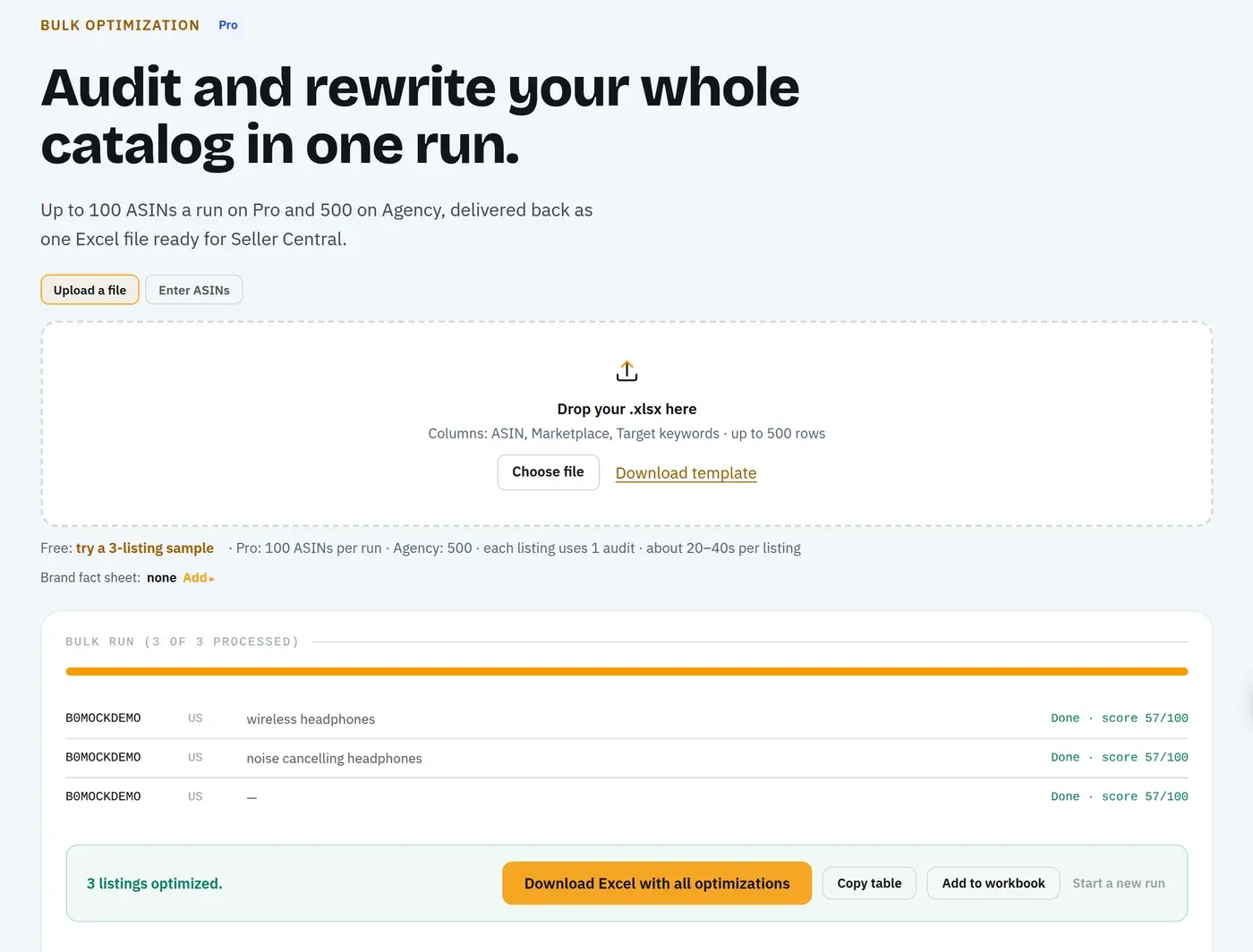
Variation families need one extra check. The parent title should describe the product without a size or color, and every child title should name its own variant, so shoppers who land on a child listing from search see the right one. Amazon SEO Ranking's Amazon bulk listing tool audits and rewrites up to 100 ASINs per run on Pro and 500 on Agency, each in its marketplace's language, with a column flagging claims and count mismatches in every draft. For a title cleanup, the useful figure is at the top of the results: how many of the new titles hold each row's target keyword (N of M), with every row marked "keyword in the title" or "not in the title".
Titles Across Marketplaces and AI Shopping Search
Each Amazon storefront holds its own title, in its own language. A title written for amazon.com and pasted into amazon.de matches few German searches, and German compound nouns often run longer than their English equivalents, so 75 characters fills faster. Write each marketplace's title from its own keyword research, not from a translation of the US version. Amazon SEO Ranking's audit covers 23 storefronts, its rewrites come back in the marketplace's language (12 languages in all), and Search volume gives Amazon search estimates for 16 of those marketplaces.
If you also sell on Tesco Marketplace in the UK, the limit is tighter again: Tesco's published requirements, as summarized in seller-tool documentation, ask for titles of 60 to 70 characters with no price, offer or delivery wording. An Amazon title of 75 characters needs another trim there. Our free Tesco listing checker scores a pasted title, bullets and description against those rules as you type, with no account. (Amazon SEO Ranking is not affiliated with Tesco PLC.)
AI shopping search adds one more reason to keep titles factual. Amazon's assistant and its COSMO research work with what a product is, who it's for and what it's used for, and a title stating "Set of 3" and "for Kitchen" answers those questions directly. Two of the 12 criteria in Amazon SEO Ranking's audit score this under AI-Readiness: whether the copy uses the words shoppers use for a need, and whether it states facts a system can pull out and quote. Our post on Rufus, COSMO and Amazon SEO covers how to write the rest of the listing for AI search.
Everything You Need to Know About Amazon Product Title Optimization
Use this table as a one-page summary of Amazon title optimization best practices 2026, and as a checklist when you review a title, yours or a client's.
| Topic | What to know | Rule or number |
|---|---|---|
| Title limit | All categories except media, since July 27, 2026 | 75 characters, spaces included |
| Item Highlights | Shown under the title, reported as searchable | Up to 125 characters |
| Over the limit | Amazon's AI rewrites the title, listing stays live | Brand owners: 14 days to review |
| Where to see AI suggestions | Manage All Inventory, Edit, View Enhancements | Review Listing Changes for brand owners |
| Formula | Brand, product type + main keyword, key attribute, variant | Main keyword right after the brand |
| Repetition | Brand and small words count | No word more than twice |
| Prohibited characters | Symbols Amazon doesn't allow in titles | ! $ ? _ { } ^ ¬ ¦ |
| Promotional wording | Offers and superlatives | No "best", "#1", "sale", "free shipping" |
| Numbers and units | Faster to read, fewer characters | "3 Pairs", "12 oz", "6 ft" |
| Keyword choice | Relevance first, then volume | 2 to 3 phrases in the title |
| Variations | Parent generic, children name their variant | Size or color in each child title |
| Marketplaces | One title per storefront, own language | Research keywords per marketplace |
| Testing | Indexing check, then performance | ASIN + phrase search; Manage Your Experiments |
Check Your Title Before Amazon Rewrites It
Amazon SEO Ranking scores a live listing against 12 published criteria, three of them on the title and Item Highlights, and rewrites what fails. The title rewrite shows exactly what changed: words cut from your live title are struck through and added words are highlighted, so you can see which keywords stayed. Every rewrite is grounded in the listing's spec table and your brand fact sheet, checked in code for the 75-character limit, pack-count mismatches and unsupported claims, and you can score it as a draft before it goes live.
It's built for sellers and agencies whose listings are already live and were written for the old 200-character limit, especially anyone selling one ASIN across several storefronts. The audit covers 23 Amazon marketplaces, and rewrites come back in each marketplace's language. It's trusted by eRetail Search specialists at Nestlé and eCommerce SEO services agencies such as Reach AI.
Titles still over 75 characters are being rewritten on Amazon's schedule, and only brand owners get a 14-day review. Try the free title checker above on one title with no account, or audit the whole listing: the free plan includes 3 full audits a month with AI fixes and no credit card required. Run a free Amazon listing audit on your best-selling ASIN, or compare Pro and Agency pricing if you're cleaning up a full catalog. Monthly Pro starts with a 7-day free trial, every plan carries a 14-day money-back guarantee, and you can cancel anytime.
FAQ
What is Amazon product title optimization?
Amazon product title optimization is writing a listing title that fits Amazon's rules and holds the keywords shoppers search, so the product gets indexed and clicked. Since July 27, 2026 that means 75 characters or fewer in every category except media. A typical title holds the brand, the product type with the main keyword, one key attribute such as count or size, and a variant or second phrase. Secondary keywords go to the 125-character Item Highlights field under the title.
How long can an Amazon product title be in 2026?
An Amazon product title can be 75 characters long in 2026, spaces included, in all categories except media. The limit took effect on July 27, 2026 and replaced the 200-character limit most categories had before. Item Highlights adds up to 125 characters below the title. Titles over 75 characters are rewritten by Amazon's AI while the listing stays live.
What is the best format for an Amazon product title?
The best format for an Amazon product title is brand, then product type with the main keyword, then the key attribute, then a variant or second keyword. For example, "Holloway Bamboo Cutting Board Set of 3, Wooden Cutting Boards for Kitchen" is 73 characters. Put the main keyword right after the brand, since the first words are the ones shoppers read on mobile. Use numerals and abbreviated units such as "12 oz" to save characters.
How do I optimize my Amazon title?
You optimize your Amazon title by choosing two or three keywords with real search volume, placing the strongest right after your brand, and cutting everything else to fit 75 characters. Move secondary keywords, use cases and compatibility into Item Highlights, which holds 125 characters. Remove promotional words, ALL CAPS, prohibited characters and any word used more than twice. Then search Amazon for your ASIN plus each phrase to confirm the listing is indexed.
What is the best SEO practice for title on Amazon?
The best SEO practice for a title on Amazon is to put your most relevant high-volume keyword directly after the brand name and keep the title under 75 characters. Relevance matters more than volume, because clicks that don't convert work against your rank. Each word counts once wherever it appears in the title, so repeating keywords adds nothing. Phrases that don't fit belong in Item Highlights, the bullets or the backend search terms.
Should the brand name be first in an Amazon product title?
The brand name should be first in an Amazon product title in most categories, followed directly by the product type and main keyword. Amazon's title guidance and most category style guides use brand-first order. If your brand is long, the formula still works, but you'll have fewer characters left for attributes. Remember that the brand counts toward the rule that no word appears more than twice.
What happens if my Amazon title is longer than 75 characters?
If your Amazon title is longer than 75 characters, Amazon gradually replaces it with an AI-generated version that fits the limit, and the listing stays active during the change. Brand owners get 14 days to review, edit or approve the new title and Item Highlights. Sellers without Brand Registry don't appear to get that review window. The rewrite keeps the words Amazon's model picks, which may not be your highest-volume keywords.
Can I accept Amazon's AI title recommendation instead of writing my own?
You can accept Amazon's AI title recommendation, and for low-selling ASINs it can be a reasonable shortcut, but check it first. The model works from your existing listing content, so it may drop the phrase with the most search demand for your product. Sellers on Amazon's forums have reported AI copy flagged for promotional claims. Compare the suggestion against your keyword list and spec table, and for your top sellers write the title yourself. Amazon SEO Ranking's rewriter gives you a second draft grounded in your spec table and brand fact sheet, with the cut and added words marked.
Paste your title and see every rule it breaks before Amazon rewrites it. Free, no account.
Check my title free