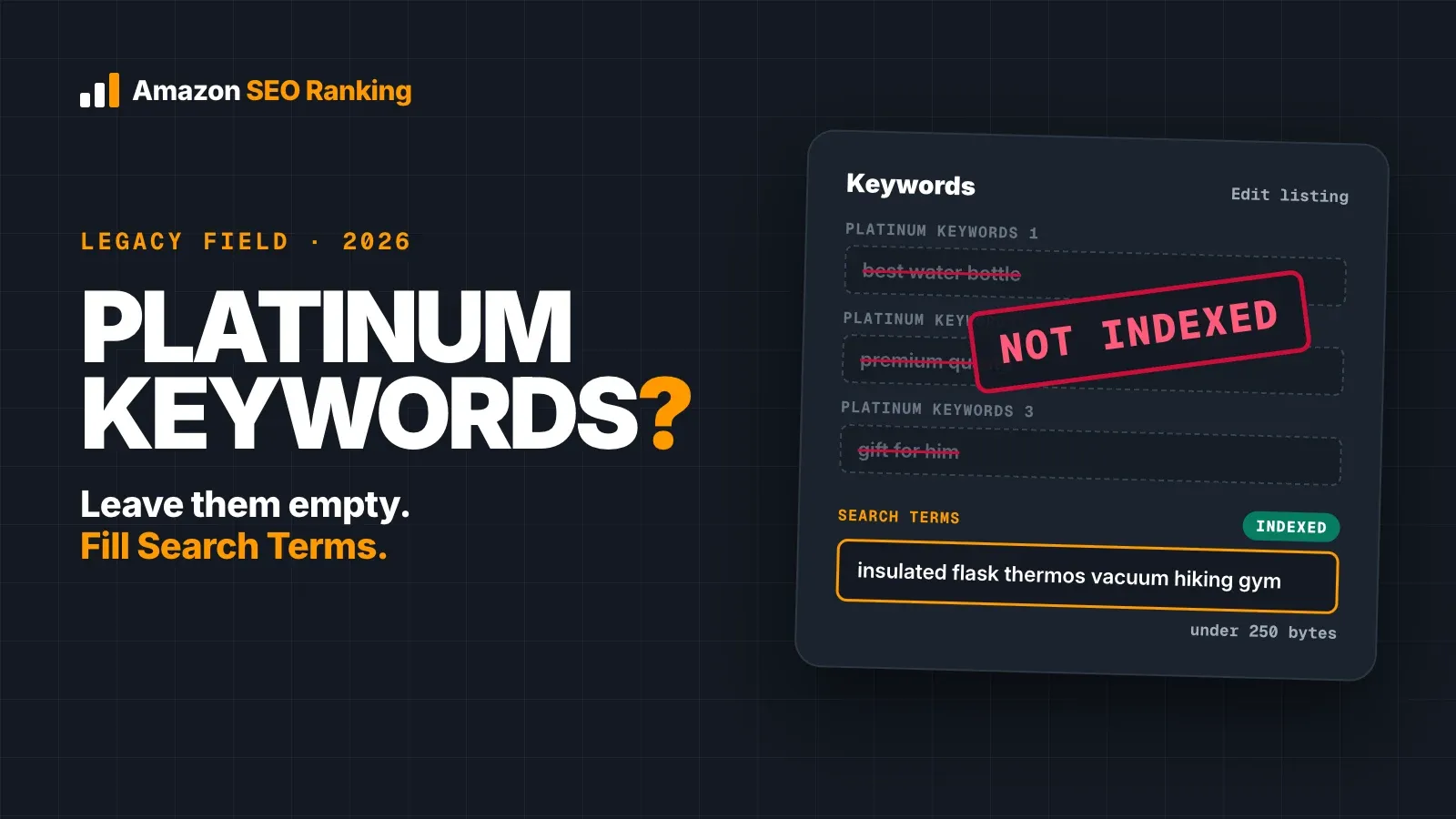
Platinum keywords on Amazon are a legacy listing field from Amazon's old Platinum seller program, and in 2026 they do nothing for search. If you searched "platinum keywords Amazon" because you saw the boxes in Seller Central, you can leave them empty. Amazon's own help page on keyword attributes lists the field as no longer used and says sellers don't have to populate it.
The field once tied products to the storefronts of Platinum sellers. Those storefronts were replaced by Stores, and the boxes stayed behind in some edit views and category templates. That leftover is why sellers still ask about it on the Seller Forums, where one seller found the fields in their backend with no explanation of what to do with them.
This guide covers where the field came from, how it compares with the Search Terms field, what to do with terms already sitting in it, and a worked example of moving them somewhere Amazon reads. It's written for sellers and agencies with live listings.
Key Takeaways (TL;DR)
- Platinum keywords were a field for Amazon's former Platinum sellers, used to place ASINs in their storefronts.
- Amazon's keyword attributes help page lists platinum_keywords as redundant: not indexed for search and not used for browse.
- Leave the field empty. Filling it won't help a listing rank, and Amazon says you don't have to populate it.
- The field that does get indexed is Search Terms (generic_keywords): under 250 bytes in most marketplaces.
- Terms someone put in the platinum boxes may be worth moving to Search Terms, after you remove repeats, brand names and claims like "best".
- Any advice to "load up" platinum keywords should come with a current Amazon source. None of the guides we reviewed gave one.
Platinum Keywords Amazon: at a Glance
| Question | Short answer | Source |
|---|---|---|
| What were they? | A keyword field for Platinum sellers, used to associate ASINs with their storefronts | Amazon keyword attributes help page |
| Are they indexed for search today? | No | Amazon keyword attributes help page |
| Are they used for browse? | No | Amazon keyword attributes help page |
| Should you fill them? | No; Amazon says you don't have to | Amazon keyword attributes help page |
| Will existing values hurt you? | Nothing Amazon publishes says so; they're ignored | Amazon keyword attributes help page |
| What to fill instead | Search Terms (generic_keywords), under 250 bytes in most marketplaces | Amazon staff, Seller Forums |
| Where to send useful terms from the old field | Search Terms, once repeats and prohibited words are removed | Worked example below |
What Are Platinum Keywords on Amazon?
Amazon once ran a Platinum seller program, separate from the Individual and Professional plans every seller chooses between today. Sellers in that tier had their own storefronts on Amazon, and the platinum keywords field told Amazon which storefront page or section an ASIN belonged to. Amazon's glossary entry describes it as formerly used by Platinum sellers to associate ASINs in their storefronts.
So the answer to "what are Amazon platinum keywords" comes down to the word itself. "Platinum" named the seller tier that could use the field. It said nothing about the quality or value of the keywords inside it, which is where much of the confusion starts. A seller reading "Platinum Keywords" next to "Search Terms" can easily assume the first is a premium version of the second.
Why the field still appears
Amazon replaced those storefronts with Stores, the brand storefronts sellers build today. The Platinum program ended, but the attribute stayed in parts of Amazon's catalog data. Depending on the category and the edit view, you may still see several platinum keyword boxes on a listing's Keywords tab, or a platinum_keywords column in an inventory file template.
Amazon's keyword attributes help page now marks that attribute as no longer used and redundant. It's the clearest answer available, and it comes from Amazon itself.
Do Amazon Platinum Keywords Still Matter in 2026?
No. For search, the field is dead weight. Amazon's help page lists it as not indexed by search and not used by browse, so a word that sits only in a platinum box can't make your product appear for a query.
You can confirm this on your own listing. Pick a word that appears in your platinum fields and nowhere else on the listing, then search Amazon for your ASIN followed by that word. If your product doesn't show, the word isn't indexed. Run the same test with a word from your Search Terms field and you'll usually see the difference.
Why some guides still recommend them
Plenty of pages still tell sellers to fill platinum keywords "for extra indexing space". When we went through the top results for this question, the guides that recommended filling the field cited no current Amazon documentation for it. Several described platinum keywords as a type of high-value search term, which mixes up the program name with keyword quality.
The guides that did check Amazon's help pages all landed in the same place: the field is legacy, and the effort belongs in Search Terms. If an agency or a course tells you otherwise, ask for the Amazon source. The help page above is the one to compare it with.
Platinum Keywords vs Search Terms
The comparison of platinum keywords vs search terms is short, because only one of the two fields does anything for search today.
| Platinum Keywords | Search Terms | |
|---|---|---|
| Flat file name | platinum_keywords | generic_keywords |
| Original purpose | Placing ASINs in Platinum sellers' storefronts | Adding hidden words for Amazon search to index |
| Indexed for search | No | Yes |
| Shown to shoppers | No | No |
| Limit | Not relevant (field unused) | Under 250 bytes in most marketplaces, under 200 in India, under 500 in Japan |
| What to do | Leave empty | Fill with synonyms, spelling variants and other-language terms your visible copy lacks |
The Search Terms limit comes from Amazon staff on the Seller Forums, who put it at under 250 bytes in most marketplaces, under 200 in India and under 500 in Japan. The count is in bytes, so accented letters such as é take two. Go over and Amazon ignores the whole attribute, first 249 bytes included.
That limit is why the platinum fields tempted sellers in the first place. The extra boxes looked like extra room. Since the boxes aren't read, the room isn't real, and the only backend space that counts is the one field with a byte cap.
Where You'll Still See the Platinum Keywords Field
Whether you see the field depends on the category, the product type and which editor you use. These are the usual places:
- The Keywords tab of a listing's edit page in Seller Central, on older views and some categories, as a set of boxes under the Search Terms field.
- Category inventory file templates, as a platinum_keywords column next to generic_keywords.
- Old catalog exports from agencies or previous account managers, where the column was sometimes filled during a bulk upload years ago.
If you don't see the field at all, nothing is missing from your listing. Amazon's current guidance on search terms covers the Search Terms field and its rules, and that's the field to work on.
What to Do With Terms Already in Your Platinum Fields
Many catalogs carry platinum values from an earlier upload. Since Amazon doesn't read them, they cause no direct harm, but the words in them were often chosen as keyword research. Some of that research is worth keeping. Here is how to fill platinum keywords in Amazon in 2026, which in practice means how to empty them usefully:
- Export the values. Download an inventory report or a category template with your current data, and copy every platinum_keywords value next to its SKU.
- Compare against your visible copy. Delete any word already in the title, Item Highlights or bullets, since Amazon indexes those fields directly. Amazon SEO Ranking's free Backend Keyword Checker finds these repeats when you paste your title and bullets alongside the line.
- Strip prohibited terms. Remove competitor brand names, ASINs and subjective claims such as "best", which Amazon's search term guidance tells sellers to leave out. Brand names are the hardest to spot by eye; the AI compliance scan on Pro and Agency flags them, as the worked example below shows.
- Check demand. Look up each remaining term's Amazon search volume, and drop phrases nobody types or that describe a different product. The Search volume tool checks up to 1,000 keywords at once in 16 marketplaces, and free accounts see the first 3 results of each search.
- Move the survivors to Search Terms and count bytes before you save. The free checker counts against the 249-byte limit as you paste.
- Clear the platinum boxes in the same edit, so the next person reviewing the listing doesn't assume they matter.
Step 6 is housekeeping. Amazon says the field is redundant, so clearing it changes nothing in search, but it removes a source of confusion for your team or your client.
For an agency or brand team cleaning up a whole catalog, steps 2 to 5 are the slow part. Export the platinum values once, then run the ASINs through Bulk Optimization, which audits and rewrites up to 100 listings per run on Pro and 500 on Agency, with a backend line for each that doesn't repeat its visible copy. If you'd rather check a new line before it goes live, a draft audit scores pasted copy against the live listing first.
Worked Example: Moving Platinum Terms Into Search Terms
Take a fictional listing: Ridgeway Bamboo Cutting Board Set, 3 Piece, with Juice Groove (61 characters). An old upload left this text across its platinum keyword boxes:
best cutting board chopping board butcher block carving board housewarming gift epicurean meal prep board bamboo cutting board
A seller who copies that straight into Search Terms has a line of 126 bytes, well under the limit. We ran it through Amazon SEO Ranking's listing copy check, from inside Claude through the Claude connector (Pro and Agency), with the AI compliance scan switched on, on 10 November 2026. The byte check passed. The rule-based check didn't flag the brand name; the AI compliance scan and a repeat check found three problems.
| Problem | Words | Why it fails |
|---|---|---|
| Competitor brand (AI scan: medium severity) | epicurean | Epicurean is an established cutting board brand; brand names invite trademark complaints |
| Subjective claim (AI scan: low) | best | Amazon's search term guidance says to leave out claims like "best" |
| Repeats from the title | cutting, board (×5), bamboo | Already indexed from the title |
The cleaned line keeps the words the title doesn't hold and adds a Spanish phrase for US shoppers who search in Spanish:
chopping butcher block carving wood kitchen meal prep housewarming gift tabla para picar
It comes to 88 bytes and passed the same check with no flags from the AI compliance scan, leaving 161 bytes free. Combined with the title, it covers searches like these (US, estimated monthly Amazon searches from Amazon SEO Ranking's Search volume tool, 10 November 2026):
| Search phrase | Est. monthly US searches | Covered by |
|---|---|---|
| bamboo cutting board | ≈9,873 | Title |
| chopping board | ≈1,683 | Backend (chopping) + title (board) |
| butcher block cutting board | ≈1,383 | Backend (butcher, block) + title |
| housewarming gift | ≈1,122 | Backend |
| carving board | ≈748 | Backend (carving) + title (board) |
| wood cutting board set | ≈224 | Backend (wood) + title |
| cutting board with juice groove | ≈187 | Title |
| tabla para picar | ≈37 | Backend |
| meal prep board | No data | Backend (meal, prep) + title (board) |
Two terms deserve a second look. "Housewarming gift" has volume, but shoppers searching it browse every kind of product, so it may bring clicks that don't convert; keep it only if the set is sold as a gift. "Charcuterie board" has far more searches (≈79,624), yet it describes a serving board, and this listing is a cutting board set. Relevance comes before volume in the backend.
Which Keyword Fields Amazon Does Read
With the platinum boxes out of the picture, these are the places that decide which searches a listing can appear for:
- Title, capped at 75 characters in Amazon's current rules. Your highest-value phrase goes in the first words.
- Item Highlights and bullets, where readable phrases also feed Amazon's AI shopping assistant.
- Search Terms, the one hidden field Amazon indexes, for synonyms, misspellings and other-language variants.
- Structured attributes such as material, size and intended use, filled from the dropdowns your category offers, with accurate values.
That last group matters more as Amazon matches products to what shoppers mean. Two of the 12 criteria in Amazon SEO Ranking's audit score this directly as AI-Readiness: whether your copy uses the language shoppers use to describe their need, and whether it states facts an assistant can quote. Our guide to Amazon Rufus and COSMO SEO covers what Amazon has published about how its AI assistant reads a listing. For the mechanics of matching a search before ranking for it, see how to rank for keywords on Amazon.
Checking the Search Terms field properly
Because Search Terms is hidden from shoppers and from any outside audit, mistakes there go unnoticed. A line one byte over the limit earns nothing, and a competitor brand name can get flagged. Our step-by-step guide to check your Amazon search terms walks through byte counts, repeats and the ASIN indexing test.
For a faster pass, the Amazon search terms tool page has a free byte checker that counts a pasted line against the 249-byte limit, with no account.
Everything You Need to Know About Platinum Keywords Amazon
| Topic | What to know | Rule or number |
|---|---|---|
| Definition | Legacy field from Amazon's Platinum seller program | platinum_keywords |
| Original use | Placing ASINs in Platinum sellers' storefronts | Storefronts replaced by Stores |
| Search indexing | Not indexed | 0 search value |
| Browse | Not used | Doesn't set browse nodes |
| Amazon's position | Redundant; you don't have to populate it | Keyword attributes help page |
| Should you fill it | No | Leave empty |
| Existing values | Ignored by Amazon | Move useful terms, then clear |
| Where to put hidden keywords | Search Terms (generic_keywords) | Under 250 bytes most, 200 India, 500 Japan |
| Over the byte limit | Amazon ignores the whole Search Terms field | 0 words count |
| Prohibited in Search Terms | Brand names, ASINs, subjective claims | Strip before saving |
| How to test indexing | Search your ASIN plus the word | Re-test after edits |
| Advice to fill it | Ask for a current Amazon source | None found in our review |
Put Your Backend Bytes Where Amazon Reads Them
The backend field is the one part of a listing no shopper and no outside audit can see, so mistakes there never show up on their own. Amazon SEO Ranking's free Backend Keyword Checker covers that blind spot: paste your Search Terms line with your title and bullets, and it counts bytes against the 249-byte limit and flags every word you're repeating, with no account. On Pro and Agency, the AI compliance scan adds the check that caught "epicurean" in the example above, and suggestions ranked by real search volume refill the bytes you free up.
For the visible copy, the audit scores a live listing against 12 equally weighted criteria in seven categories, with every pass rule published. That's the standard this post asked you to apply to platinum keyword advice: you can check where a score comes from, and the AI rewrites are tied to the specific criterion each listing fails. Each rewrite includes a backend line that never repeats your visible keywords, and a draft audit scores the new copy before you paste it into Seller Central.
It's built for sellers and agencies improving listings that are already live, and for brand teams cleaning up catalogs where old uploads left fields like platinum keywords filled with research nobody checked. The audit covers 23 Amazon marketplaces, Bulk Optimization rewrites up to 500 ASINs per run on Agency, each in its marketplace's language, and Pro and Agency work inside Claude through the Claude connector. It's trusted by eRetail Search specialists at Nestlé and eCommerce SEO agencies such as Reach AI.
Start with the backend line you cleaned up, then run a free Amazon listing audit on the visible copy: the free plan includes 3 full audits a month with no credit card required. For a catalog, see Pro and Agency pricing: Pro is $79 a month on monthly billing with a 7-day free trial and a 14-day money-back guarantee.
FAQ
What are platinum keywords on Amazon?
Platinum keywords on Amazon are a legacy listing field that Platinum sellers once used to place their ASINs in their own storefronts. The Platinum program and those storefronts are gone, replaced by Stores. Amazon's keyword attributes help page now lists the platinum_keywords field as redundant and not indexed for search. The field still appears in some Seller Central views and category templates.
Do platinum keywords still work on Amazon in 2026?
Platinum keywords do not work on Amazon in 2026, because Amazon doesn't index the field for search or use it for browse. A word that appears only in the platinum boxes can't make a product show up for that query. You can confirm it by searching Amazon for your ASIN plus a word found only in that field. The Search Terms field is the hidden field Amazon does index.
Should I fill in the platinum keywords field?
You should not fill in the platinum keywords field, since Amazon's help page says you don't have to populate it. Filling it costs time and adds no search coverage. Put that effort into the Search Terms field, which holds under 250 bytes in most marketplaces. If the field already has values, move any useful terms to Search Terms and clear the boxes.
What is the difference between platinum keywords and search terms?
The difference between platinum keywords and search terms is that Amazon indexes search terms and ignores platinum keywords. Search terms (generic_keywords) add hidden words a listing can be found for, up to 249 bytes in most marketplaces. Platinum keywords placed ASINs in Platinum sellers' storefronts, a job that ended when Stores replaced them. Both are hidden from shoppers.
How many platinum keywords can you have on Amazon?
Platinum keywords on Amazon have no limit worth tracking, because none of the boxes are read for search. Some Seller Central views show several platinum boxes on the Keywords tab, and Amazon publishes no current limit for them since it lists the field as redundant. The limit that does matter is Search Terms: under 250 bytes in most marketplaces, under 200 in India and under 500 in Japan.
What replaced platinum keywords on Amazon?
Nothing replaced platinum keywords on Amazon as a keyword field; the storefronts they served were replaced by Stores. For hidden search keywords, every seller uses the same Search Terms field. Brand owners build storefront pages through Stores instead of keyword fields. Accurate category attributes, such as material and intended use, also help Amazon match a listing to relevant searches.
Can I move my platinum keywords into the Search Terms field?
You can move your platinum keywords into the Search Terms field, as long as you clean them first. Remove every word already in your title, Item Highlights or bullets, then strip brand names, ASINs and claims like "best". In our worked example, a 126-byte platinum line held a competitor brand and a subjective claim, and the cleaned version came to 88 bytes with no flags. Count bytes before saving, because a field over the limit is ignored entirely.
My agency says platinum keywords help ranking. Are they wrong?
An agency that says platinum keywords help ranking is contradicting Amazon's own help page, which lists the field as redundant and not indexed for search. Ask them for a current Amazon source, then test it yourself by searching your ASIN plus a word found only in the platinum boxes. If your product doesn't appear, the field isn't helping. The hours are better spent on your title, bullets and Search Terms line.
Check whether your Search Terms field is filled and under the byte limit. Free audit, 3 a month, no card required.
Run free audit